Two confirmation emails landed 11 minutes apart on a Tuesday in March. Nobody opened either one by hand, and by Tuesday evening the flight and the hotel were both on Elena's calendar with the confirmation codes attached.
How to let an AI chief of staff run your trips
Booking the flight takes twenty minutes. The calendar entries, the itinerary, the airport transfer and the coffee near the hotel take days of small decisions. Here's how to hand those over.
Fasrad · September 16, 2026 · 5 min read
That's what an AI chief of staff does with a trip. It works from the mail already in your inbox, the dates already on your calendar, and what it remembers about how you travel. Connect a Fasrad agent to your mailbox and the bookings file themselves. Ask for an itinerary and you get one you can change by talking to it. What follows is a single trip, Austin to Lisbon for a week, run that way.
Six weeks out: the bookings file themselves
Elena books the way most people do. A flight on the airline's site, a hotel through the hotel, a confirmation email for each. Her agent watches her own mailbox read-only, and months ago she gave it one rule: "Put confirmed flights, hotels, and restaurant reservations in my calendar."
United 68 from Austin to Lisbon became a calendar entry carrying the departure and arrival in their own time zones, with the confirmation code and seat 14C in the description. 5 nights in Chiado became a stay running check-in to check-out, with the full address on it. That address is the part that matters later. Every question she asks about "the hotel" for the rest of the trip resolves through it.
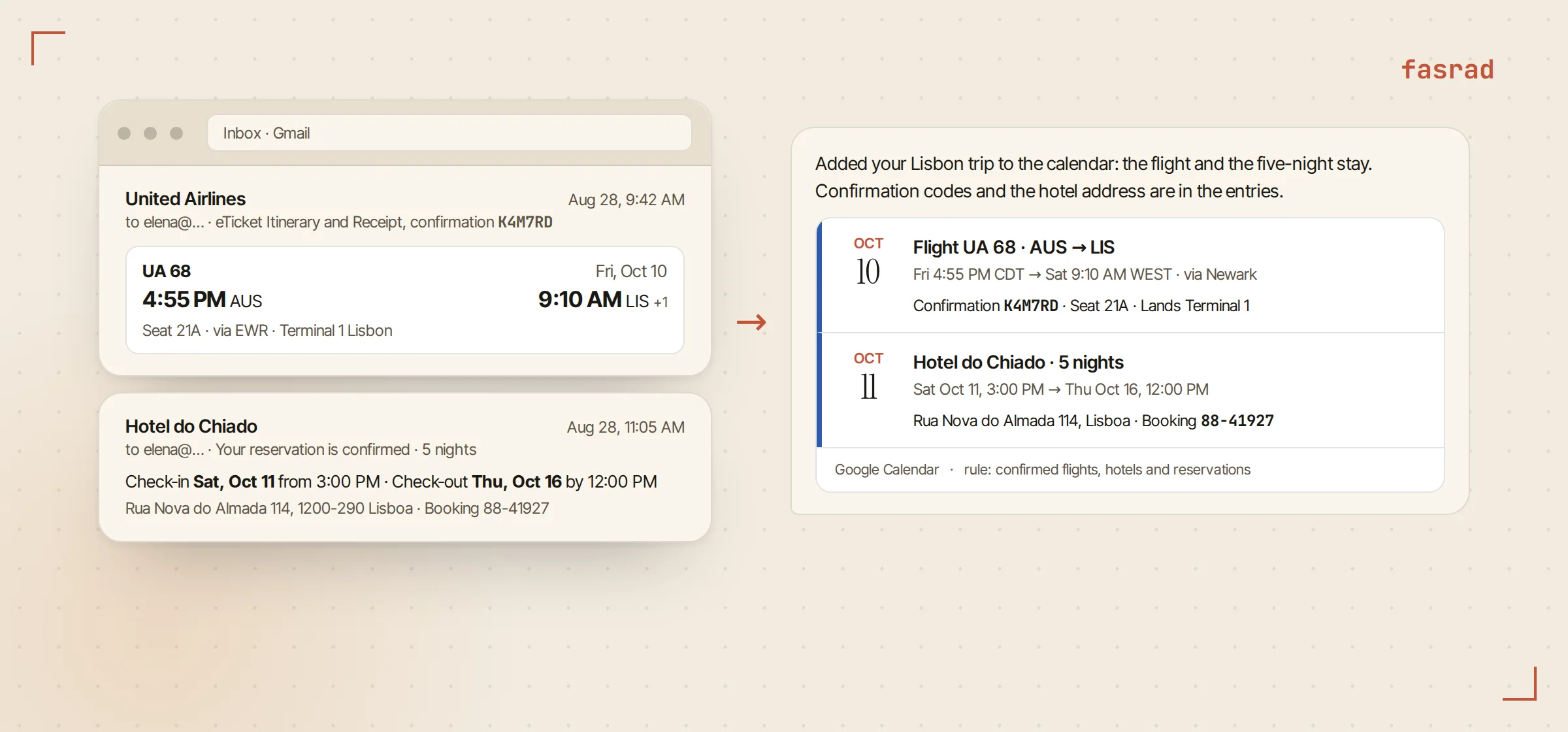
She gets a note each time something is added. No mystery entries turn up later. Nothing in the mailbox is marked read, moved or answered. A changed booking updates the entry it already made instead of leaving a second one behind. The AI email assistant page goes deeper on the rules, including the ask-first mode for invitations you didn't book yourself.
Two weeks out: one request, one itinerary
With the dates and the hotel already on the calendar, the itinerary is a single message: "Create a sightseeing itinerary for my first three days in Lisbon, all by public transport, with a good cocktail bar for each evening. Make it an interactive widget."
Before it writes anything, it checks the forecast for those dates and reads up on the metro and the trams. What renders inside the chat is a widget, not a wall of text. It opens with the dates and a three-day weather strip. Each day gets its own tab, every stop is timed, and every leg names the tram or the metro line that gets you there. Photo tiles sit under the main sights. The evening section lists the bars with a directions link on each, and the footer names the timetables worth double-checking before she travels.
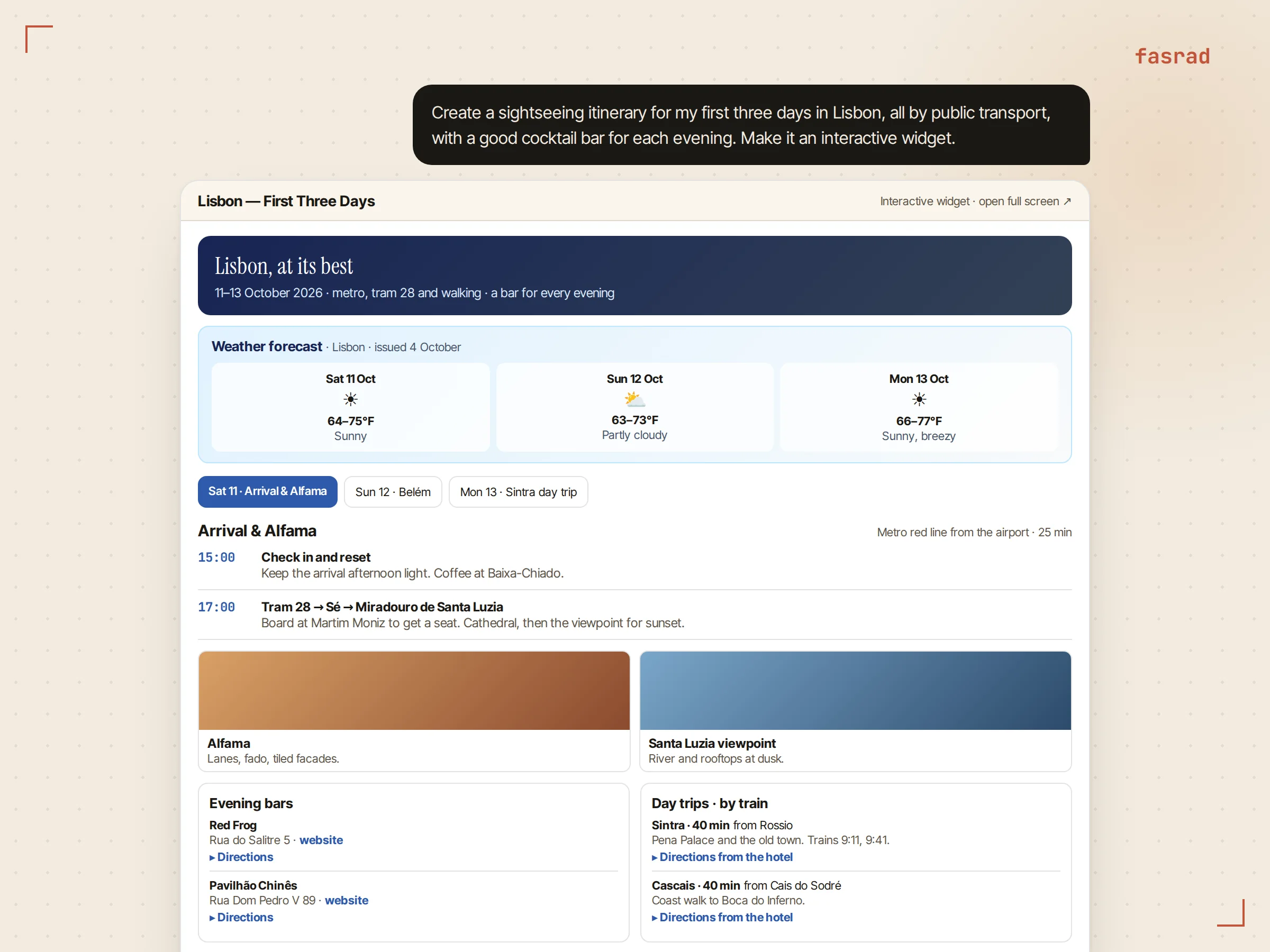
The widget is a page the agent wrote for her, so she changes it the way you change a document. By saying what's wrong with it.
That matters more than the first version. The first version is never the one you travel with.
The week before: changing it by talking
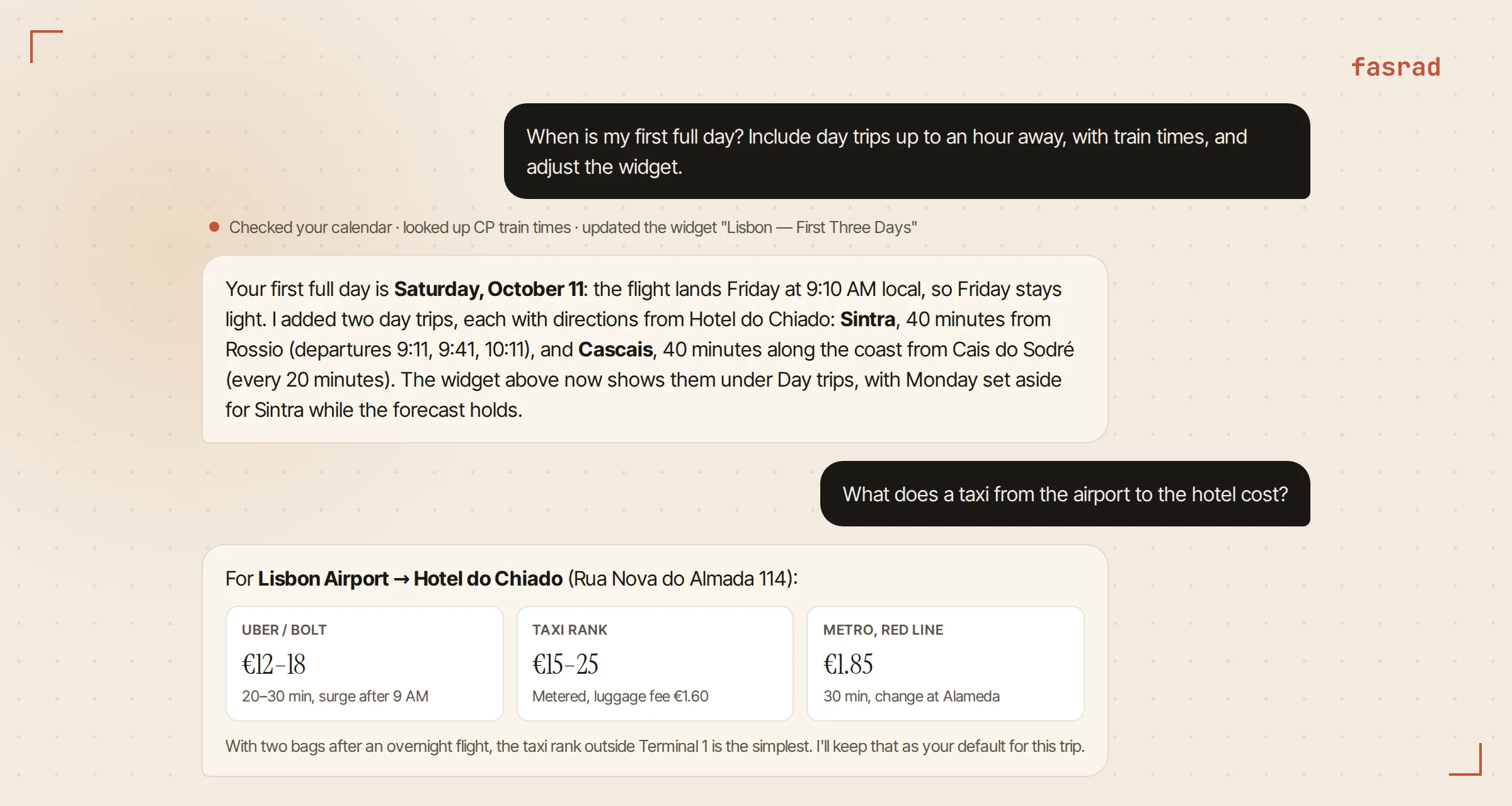
Her next message packs three questions into one: "When is my first full day? Include day trips up to an hour away, with train times, and adjust the widget."
That first question comes off the calendar. The flight lands Friday afternoon, so Saturday is the first full day. Then it looks up the trains and replaces the widget in place. Sintra comes back at 40 minutes from Rossio with that morning's departures listed under it, and Cascais at 40 minutes along the coast. Both carry directions from the hotel.
The old version doesn't linger. That same card in the chat now shows the new plan.
Then the practical one: "What does a taxi from the airport to the hotel cost?"
She didn't name the airport. She didn't name the hotel. Both come off the calendar. Back comes the ride-hailing range against the taxi-rank range, the metro alternative with its fare and how long it takes, and one line recommending the rank for anyone with luggage. A personal assistant holding the calendar doesn't need the question spelled out.
On the ground: the small questions
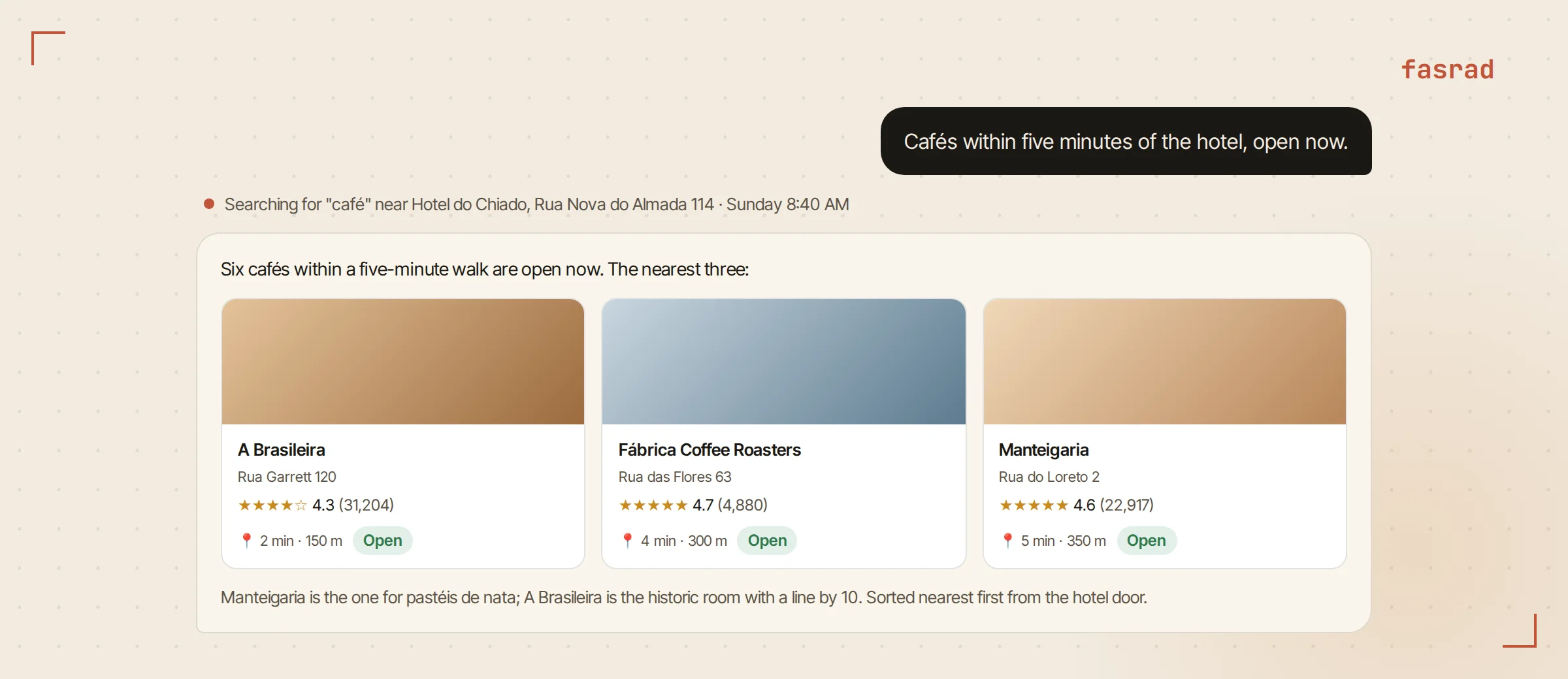
Trips are made of small questions, and they come fast. "Cafés within five minutes of the hotel, open now." Live listings around the hotel address come back as cards carrying the name, the street, the rating, the walk in minutes, and whether the place is open at this exact minute. Nearest first.
"Somewhere for dinner tonight near the second bar on the widget" lands the same way. The widget and the calendar are both things it can read back.
For landmarks rather than businesses it draws on a different source and tells you what a place is before you walk to it. For directions it uses your position when you've shared one and the hotel when you haven't. The AI travel planner page covers the on-the-ground side properly.
What it keeps for next time
A chief of staff earns the title on the second trip. Hers now knows she prefers the taxi rank with luggage, that she wants the first evening kept light, and that 40 minutes is her limit on a day trip. Those become defaults when the next flight confirmation arrives.
Changes mid-trip go through the same door. When the airline moved her return by 3 hours, the new confirmation updated the calendar entry it had already written rather than leaving a second one behind, and the note said which field had changed. She found out from the agent before she found out from the airline app.
A few days after she got home it asked how the trip went. She wrote back that the Sintra day was the best part and it should do that again.
The agent filed it.
Six weeks later a confirmation for Porto arrived and the first itinerary draft came back with a day trip already on it, 40 minutes out, because that is what she had said she liked. She changed 2 stops and kept the rest.
Frequently asked questions
Does the agent need access to my email to do this?
It works best with it. The agent watches your own inbox read-only, over IMAP with an app password, and turns confirmation emails into calendar entries under rules you write in plain English. It never marks mail read, moves it, or sends from your address without your approval. You can also paste a confirmation into the chat and get the same calendar entry.
What is the itinerary widget, exactly?
A small interactive page the agent writes for you and renders inside the chat: weather, day tabs, timed stops with transit lines, photos, evening plans and day trips. You change it by telling the agent what to change, and it updates the same widget in place. It also opens on its own page you can share.
Can it book flights, hotels or tours?
It finds and compares them and hands you the booking page: flights and hotels through live web search, tours and airport transfers through Viator with prices and free-cancellation terms on the card. Paying stays with you, and once the confirmation email arrives the agent puts the booking on the calendar.
How does it know which hotel or airport I mean?
From the calendar entries it created from your confirmations. The hotel stay carries the address, and the flight carries the airports and times, so questions like "a café near the hotel" or "a taxi from the airport" resolve without you naming either.
Does it work for domestic trips and road trips too?
Yes. The same rules and the same itinerary widget apply whether the confirmation is from an airline, Amtrak, a hotel chain or a vacation rental. For driving days the agent gives routes, stops along the way and places to eat near the route.
Will it remember how I like to travel?
Yes. Preferences you state, such as "never book me a 6 AM flight" or "I prefer the taxi rank with luggage", are kept as standing instructions and applied to the next trip, and it asks how the trip went afterwards so the next plan starts from what worked.