Four hundred and twelve contacts, split between an iPhone, a Google account from a firm she left, and Dana's own memory. That was the state of the book on Monday morning.
How to run a one-person advisory firm with an AI agent
Contacts, prospect lists, client handouts, outreach and follow-ups eat the week of a solo advisor. Here's one week where an agent did the hours and Dana did the decisions.
Fasrad · September 16, 2026 · 5 min read
She runs a fee-only advisory practice in Raleigh, alone, with no plan to hire. What follows is one working week with a Fasrad agent handling the back office: the contacts into a CRM, a prospect list built from a public directory, a client handout written from real data, outreach drafted for her review, and a nudge on Friday about who was still waiting.
Monday: the contacts
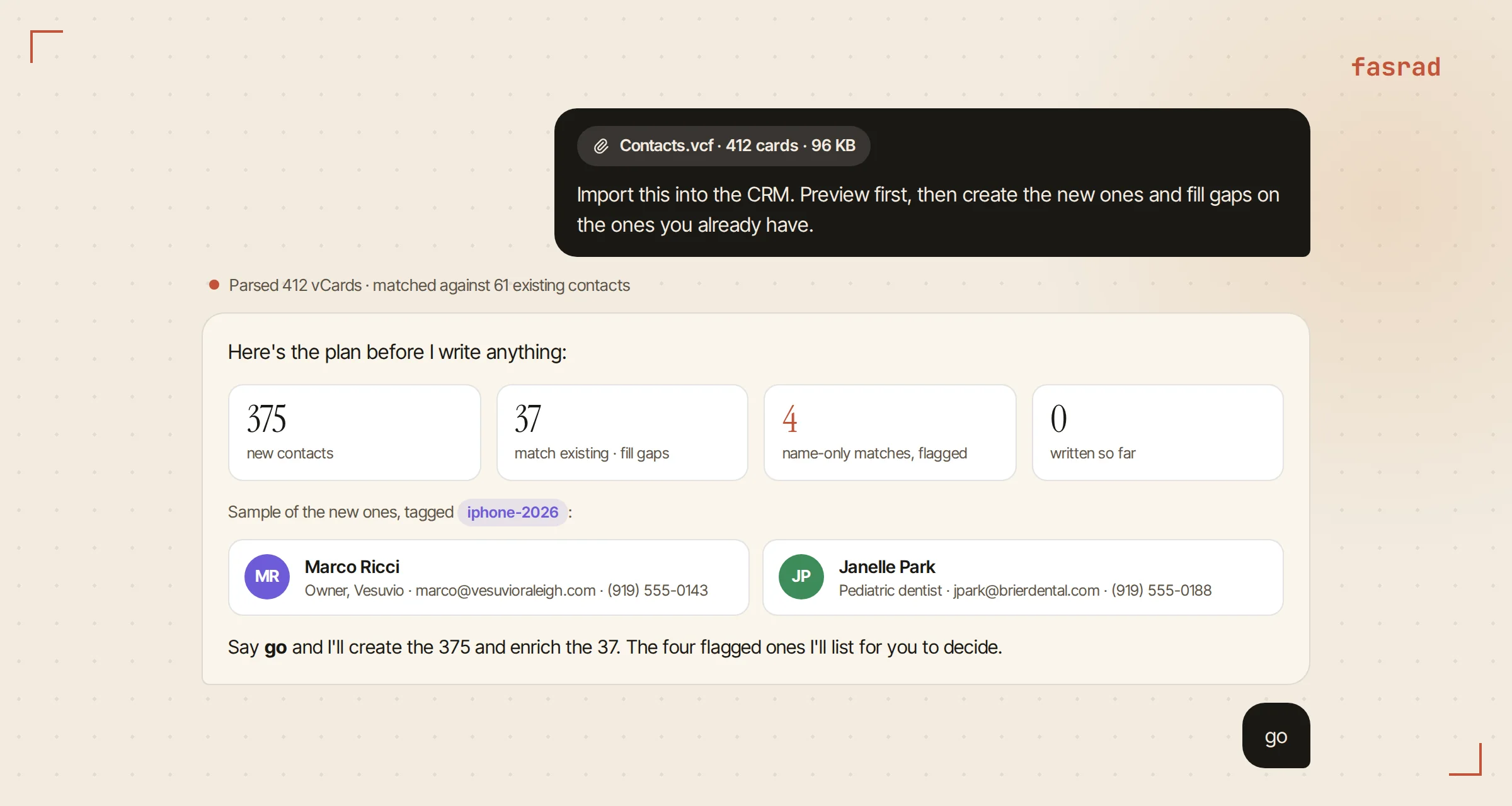
She exported the iPhone contacts as a vCard, dropped the file into the chat, and typed: "Import this into the CRM. Preview first, then create the new ones and fill gaps on the ones you already have."
All 412 cards were read before anything was written, and back came a plan. 375 new contacts. 37 that matched people already in the CRM by email or phone. Four name-only matches it refused to guess at and flagged instead.
She approved. By 9:15 the AI personal CRM held her whole book, tagged by source so the old firm's leads stayed distinguishable from her own.
The Google export was a CSV and went the same way, columns mapped automatically. Every contact now had a timeline attached. That detail is the one that pays off on Friday.
Tuesday: the prospect list
Dana wanted a niche and she'd already picked one. Independent restaurant owners have irregular income, no retirement plan, and nobody advising them.
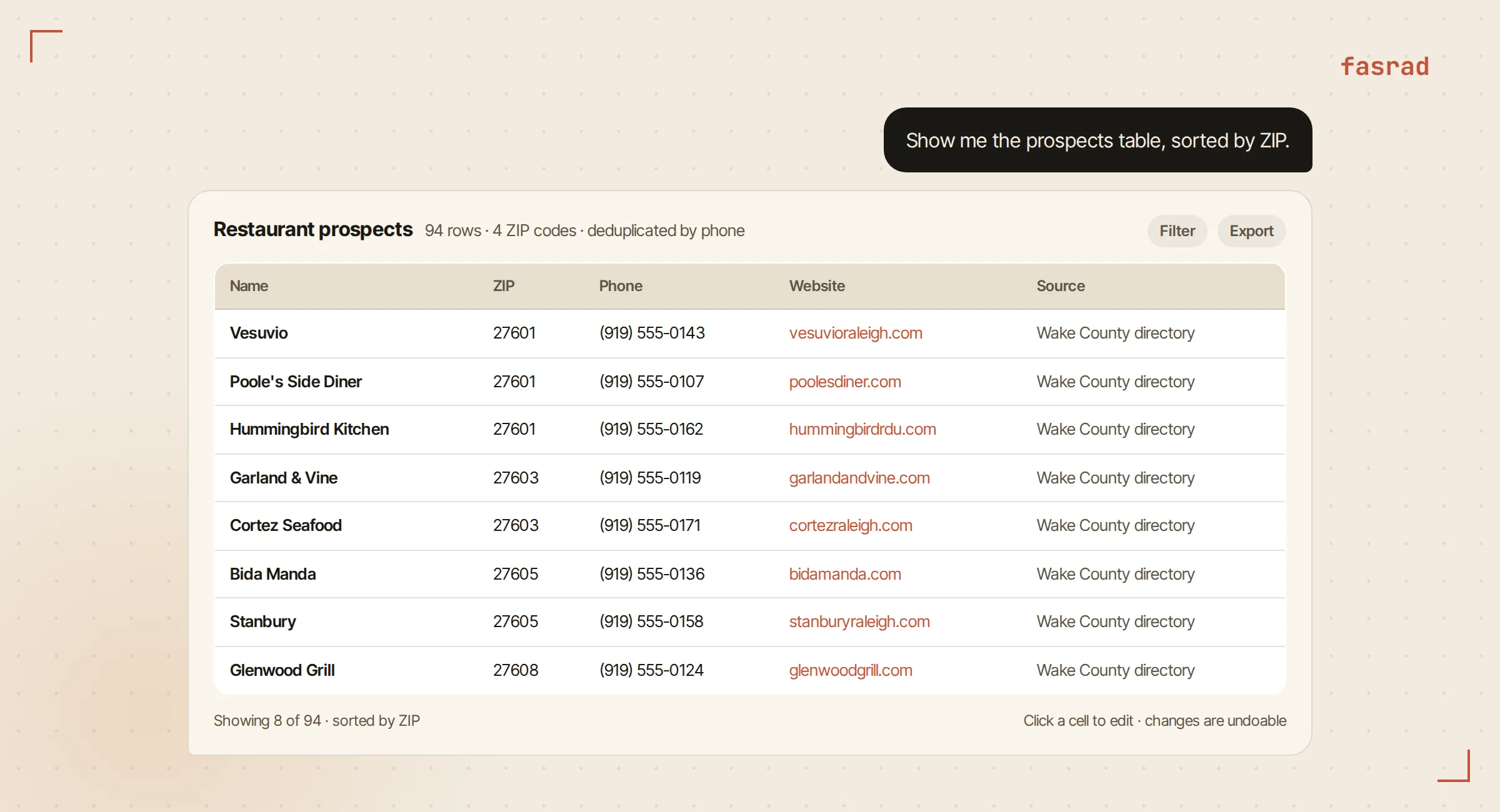
"Build me a list of independently owned restaurants in ZIP codes 27601, 27603, 27605 and 27608. I want name, address, ZIP, phone, website and where you found it. Skip chains."
It made a datastore called Restaurant prospects, then worked through the county's public directory page by page, one row per listing, dropping anything that turned up on a franchise list. Ninety-six rows came back deduplicated by phone number, in about twelve minutes. She pulled the table into the chat sorted by ZIP and spot-checked ten of them against their own websites. Two had closed. She deleted those rows in the table view and moved on with 94.
That list feeds everything after it. The agent queries it, updates it in bulk with a dry run first, and exports it to Excel when her compliance reviewer wants a copy.
Wednesday: the client one-pager
Client meetings kept circling the same question. Why does the account feel smaller than the balance says?
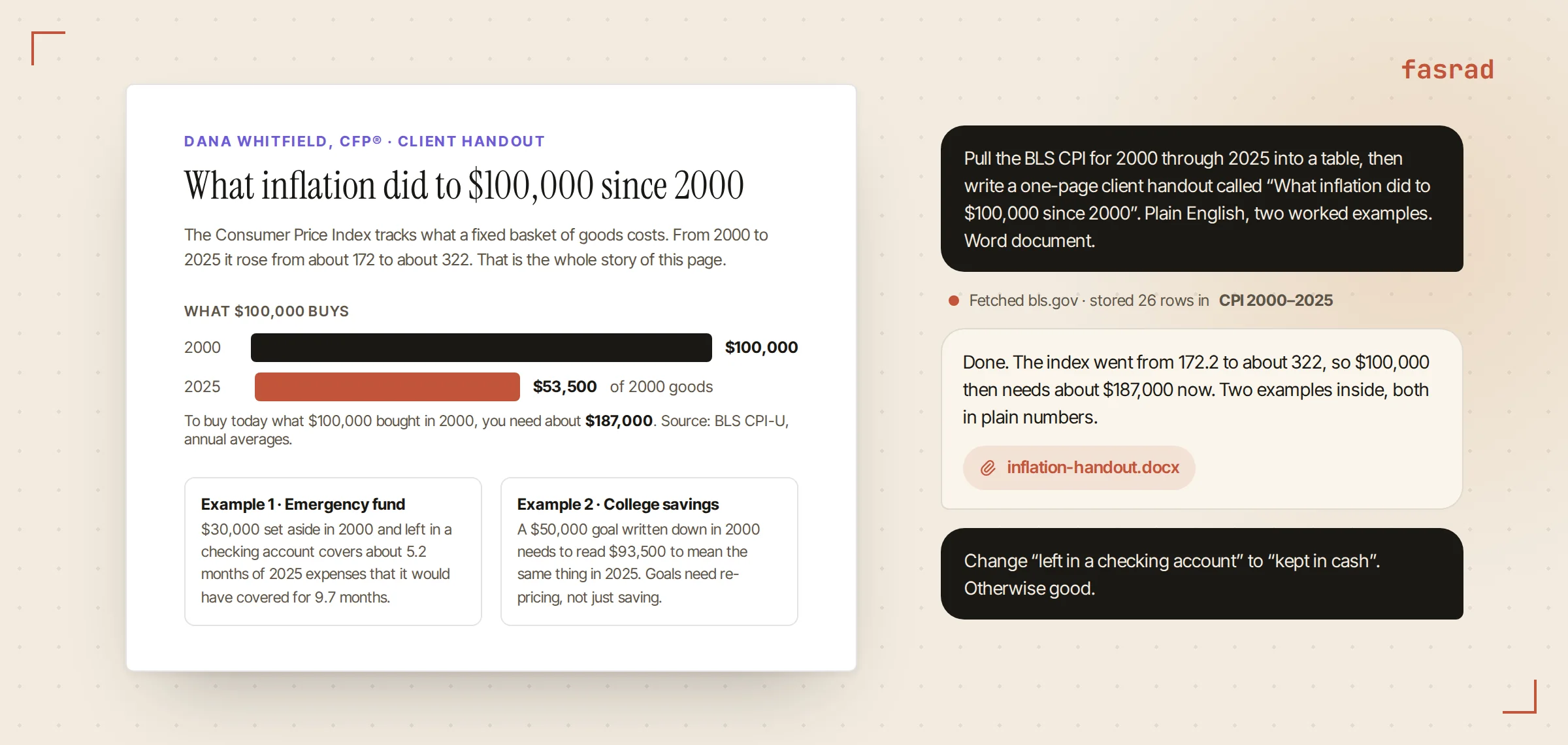
So she asked for a handout. "Pull the BLS consumer price index for 2000 through 2025 into a table, then write a one-page client handout called What inflation did to $100,000 since 2000. Plain English, two worked examples, no jargon. Word document."
Back it went to the Bureau of Labor Statistics, stored the 26 index values, and did the arithmetic. CPI-U went from roughly 172 in 2000 to about 322 in 2025, so it now takes around $187,000 to buy what $100,000 bought then. Turned the other way around, $100,000 left in cash since 2000 buys about $53,500 of goods today. The two worked examples were a retiree's emergency fund and a college savings balance. The document landed as an attachment in the chat and Dana changed one sentence in it.
Because the agent kept the CPI table, next January's update is a one-line request. The advisor agent page shows more of what comes out of the same source material, from comparison sheets to plain-language explainers.
Thursday: the outreach
Cold email to 94 restaurant owners is where most solo practices stall. Every message needs a first line that proves somebody looked.
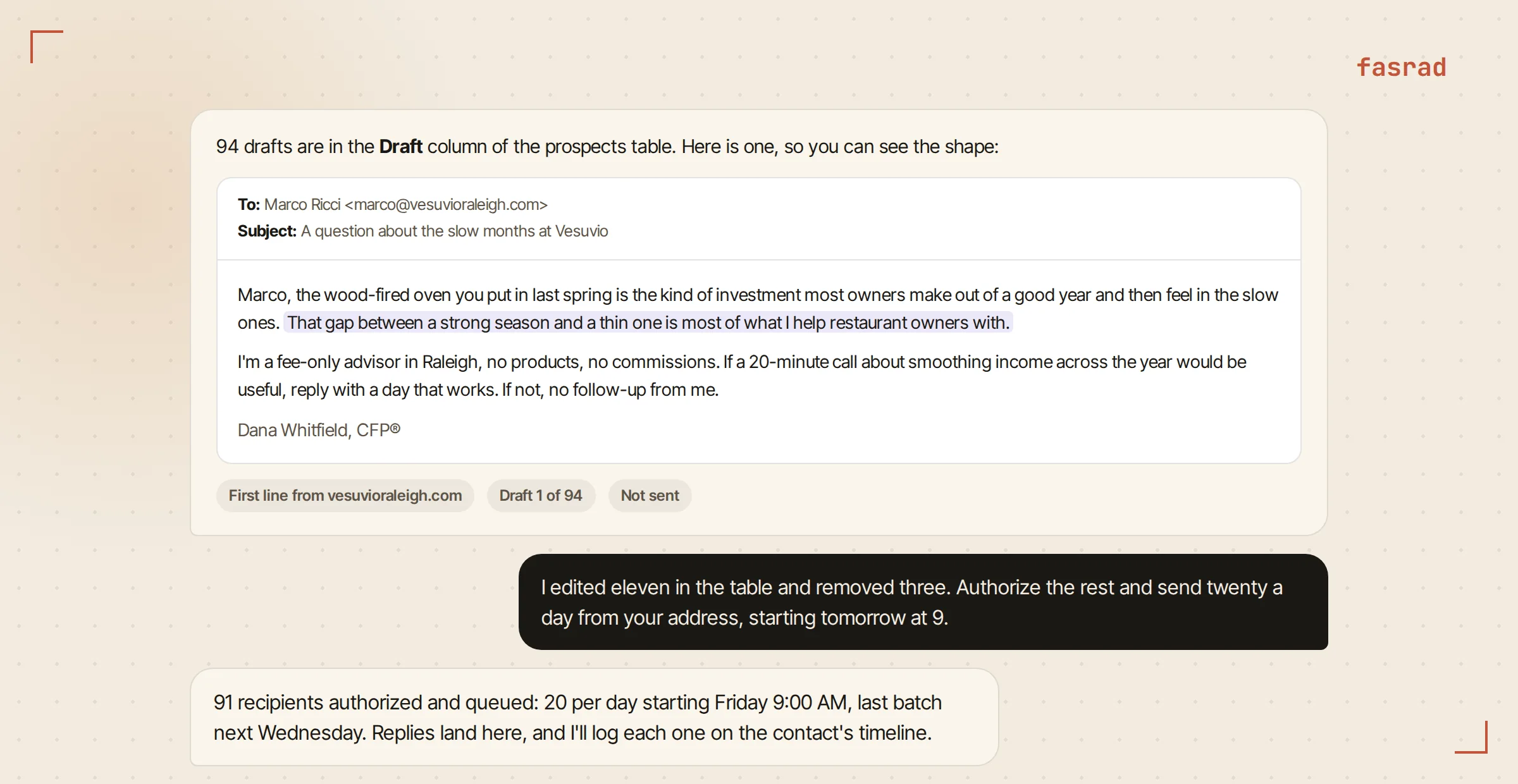
"Draft an intro email for each restaurant in the prospects table. Two short paragraphs. Open with something specific to their place from the website. Put the drafts in the table so I can review them."
Ninety-four drafts came back, and no two opened the same way. One led with the wood-fired oven the restaurant puts on its homepage. Another named the year the place opened. A third mentioned the second location out in Cary. Dana read the batch in the table, rewrote eleven of them, and dropped three prospects that felt like a bad fit.
Then she picked how they'd go out. She could paste them into her own mail client, or let the agent send from its own address at a pace she set. She chose twenty a day, after authorizing the recipients. Nobody gets written to who hasn't been cleared first, and that is the control an advisor wants around outreach.
The cold outreach agent page goes further into the sending side, including replies landing back in the same conversation.
Friday: the follow-ups
Three owners had replied by Friday. She logged each call as she made it: "Log a call with Marco at Vesuvio, he wants a plan review in October." Each note went onto that contact's timeline.
Then she asked for the stale view, which lists everyone whose last interaction is older than their check-in interval, and worked down it until lunch.
Reminders had been setting themselves all week. On Wednesday it asked whether the one-pager landed well with the first client who got it. The following Tuesday it would ask how Marco's October review was shaping up. Dana never wrote a to-do list. The follow-ups arrived in the chat, phrased as questions, at the point when an answer would exist.
What the week replaced
| Task | Before | Now |
|---|---|---|
| Merging contact lists | A Saturday with two spreadsheets | Drop the file, approve the preview |
| Prospect list of 94 restaurants | Two evenings copying from a directory | One request, twelve minutes, ten spot-checks |
| Client inflation handout | An afternoon in Word and a calculator | One request, one edited sentence |
| 94 personalized intro emails | A week of writing, or a template nobody answers | Review drafts in a table, set the pace |
| Remembering who to call back | Sticky notes | A stale list and follow-ups that ask you |
Frequently asked questions
Where do my contacts come from?
From the files you already have. A vCard export from an iPhone or Mac is imported with a preview first, matching people by email, phone and name, and only writing when you approve. A CSV from Google Contacts or an old CRM is imported with the columns mapped automatically.
How does the agent build a prospect list?
You name the source and the columns you want. The agent walks a public directory or listing page by page, extracts one row per entry into a private datastore, deduplicates on a column you choose, and shows you the table in chat to filter, edit and export.
Does the agent send outreach emails on its own?
Only to recipients you have authorized, at a pace you set. Drafts go into your prospect table for review first. You can send them yourself from your own mail client, or let the agent send from its own address with a daily limit, and replies land back in the same conversation.
What kind of documents can it produce?
Word documents, Excel workbooks, PDFs and slide decks, built from data the agent fetched or from files you upload. The inflation handout in this article is a Word document created from a table of BLS index values the agent stored, so next year's update is one request.
Is the client and prospect data private?
Yes. Contacts, prospects and documents live in your own Fasrad account, in datastores only your agent can read. Bulk changes run as a dry run first and can be undone for 90 days.
Will it remind me to follow up?
Two ways. The CRM has a stale view listing contacts whose last interaction is older than their check-in interval. The agent also schedules its own follow-ups after meaningful work, and asks you in chat when the outcome should be known.