Reading your own draft out loud is still the best thing you can do to it. This is the second best, and it works at eleven at night.
How to get essay feedback with AI
Paragraph by paragraph, every device named along with what it does to a reader, in the format you asked for once. The revision comes back as a Word file.
Fasrad · September 21, 2026 · 4 min read
Nina has a Thursday deadline and a draft she's read so often she can't see it anymore. What she wants is the thing a good tutor does: point at a sentence and say what it's doing. A Fasrad agent reads the file she uploads, goes through it paragraph by paragraph, and names the moves in the writing along with the effect each one has on a reader.
Give it the actual file
Upload the document instead of pasting an excerpt. It reads a .docx directly, with the headings and tables intact. PDFs and plain text too, so the agent works from your real draft rather than the fragment that fit in a chat box.
A photographed page works too. Point a phone at the printed sheet and the agent reads the text off the image, which is how Nina handles the one seminar handout she only has on paper.
Give it the assignment sheet as well. Upload the prompt or the rubric alongside the draft and the feedback gets measured against what was actually asked for. That catches the essay which is well written and answering a different question.
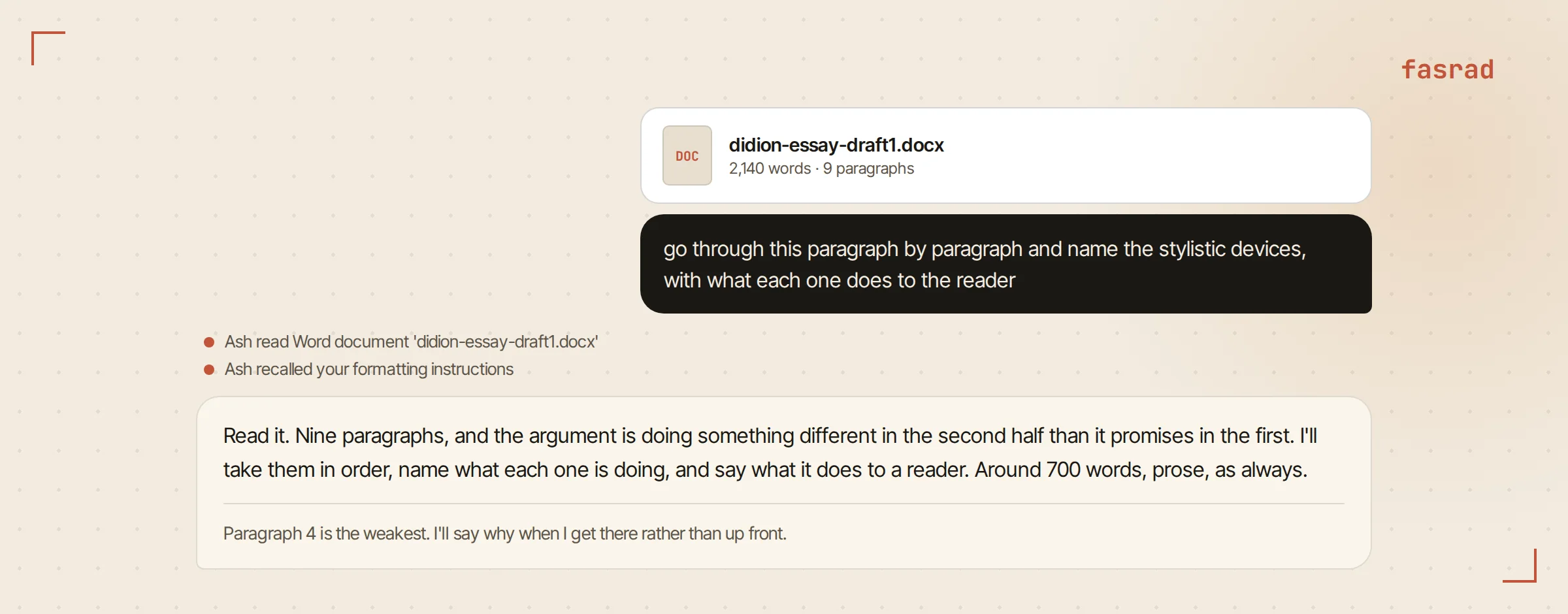
Ask for the paragraph pass
The request that changes the quality of the answer is a specific one: "go through this paragraph by paragraph and name the stylistic devices, with what each one does to the reader".
What comes back is per paragraph rather than per essay. On a 1,400-word essay that comes back as 11 separate notes. It flags the anaphora in her third paragraph and says what the repetition is doing to the pace. It notices that a short sentence after three long ones lands like a full stop, and that a metaphor two lines up is fighting the one below it. Each note gives you the device and its exact location, plus the effect, so you can decide whether that effect was the one you wanted.
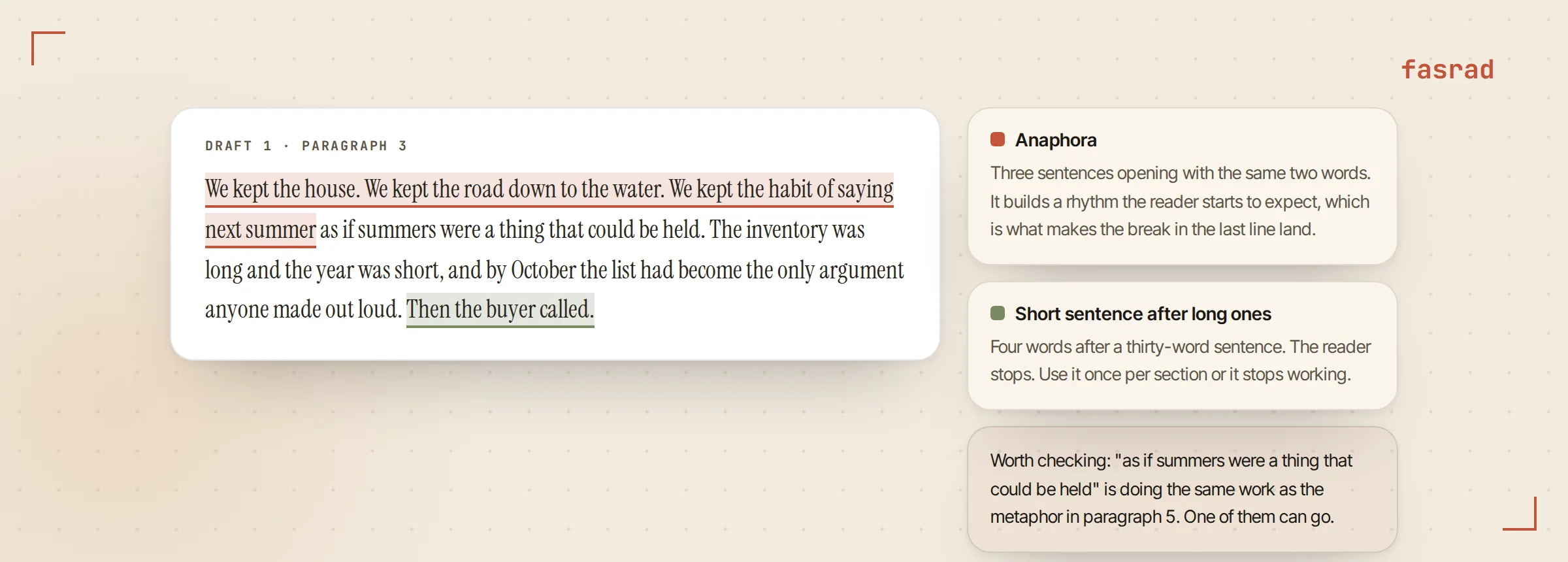
Ask it to be blunt and it will be. "Which paragraph is the weakest and why?" gets one answer with a reason attached. That beats a ranked list of everything.
Other asks in the same shape work as well. Where does the argument stop following from the evidence? Which sentence is a reader most likely to reread? Does the opening earn the second paragraph? Narrow questions get answers you can act on by Thursday.
Tell it your format once
Feedback arriving in the wrong shape gets rewritten by hand.
So you end up doing the work twice.
Nina told hers once: "around 700 words, full sentences, no bullet points". One sentence, and it has held across 9 drafts since. That became a standing instruction, and every later draft comes back in that shape without a reminder.
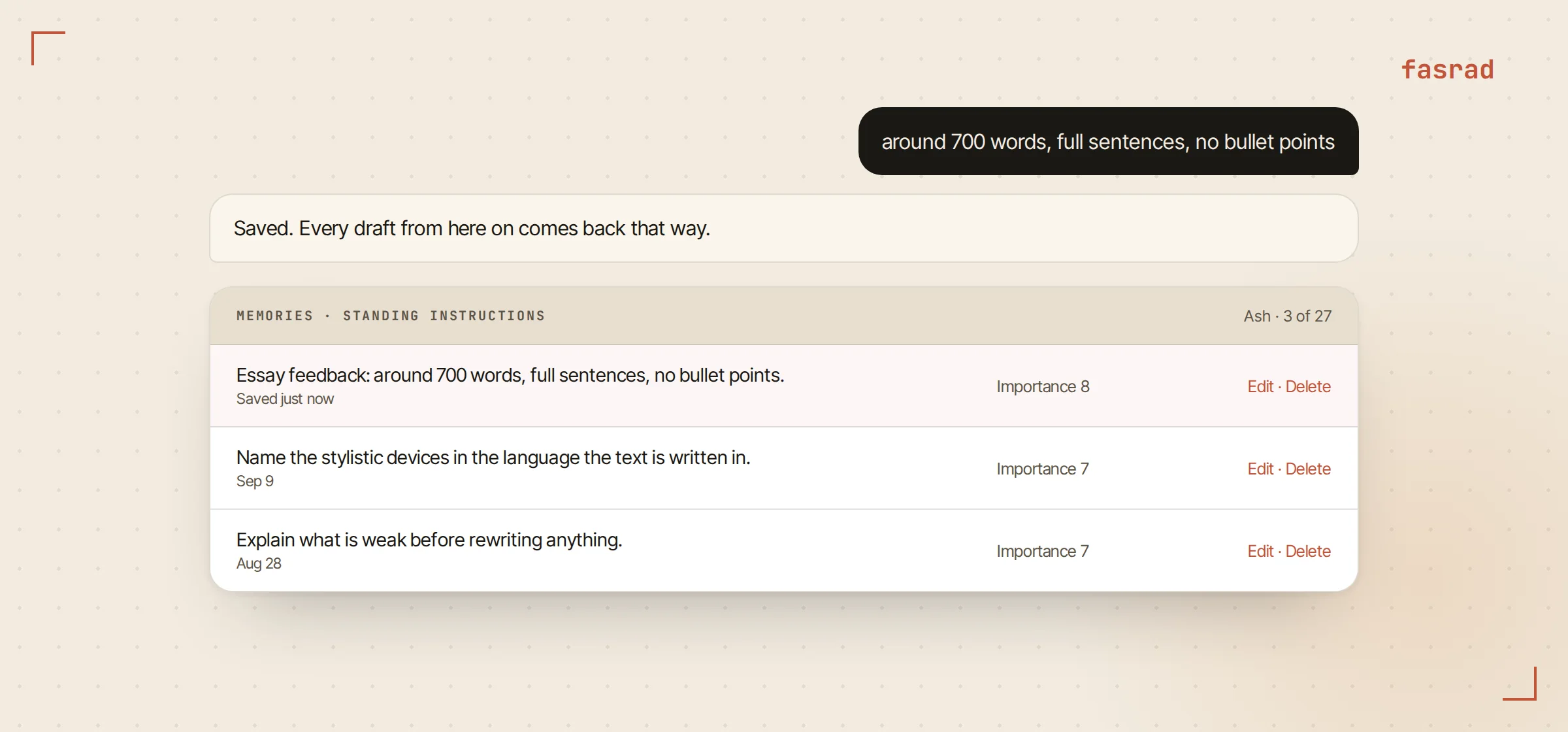
Format instructions stack. Hers now hold a word count and a preference for prose over bullets, plus a rule that devices get named in the original language of the text. Each one is editable in the Memories panel, so a rule that stops being useful gets deleted rather than argued with. A language tutor agent runs on the same mechanism for corrections.
Get the revision as a Word file
"Rewrite the second section with the pacing we talked about, and give it to me as a Word file" produces a .docx with the headings and paragraphs in place, ready to open and hand in. Nothing to copy out of a chat window and no lost formatting.
Nina usually asks for the rewrite and the reasoning separately. First the explanation of what's weak, then the revision, so she can see whether she agrees before the text changes under her.
An existing Word file can also be edited in place, passage by passage, rather than rebuilt. That keeps a document already carrying the formatting a course requires, because only the passages you named get swapped and everything around them is left alone.
Keep the drafts where you can compare them
Each draft goes into a notebook as its own note, dated and titled. Draft one on Sunday, draft two on Tuesday, with the feedback attached to each. By the Thursday deadline there are usually 4 of them. Nothing overwrites anything.
A draft you abandoned in week two is still readable in week six. Week six is usually when the argument you dropped turns out to have been the right one.
Notes are searchable, so a phrase you remember writing three weeks ago is findable without opening five files. Nina keeps one notebook per course. The titles carry the dates.
Then the question that's hard to answer on your own: "What changed between these two drafts, and did it fix the pacing problem?" The agent reads both notes and answers from them. A second brain agent is the same idea applied to everything else you write.
Ask before the deadline, not after
The last piece is timing. "Check in with me Wednesday evening about the essay" sets a reminder that arrives as a reply on the original thread, so the conversation picks up where it left off instead of starting cold.
For a longer piece a tutor agent can hold the whole arc. The outline in one note, the sources in another, the drafts in a third. Ask on Sunday what's still missing and the answer comes from those notes rather than from a guess.
Frequently asked questions
What file types can it read?
Word documents, PDFs and plain text are read directly with headings, paragraphs and tables preserved. A photo of a printed page works too, since the agent reads the text off the image.
What should I ask for to get useful feedback?
Be specific about coverage and depth. Asking it to go paragraph by paragraph, name the stylistic devices and say what each does to the reader produces something you can act on, where asking for thoughts produces praise.
Can I set how the feedback is formatted?
Yes, once. Say the word count, prose instead of bullets, or any other rule and it is saved as a standing instruction that applies to every later draft. The instructions stay editable in the Memories panel.
Can it give me the revision as a Word document?
Yes. Ask for the rewrite as a Word file and you get a .docx with headings and paragraphs in place, ready to open. Existing documents can be updated rather than recreated.
Where do my drafts end up?
In a notebook, one note per draft, dated and titled, with the feedback alongside. Nothing is overwritten, so draft one is still there when you are on draft four.
Can it tell me what changed between two drafts?
Yes. Point it at both drafts and ask what changed and whether it fixed the problem you were working on. It reads both notes and answers from the text rather than from memory of the conversation.
Does it work in languages other than English?
Yes. It reads and responds in the language of the text, and a standing instruction can fix which language the feedback itself is written in.