Five files, one of them forty pages long, and a leadership meeting on Thursday morning. Owen had the raw material and no time to read any of it.
Create a research brief with an AI agent
Five documents into the chat, the web for what they don't cover, a shareable report with sources and a chart, an article folded in from the browser, and a one-page PDF for the meeting.
Fasrad · September 17, 2026 · 4 min read
He's a product manager in Seattle, and the question he needed an answer to was whether mid-market marketing automation would consolidate over the next eighteen months. A Fasrad agent reads documents you already have and the parts of the web you haven't got to. Drop the files in, state the question the brief has to answer, and it publishes a report behind a link you can send to anyone, with the sources named and a chart where the numbers disagree.
Tuesday afternoon: five files and one question
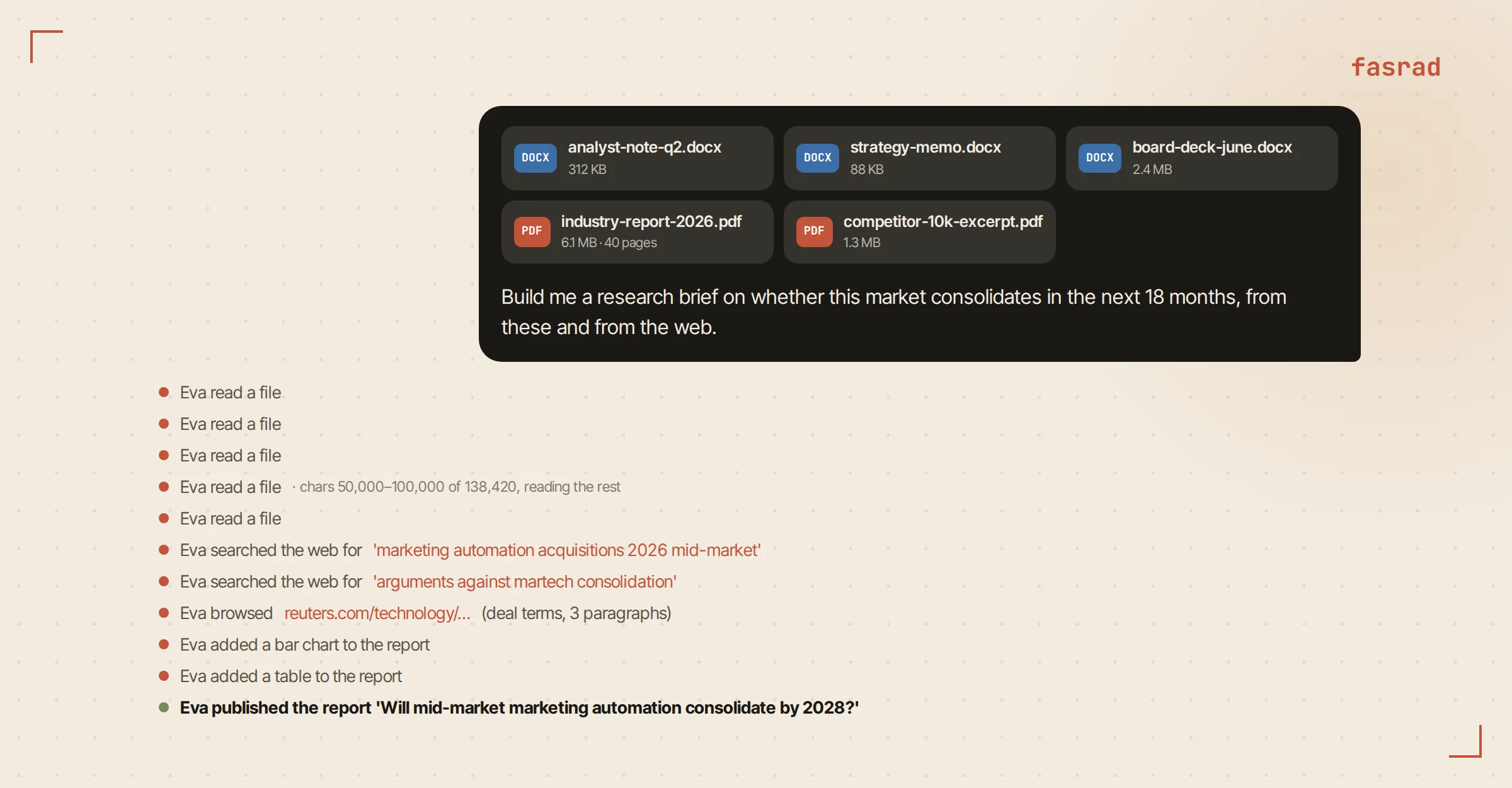
He dragged three Word documents and two PDFs into the chat. One was an analyst note. Two were an internal strategy memo and a board deck exported to DOCX. The last two were a 40-page industry report and an excerpt from a competitor's 10-K.
Five chips lined up over the composer.
Then: "Build me a research brief on whether this market consolidates in the next 18 months, from these and from the web."
Each file gets read in full. Word documents come through as paragraphs and tables, PDFs as text, with OCR for a scanned page. Long files arrive in pages of 50,000 characters and it keeps reading until the whole thing is in, so the 40-page report gets read rather than sampled. After the files it goes to the web for what they can't hold: recent deals and current numbers, plus the counterpoints an internal memo tends to leave out. A search result is only a lead. The agent opens the pages that look worth opening and reads those too.
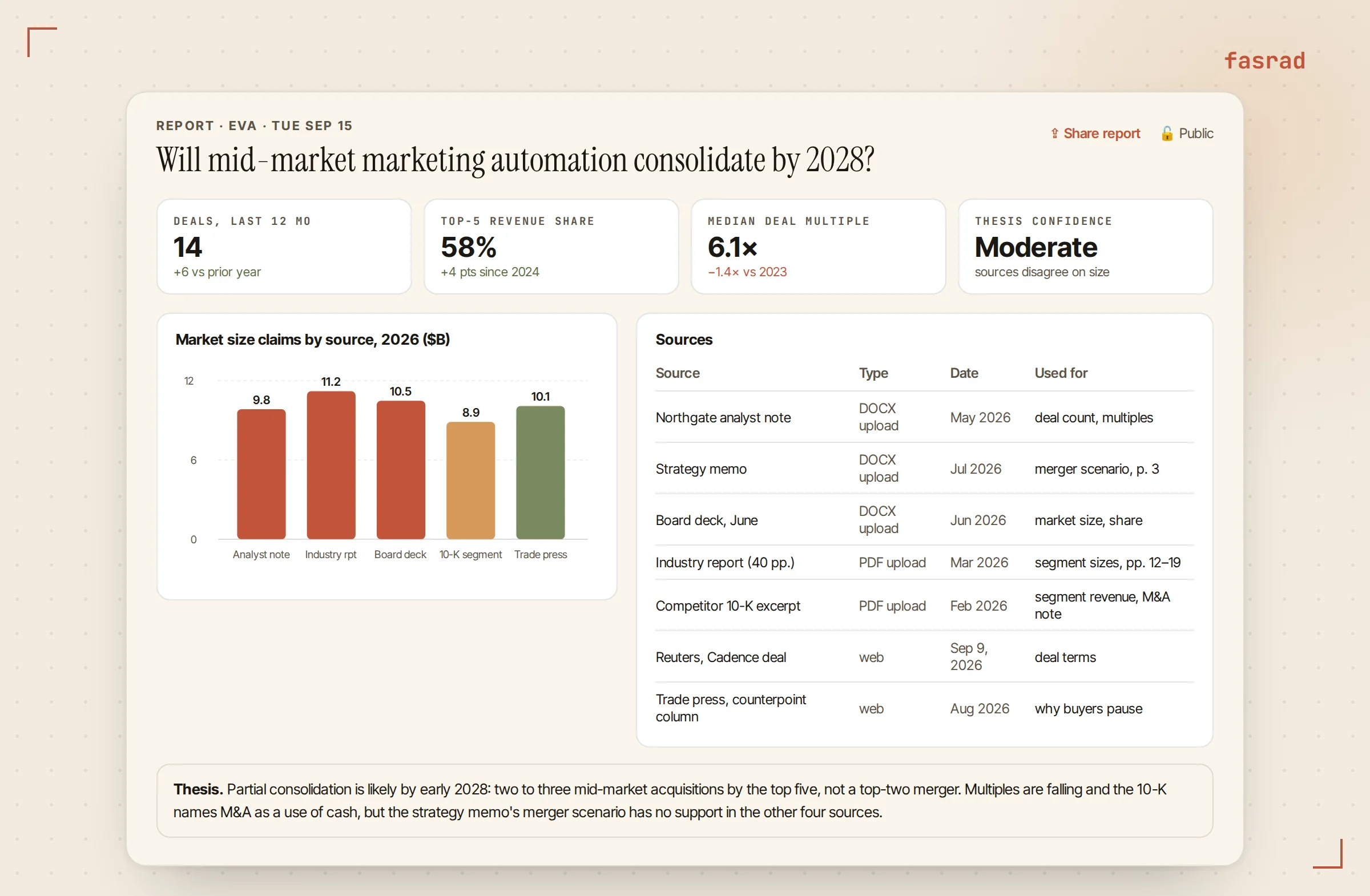
Fifteen minutes later the brief arrived as a report card in the chat. A thesis section, a metric row, the market-size claims from each source drawn as a bar chart, a section on recent deals, and a sources table naming every document and web page it drew on.
Share report copies a link. The report is public by that link until he flips it to private with one click on the card. An AI research analyst built this way reads your files first and the web second, and shows its working either way.
Tuesday evening: pushing on the weak points
He read it on the couch and argued with it. "The strategy memo assumes the top two players merge. What in the other sources supports or contradicts that?"
It answers from the files it read that afternoon and names the page it's quoting. Nothing gets re-uploaded. The files stay with the conversation.
"Find the two strongest arguments that this market does not consolidate." That one goes back out to the web, and the reply cites what it found rather than paraphrasing a snippet. By ten he had a thesis he believed in and two objections he could name out loud, which is the position a market research agent exists to get you to.
Wednesday morning: folding in an article
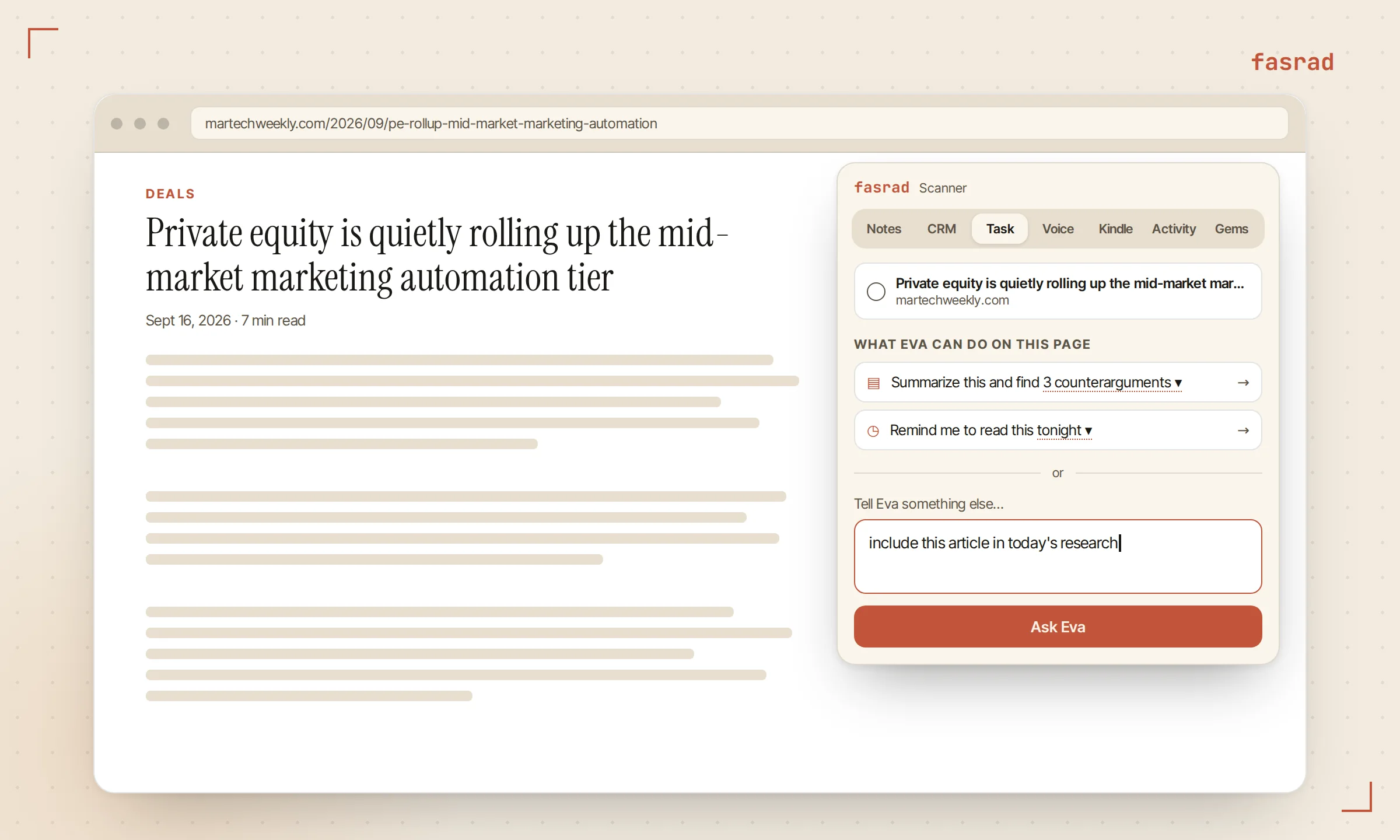
Reading a trade publication in Chrome, he hit a piece on a private-equity roll-up one tier down. He opened the Scanner extension, switched to the Task tab, and typed "include this article in today's research" into the box under the page title.
Back comes a one-sentence proposal of what it's about to do, framed as a research task. He can edit that sentence before confirming.
On confirm the extension captures the article from his own tab, so a paywall or cookie wall his browser already passed doesn't stop the agent, and the full text travels with the task instead of an excerpt. The task ran within seconds and replied in the chat with what the article adds and which section of the brief it touches. "Fold that into the brief and republish, with the article in the sources table" produced a revised report as a new card with its own link.
Tuesday's link keeps working. Reports don't get edited in place, so anyone who already has one still has what you sent them.
Wednesday afternoon: cutting it to one page
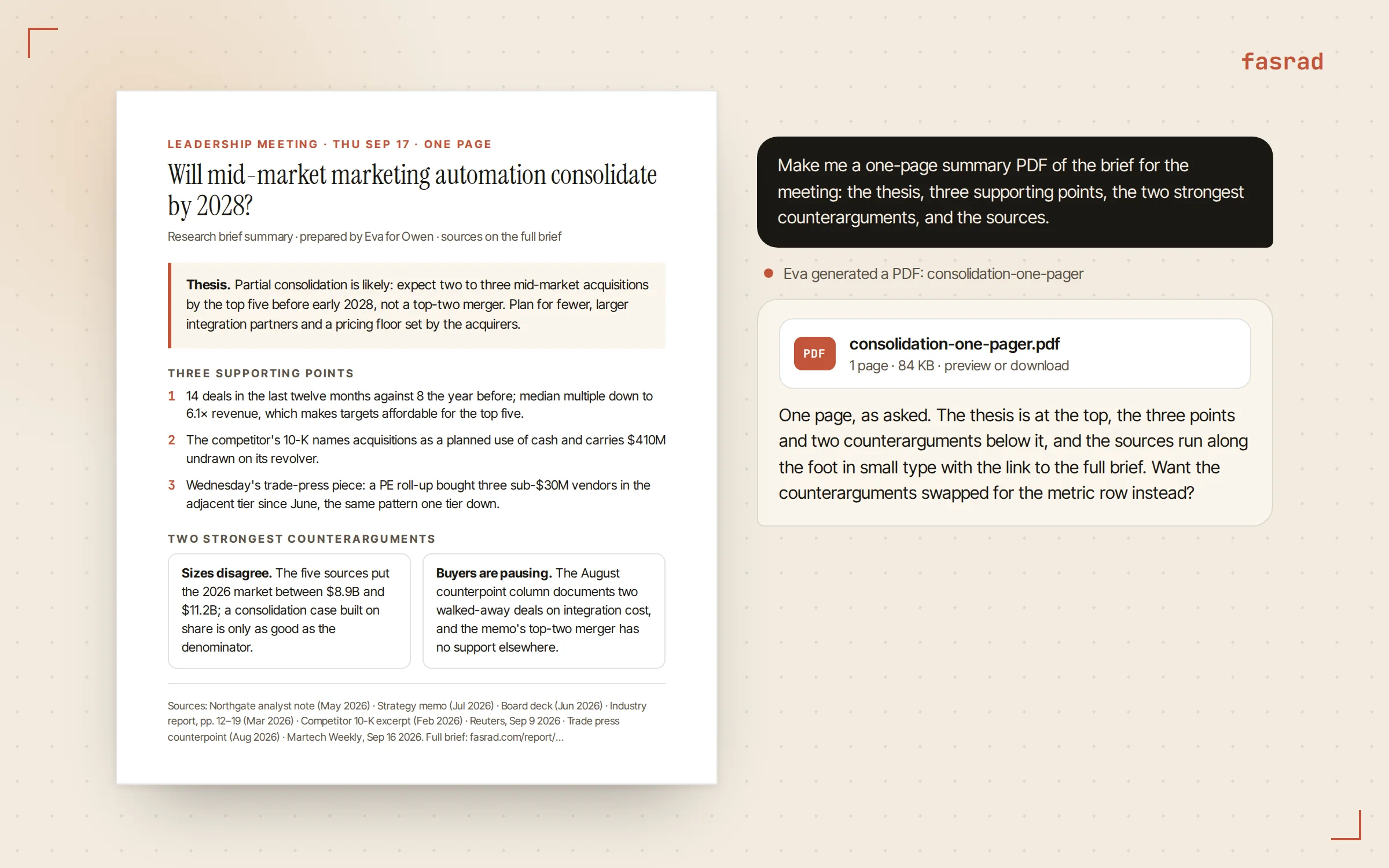
A leadership meeting gets a page, not a report. "Make me a one-page summary PDF of the brief for the meeting: the thesis, three supporting points, the two strongest counterarguments, and the sources."
It writes the page as HTML with its own styling, compiles that to PDF, then posts the file in the chat as a chip he can preview or download. Writing the layout as HTML is what gives it control of the page. A single sheet. The thesis in a pull-out, a two-column block for the counterarguments, and the sources in small type at the foot with a link to the full brief.
PDF creation is a skill on the Skills tab and it's on by default. It converts Word, PowerPoint and Excel files to PDF as well, so the board deck itself can go out that way if that's what the room needs. A document reviewer uses the same reading, and a due diligence agent the same brief-then-summary shape.
Thursday 8 AM: it comes back on its own
Owen's morning briefing arrives at 8, the time he set. It looks at the calendar for the next two days and brings back earlier work that matches what's coming, with its age attached, so Wednesday's article task appears next to the 10 AM leadership meeting instead of vanishing into the scroll.
Forty-five minutes before the meeting a short pre-meeting brief lands, because the invite carries attendees. It has a section headed earlier work on this.
The full report and the PDF sit in the chat thread and on the Work page, where every report the agent has published is listed. Owen walked into the 10 AM with the link, the page, and the two objections he'd found on the couch.
Frequently asked questions
What file types can I upload for a research brief?
PDF, Word (.doc and .docx), PowerPoint, Excel, plain text, CSV, and images, up to 200 MB per file, and several files in one message. The agent reads Word paragraphs and tables and PDF text, with OCR for scanned pages.
Does the agent read the whole document or only the first pages?
The whole document. Long files are read in pages of 50,000 characters and the agent continues from where the previous page ended until it has everything, so a 40-page report is read in full.
Can I share the brief with people who do not use Fasrad?
Yes. Every published report has a link, copied with one click on the card, that opens the report as its own page. The card also has a public or private switch, so you decide who can open the link.
How do I add an article I am reading to the research?
Open the Scanner extension on the page, go to the Task tab, and type what you want done in the box. The agent shows its reading of the request as one sentence, you confirm, and the extension sends the page from your own tab so paywalled or cookie-walled articles work too. The result comes back in the chat.
Do I need to enable anything to get a PDF?
PDF creation is a skill in the agent's Skills tab and it is on by default. The agent writes the page as HTML and compiles it to PDF, which is how it controls a one-page layout. It also converts Word, PowerPoint, and Excel files to PDF.
Will the agent bring the brief back before my meeting?
The morning briefing looks at the next two days of your calendar and brings back earlier work that matches, with its age stated. If the meeting invite has attendees or names one of your contacts, a pre-meeting brief arrives about 45 minutes before it starts with an earlier-work section. Reports are also listed on the Work page.
Can the brief be updated later?
Yes. Ask for the change in the chat and the agent publishes a revised report as a new card with its own link. Earlier versions keep their links, so anyone you already sent one to still has it.