Theo shipped his customer portal on a Sunday and spent the next three weeks picturing the same thing. A customer opens the browser's network tab, finds the database key sitting in the page, and reads the whole thing.
How to scan your website for security holes with an AI agent
One line in the chat, an ownership check, a graded report with the worst finding first, and a weekly monitor that stays quiet unless something new turns up.
Fasrad · September 17, 2026 · 5 min read
He runs a small company in Tampa and built the portal over a weekend with AI coding tools. On a Tuesday night he turned on the Security skill and typed one line. A Fasrad agent reads the same public JavaScript your visitors download and recovers the backend keys and table names the app ships with. Then, once you've proved you control the domain, it checks whether that backend hands data to anyone holding the public key.
Minute one: reading the public bundle
He typed "Security-scan https://portal.example.com".
An activity line appeared under his message next to a small shield, and it stayed there about 30 seconds. In that time the agent fetched the page, followed the script tags to the bundles, and read them the way a browser would. Out of that text came the Supabase project reference, the key the app ships and the role that key carries, plus every table name the code calls. His bundle named 3 of them: customers, invoices and portal_settings.
An anon key is public by design. A service_role key in the browser is a different matter entirely.
It also checks what a weekend build forgets. Is /.env being served? Is /.git/config reachable? Do the bundles publish their source maps? Which security headers are missing, and is the TLS certificate valid and not about to expire? All of that is passive reading, and none of it touches his database.
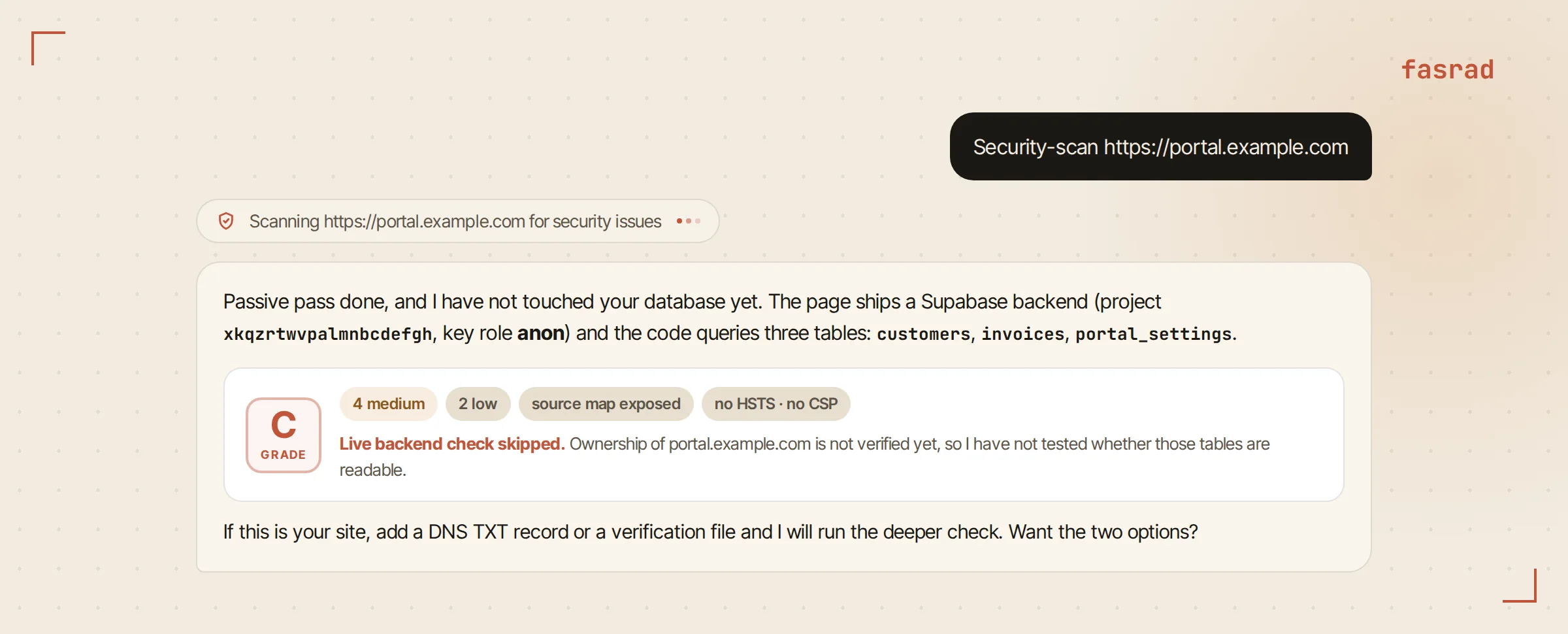
The first reply is short. A provisional grade, the counts, the backend the app ships, and one line saying the live check was skipped because ownership isn't verified. Proving the domain is yours comes first, and it takes one DNS record or one file.
Proving the domain is yours
Theo asked "How do I verify ownership?" and got two options with a button under each.
The first is a DNS TXT record at _fasrad-verify.portal.example.com, with a value starting fasrad-verify-. The second is a plain file at https://portal.example.com/.well-known/fasrad-verify.txt whose entire body is that same token. He picked the file, since static files are easy on his host, and pressed File is in place.
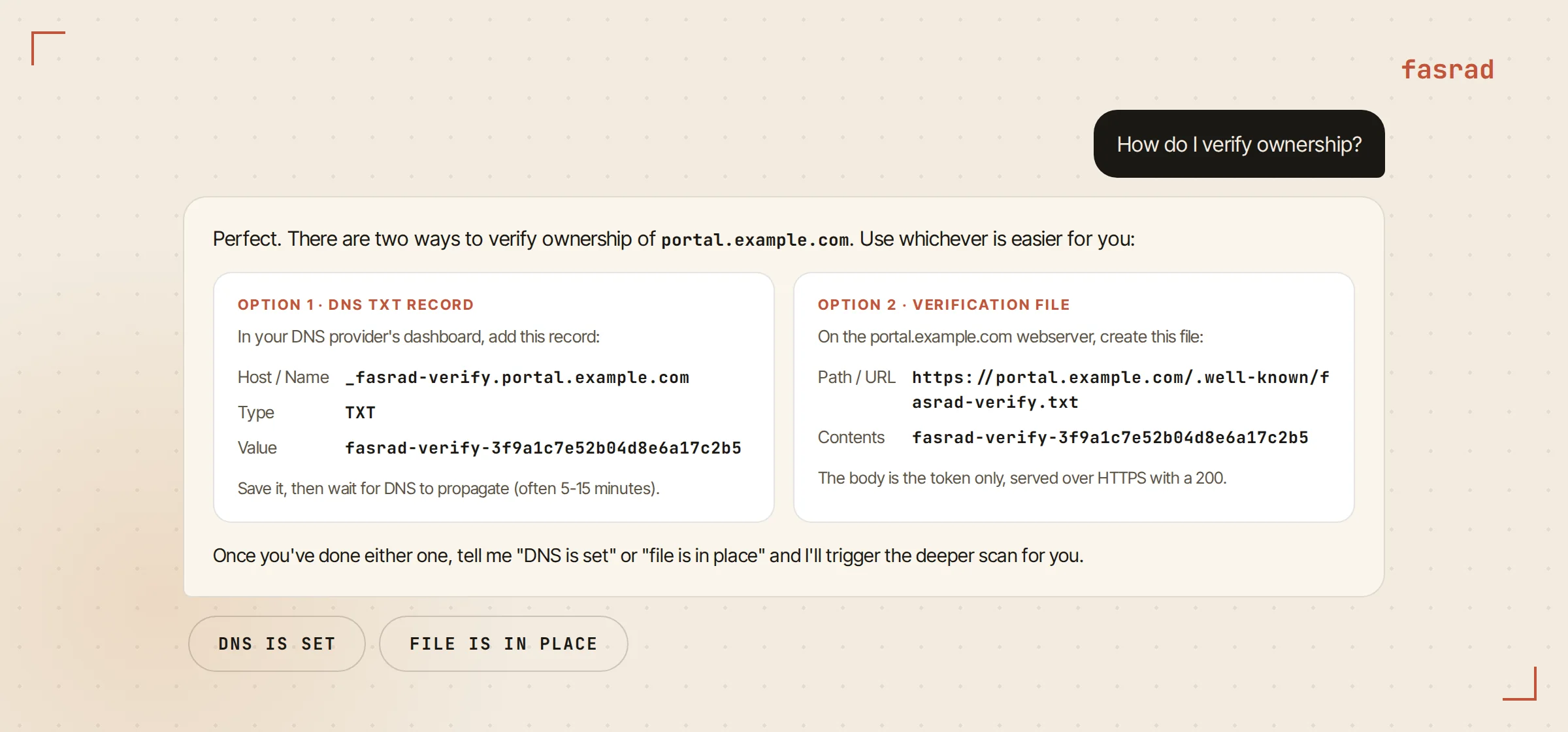
It fetched the file, found the token in it and ran the deeper scan on the spot. When a check fails instead, the reply shows the TXT values it can actually see at that name and the HTTP status of the file, then names the usual causes. A DNS provider that appends the domain twice. A single-page app whose catch-all route serves index.html instead of the file. A CDN cache that needs purging.
Ownership goes on record for that domain, so the weekly monitor further down gets the full check without asking again.
What the report said
The live check is one read request per table the bundle referenced, made with the key the app already ships and nothing else. A table with row-level security in place returns an empty list. A table without it returns a row. Recorded next are the table name and the row count, along with the column names. Never the contents.
Theo's grade was F. customers came back readable with 1,284 rows, and its columns included email, phone and billing address. invoices was readable too. Both count as critical, because those table names signal personal data. portal_settings was readable as well but rated medium, since nothing in its name suggests people. Under those sat the rest. No HSTS header and no content security policy. Nothing against clickjacking. An exposed source map, and a server header advertising its version.
The grade follows a fixed rule. Any critical finding is an F, any high is a D, more than two mediums is a C, and a site with only a few mediums or lows is a B.
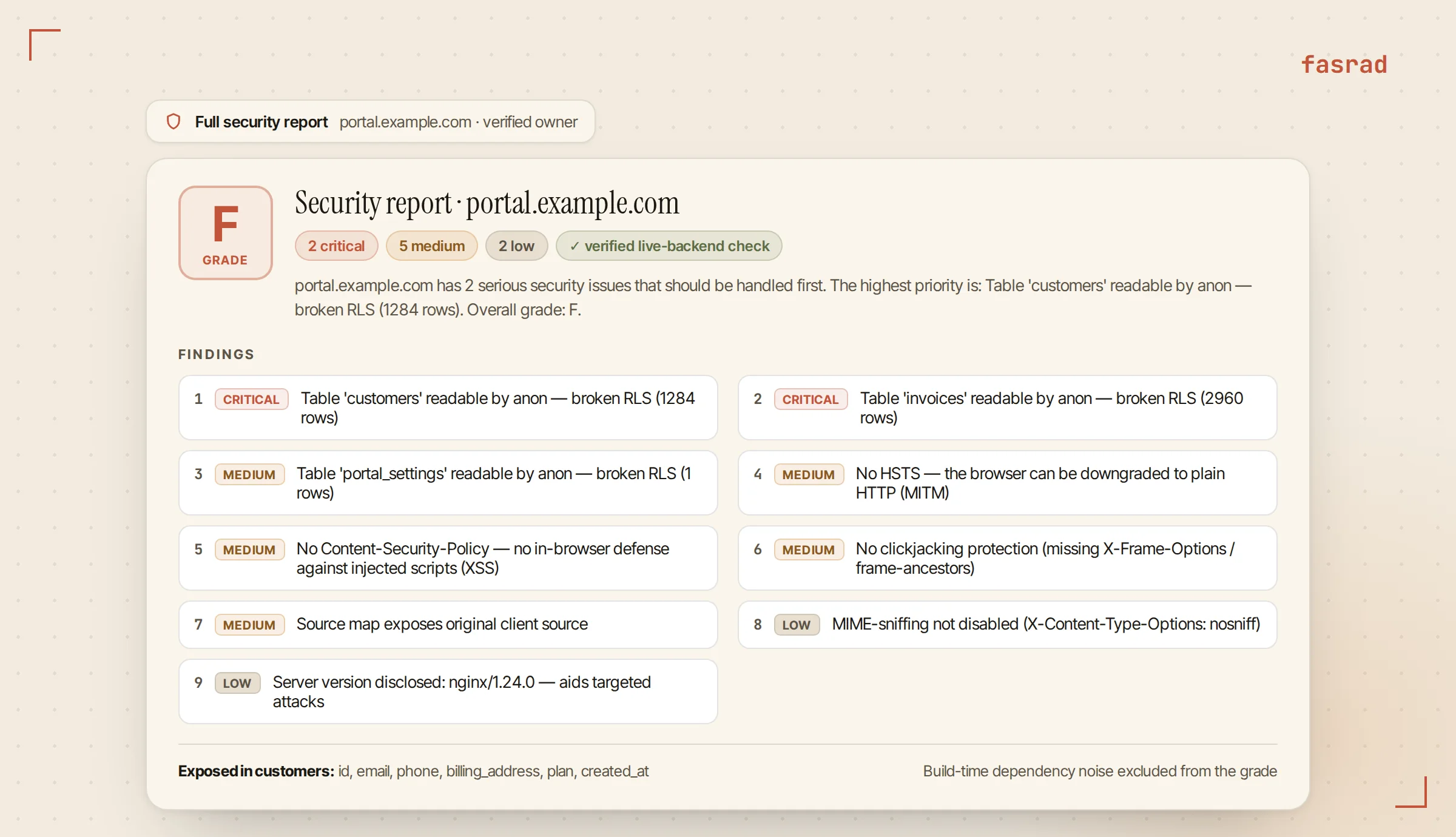
Every finding carries a location and an explanation of why it matters, then the fix and a link to the vendor's own documentation. Build-time dependency noise stays out of the grade, so the letter reflects what's actually deployed. An AI security agent reading your site the way a stranger would finds what a stranger would find.
Working down the list
"Walk me through the fixes" returned one finding rather than nine.
It takes the most severe item and answers only that, in about 100 words: the table, where it lives in his project, the exposed columns, and the fix. For customers that meant turning on row-level security and adding a policy so a signed-in user reads their own rows and nobody else's, then re-running the scan to confirm. It doesn't pile the header fixes on top until he asks.
He worked down the list in an evening. "Next one" moved him to invoices, then portal_settings, then the headers, where the agent gave one implementation path for the stack he'd named instead of five. "Re-scan it" afterwards produced a B with two lows left. A developer agent in the same chat drafted the policies for the third table from the column names, and saved him the documentation trip.
Every week from here
"Check it every week" creates a recurring monitor. Because the domain is verified, the weekly run includes the live database check and not only the passive read. Each run gets compared with the last one: a finding that was open and is now gone is marked fixed, one that returns is marked reopened, and one never seen before is new.
The alert goes out for new or reopened findings, so a message in the morning means something moved.
Three weeks later Theo shipped a support_tickets table on a Friday afternoon and forgot the policy. The Monday scan, timed to land before his morning briefing, sent one Telegram message: the grade, a line reading one new and six fixed since the last scan, and the single new finding with its location.
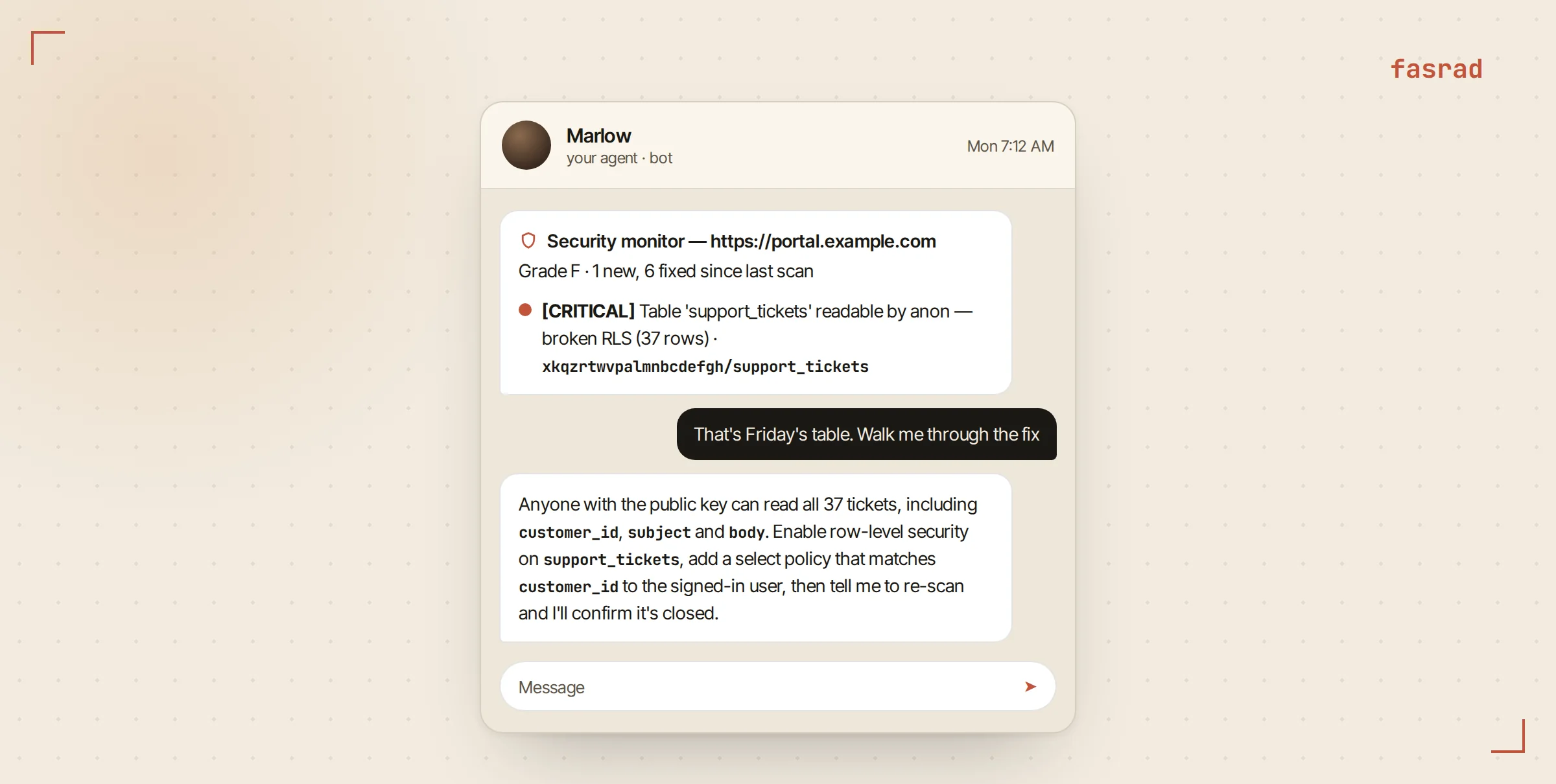
For a founder who is also the whole engineering department, a virtual assistant for entrepreneurs that watches the database too is one fewer thing to hold in your head, and an incident responder on the same agent picks up from that message.
Frequently asked questions
Does the scan touch my database before I verify ownership?
No. The first pass reads the public page and its JavaScript bundles, the same files any visitor downloads, plus a few well-known paths and the response headers. The live backend check runs only after the DNS TXT record or the verification file is confirmed, and the reply says explicitly when it was skipped.
What does the live check actually do?
One read request per table the bundle references, using the key your app already ships. An empty list means row-level security is enforced. A row coming back means the table is readable, and the agent stores the table name, the row count and the column names, never the row contents. Firebase Realtime Database and Firestore get the equivalent open-rules check.
Which exposures does it look for in the bundle?
The Supabase key and its role (the anon key is public by design; a service_role key in the browser is critical), the Supabase URL and project reference, and Firebase configuration. On the server it checks for a served .env file, .git metadata, an AWS credentials file, config.json and JavaScript source maps, along with missing security headers and TLS certificate problems.
How is the grade decided?
By a fixed rule. Any critical finding is an F, any high is a D, more than two mediums is a C, a site with a few mediums or lows is a B, and a site with none is an A. Build-time dependency vulnerabilities that do not ship in the deployed bundle are left out of the grade.
Do I have to own the site?
Yes, and that is the point of it. Verifying the domain turns on the live backend check, and the graded report, the fix walkthrough and the weekly monitor are all built for the person who can act on them.
Can it scan my source code as well?
Yes. Give it a public GitHub, GitLab or Bitbucket URL and it runs a static scan for vulnerable dependencies, leaked secrets and risky patterns. For a private repository the agent opens a secure field for a read-only token, which is encrypted on submit and never passes through the chat.
When does the weekly monitor send an alert?
Only when a finding is new or has reopened since the previous run. The message names the grade, the count of new, reopened and fixed items, and each new finding with its location. Monitors can run daily or weekly, and a verified domain gets the live backend check on every run.