Leah had 912 Kindle highlights across 58 books. For six years they sat on Amazon's notebook page, and she opened it maybe twice.
Become a better reader with AI: integrate Kindle highlights, Goodreads, and Kindle vocabulary
Highlights she'd forgotten come back at breakfast, the words she looked up become flashcards, and her agent knows every book on her shelves.
Fasrad · September 28, 2026 · 5 min read
Now one of those highlights turns up in her morning briefing. The words she looked up on her Kindle live in a study deck, and her agent keeps a shelf of every book she's read next to the 118 she still means to. Here's her setup on a Fasrad agent, piece by piece. It changed what she reads, and how much of it she still remembers a year later.
Getting 912 highlights out of Amazon
Everything starts with the Fasrad Scanner, a browser extension that carries data from sites you're signed in to over to your agent. Leah opened read.amazon.com/notebook and hit Sync from Amazon on the Scanner's Kindle tab. One pass pulled her library and every highlight.
Each highlight becomes its own note in a notebook called Kindle Highlights, grouped by book. The note keeps the Kindle location and a link that opens the passage in the Kindle reader.
She did that once. After the first run the extension checks in every hour and syncs again whenever the last run is more than 23 hours old. A book she finishes on the couch tonight is on her shelf tomorrow with its highlights.
A highlight with breakfast
Highlighting is easy. Rereading is the part almost nobody does, and it's the part that makes a book stick.
So Leah gave her agent one briefing preference, in plain words:
"Include one random note from my Kindle Highlights notebook in my briefing, with a short headline."
Every morning one box in her briefing holds a passage she marked, under a headline the agent writes for it, with the book underneath. On Tuesday it was Kahneman's line from Thinking, Fast and Slow: "Nothing in life is as important as you think it is, while you are thinking about it." She'd highlighted it on a flight three years earlier. It landed on the morning of a meeting she'd been dreading, and she walked in calmer.
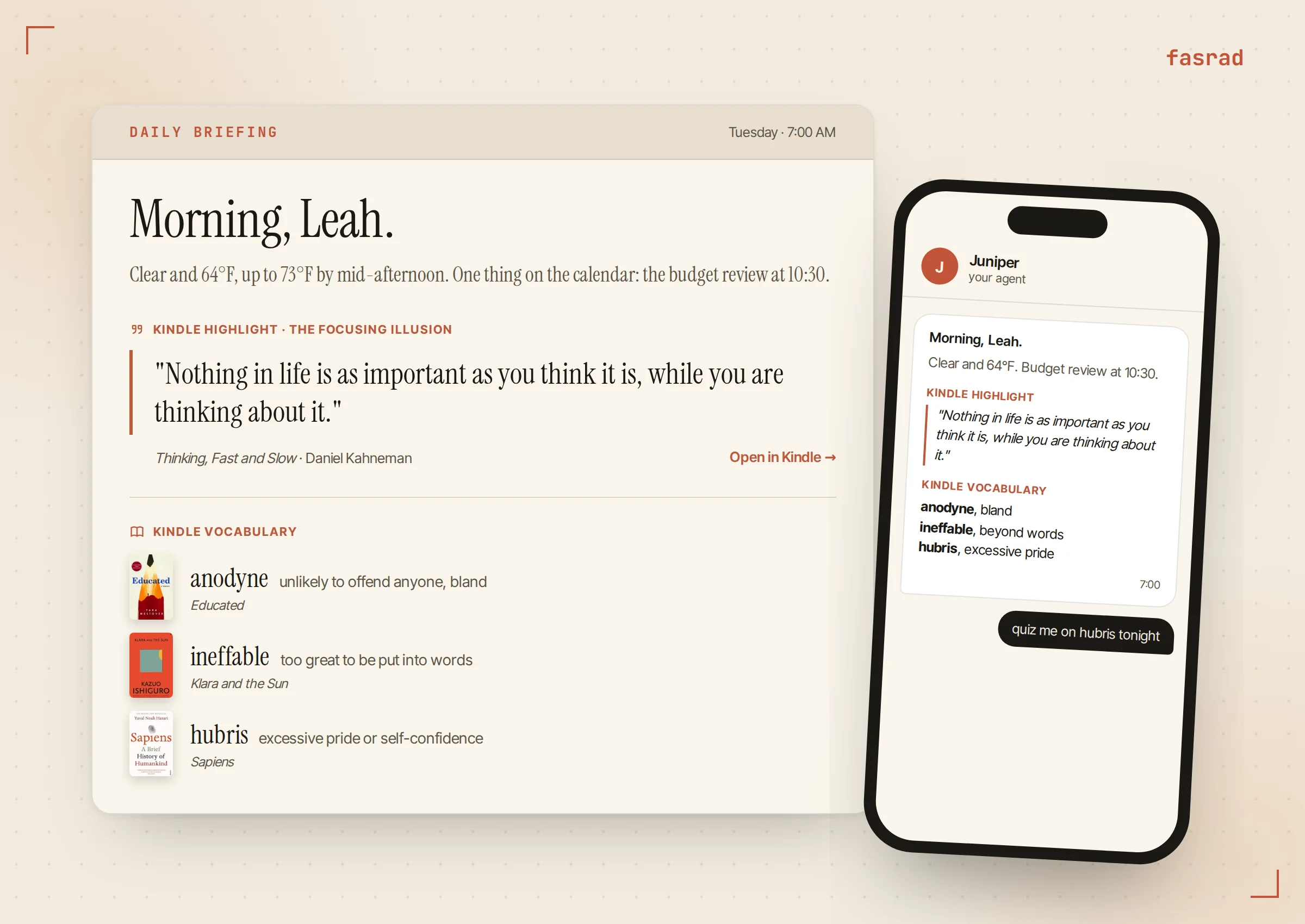
The pick is random across the whole notebook, so a book from 2019 is as likely as last month's. When a passage pulls her back in, Open in Kindle takes her to the exact spot.
The read shelf the agent keeps
Her agent keeps a Books shelf. It settles a question she used to get wrong in bookstores: have I read this? Kindle books land there by themselves, and Goodreads adds the paper books and everything from before she owned a Kindle. A book she mentions in chat, like "I just finished Educated", goes on with that one message.
"Show my book library" renders the shelf as cover cards with a highlight count on each. Range leads hers at 64. Clicking a card opens that book's highlights.
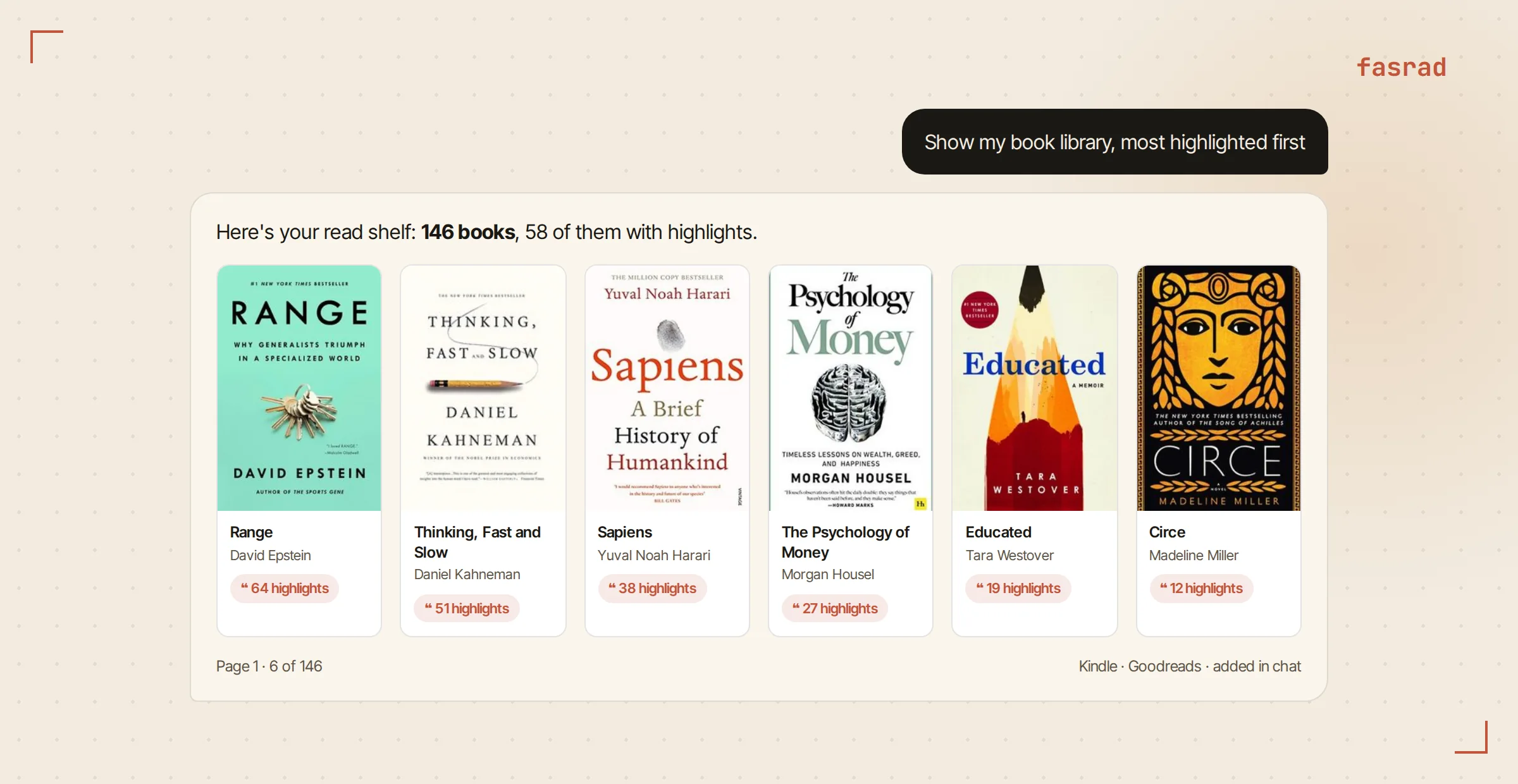
The questions she actually asks are more pointed. "Have I read anything by Madeline Miller?" gets a yes and the cards for Circe and The Song of Achilles. "Show me the last 10 books I read" sorts by the real last-read date. A topic question also searches the text of her own highlights, so a book comes back for what's inside it, even when the title gives nothing away.
What Goodreads adds: 118 books she meant to read
A want-to-read shelf on Goodreads is the most honest record of anyone's taste. Nobody buys a book to say they're curious about it. They add it to a list and forget.
On any goodreads.com page the Scanner's Task tab offers Import Goodreads shelf. Leah imported Read and Want to Read. Ratings and read dates came along, and books already on her Kindle shelf were matched by ISBN or title instead of duplicated.
A list of 118 books is useless as a list. As something her agent can query, it's a reading plan. "Which books on my list are about medicine?" narrows it to Outlive and The Covenant of Water in seconds. "For each book I want to read, check if there's an Amazon promo" is a real errand, and the agent reports back book by book.
How she asks for the next book
Before a beach week she typed: "Give me some fun travel book suggestions based on the books I read and books I want to read."
The answer came back as cards. Each had a cover, an Amazon link and one line on why it fit. In a Sunburned Country, because she'd loved Bryson's jokes in The Body. The Geography of Bliss, because Thinking, Fast and Slow is one of her most highlighted books.
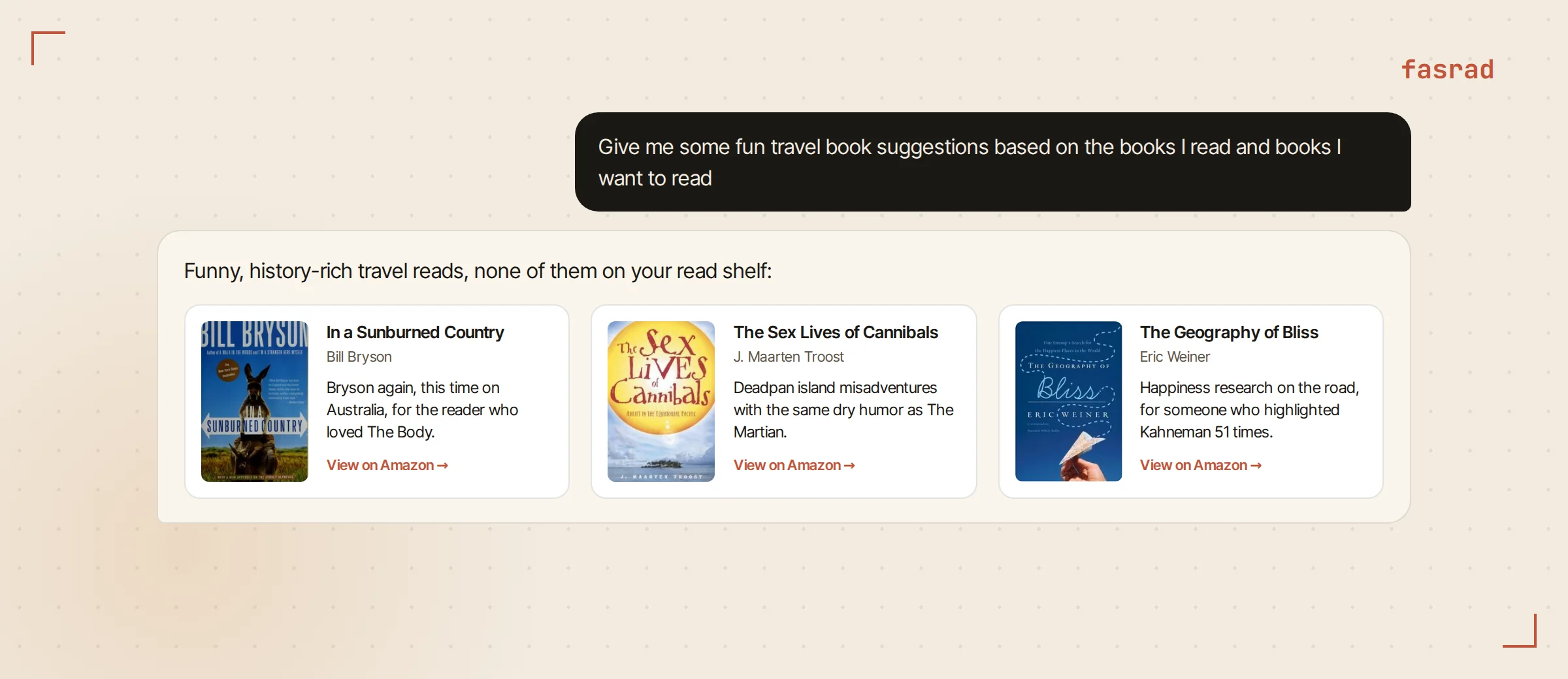
Nothing she's already read shows up. When a pick is already on her want-to-read list, the agent tells her it's there instead of selling it to her as a find. The reason line is the most useful part of the card. It names a book of hers, so she can argue with the logic and steer: shorter, or less history. The book recommendations guide walks through that part step by step.
Kindle vocabulary as a Study deck
Every time you long-press a word on a Kindle, the device logs it in a file called vocab.db, together with the sentence you were reading. Leah's held lookups from 41 books.
She plugged the Kindle in over USB, found vocab.db in its system folder and dropped it on the Vocabulary Builder section of the Scanner's Kindle tab. The import turned it into 306 cards in Study, Fasrad's spaced-repetition tool. It threw out accidental taps on words like "where" and "among" by itself.
Each card carries a short definition, a memory hook and the original sentence from the book. Supercilious comes with Tom Buchanan from The Great Gatsby: "Now he was a sturdy straw-haired man of thirty with a rather hard mouth and a supercilious manner." A word met inside a story is far easier to keep than a word from a list.
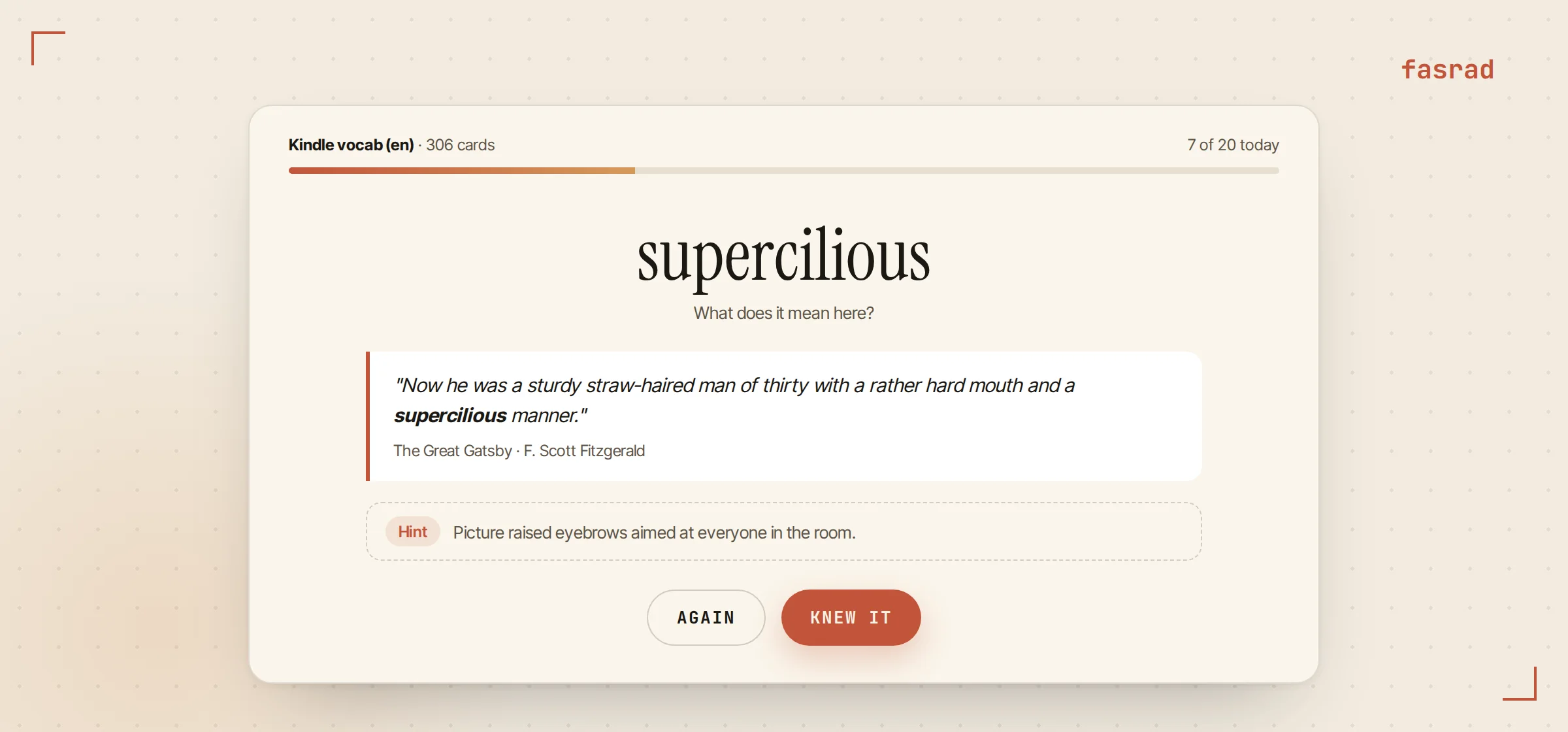
Reviews run on a spaced-repetition schedule with a daily target of 20 cards. Leah told the agent once that when she's stuck she wants a one-line hint tied to the context, never the full definition. It has done that in every review since. It also slips due words into ordinary replies now and then, and when she uses one back in a message, that counts as a review. Re-importing a newer vocab.db adds the new words and keeps her review history.
Three words every morning
Study works when she sits down for it. The briefing puts the words in front of her on the days she doesn't. This is her second reading preference:
"Include one section titled "Kindle Vocabulary" containing 3 random words from my Kindle vocabulary, with each word's brief definition and the book title it came from."
Tuesday's three were anodyne from Educated, ineffable from Klara and the Sun and hubris from Sapiens. Three words take about ten seconds to read, and each one arrives with the book she was holding when she first got stuck on it.
Frequently asked questions
Do I need a Kindle for this setup?
No. A Goodreads import builds the read shelf and the want-to-read list on its own, and you can add any book by telling your agent you read it. A Kindle adds the highlights for the briefing and the vocab.db file for Study.
Do my highlights keep syncing after the first import?
Yes. After you run Sync from Amazon once, the Scanner extension checks every hour and syncs again whenever the last run is more than 23 hours old, so new highlights and new books arrive by themselves.
Where do I find vocab.db on my Kindle?
Connect the Kindle to your computer by USB and open its storage. The file sits in the system folder. Drop it on the Vocabulary Builder section of the Scanner's Kindle tab and Study builds the deck.
Can I change what the briefing includes?
Yes. Briefing preferences are plain sentences. Tell your agent "make it 5 vocabulary words" or "add one highlight from a book I read this year" and the next briefing follows it.
Will the agent recommend books I have already read?
No. Suggestions exclude everything on your read shelf. When a pick is already on your Goodreads want-to-read list, the agent tells you it's on your list instead of presenting it as new.
Does re-importing vocab.db reset my progress?
No. A re-import adds the words you looked up since the last one and refreshes the card text. Your review history and schedule stay as they are.