The action items from Tuesday's planning call sat in a Notion page for six days. There were eleven of them, and nobody had copied a single one into Todoist or Linear.
How AI can connect your Todoist, Linear and Notion
Notion meeting notes become Todoist tasks, Linear issues land on your teammates' Todoist lists, and a bug you jotted on the train turns into a Linear issue. One sentence each, in one chat.
Fasrad · November 9, 2026 · 5 min read
With all three apps connected to one AI agent, that copying takes a sentence. You say what should move where, and the agent reads one app and writes into another. Your morning briefing already picks up all three on its own once they're connected. This guide covers the other half: the requests where moving work between apps is the whole point.
Connect Todoist, Linear and Notion from one chat
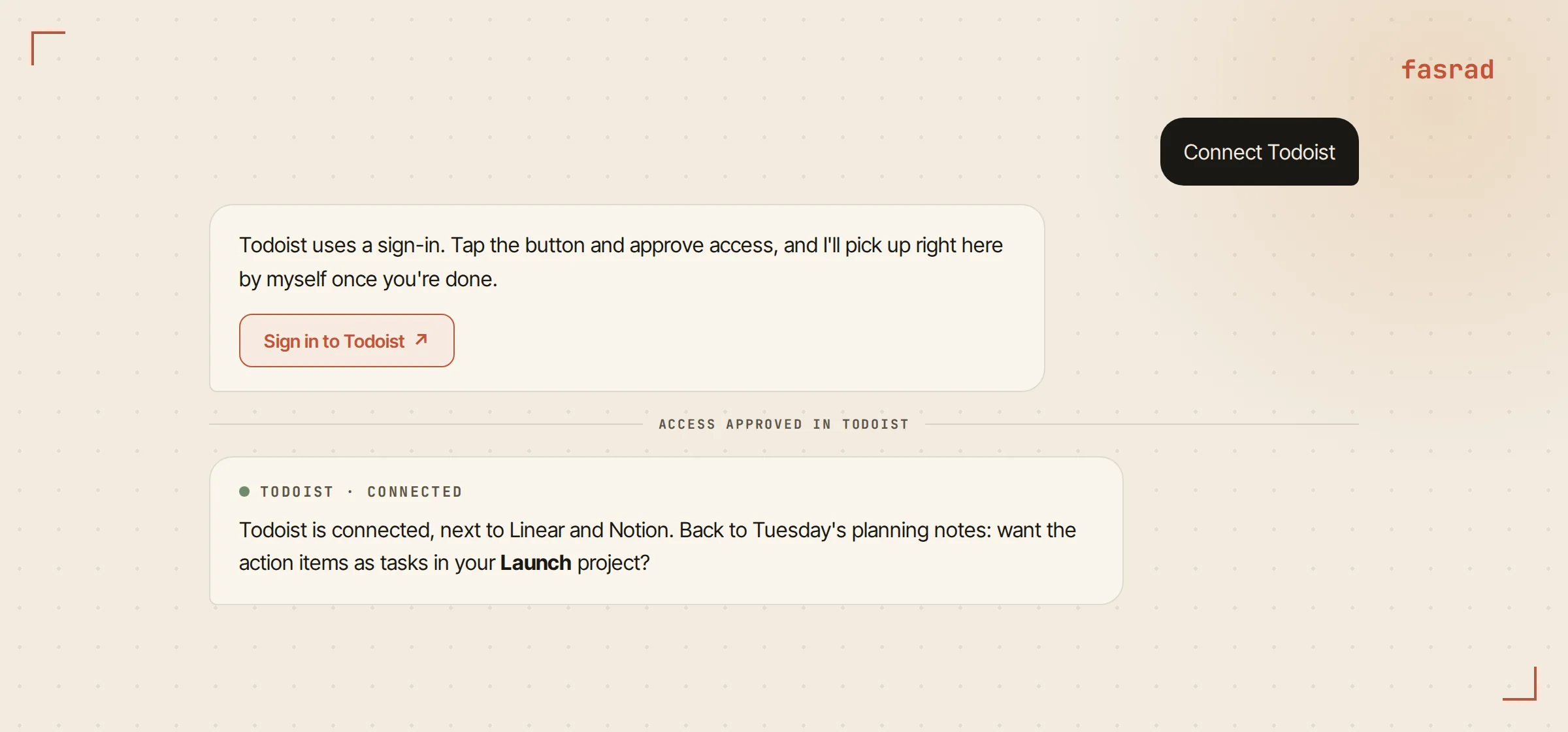
Between two calls, Hana typed "Connect Todoist" to her agent, Kit. A Sign in to Todoist button came back. She tapped it and approved access on Todoist's own page. Back in the chat, Kit was already carrying on with the conversation, without her having to say she was done. Linear and Notion connected the same way a minute later.
The sign-in link stays good for 15 minutes.
Each app brings its own set of tools, from reading Notion meeting notes to saving Linear issues and comments. Under Agent settings, Skills, Connected apps, every tool that writes is marked "may change data", and any single one switches off with a toggle. You can also just ask: "Turn off Linear's delete tools." Kit asks before it deletes or overwrites anything. New tasks and new issues it creates straight away, because creating them is what you asked for.
Notion meeting notes into Todoist tasks
Tuesday's call had run through Notion's meeting notes, so the transcript and summary were already sitting in Notion. Hana asked:
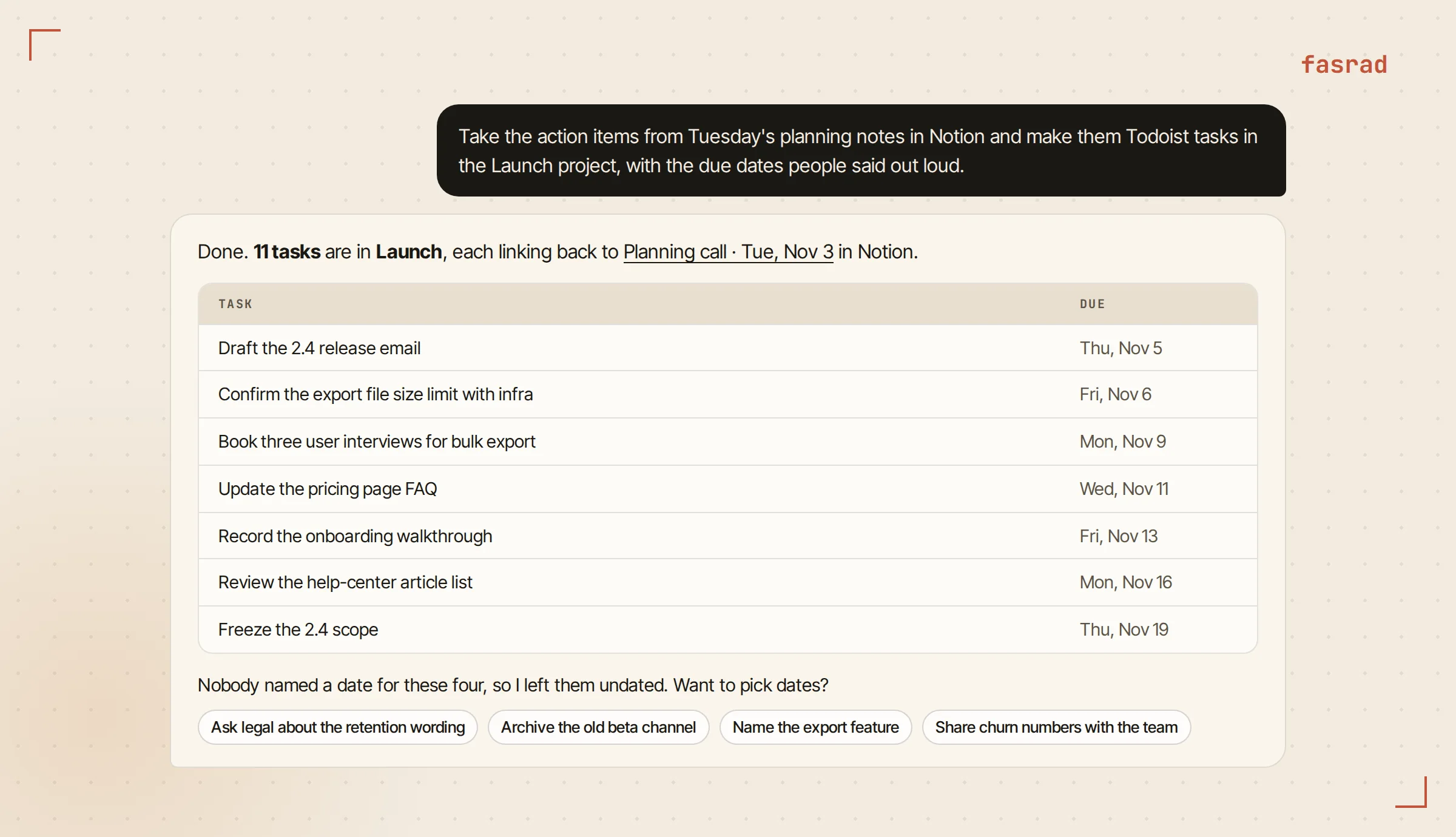
"Take the action items from Tuesday's planning notes in Notion and make them Todoist tasks in the Launch project, with the due dates people said out loud."
Kit found the meeting, read the notes and picked out all eleven items. Seven had a date somebody said on the call ("by Thursday", "before the 20th") and got that date in Todoist. The other four had no date, so Kit left them undated and listed them at the bottom of its reply for Hana to settle. Every task links back to the Notion page in its description.
Try this one first. Action items are the thing everyone means to copy and nobody does, and here the whole job happens in the minute after the call ends. If the call itself happens on Google Meet, a meeting agent can join it and take the notes too.
Who gets which Linear issue in the shared Todoist project?
Engineering lives in Linear at Hana's company. Mateo in support and Ingrid in marketing work from a shared Todoist project called Launch, and neither has opened Linear in months.
Before the 2.4 release, nine issues in the Linear project needed work from one of them. Hana wrote:
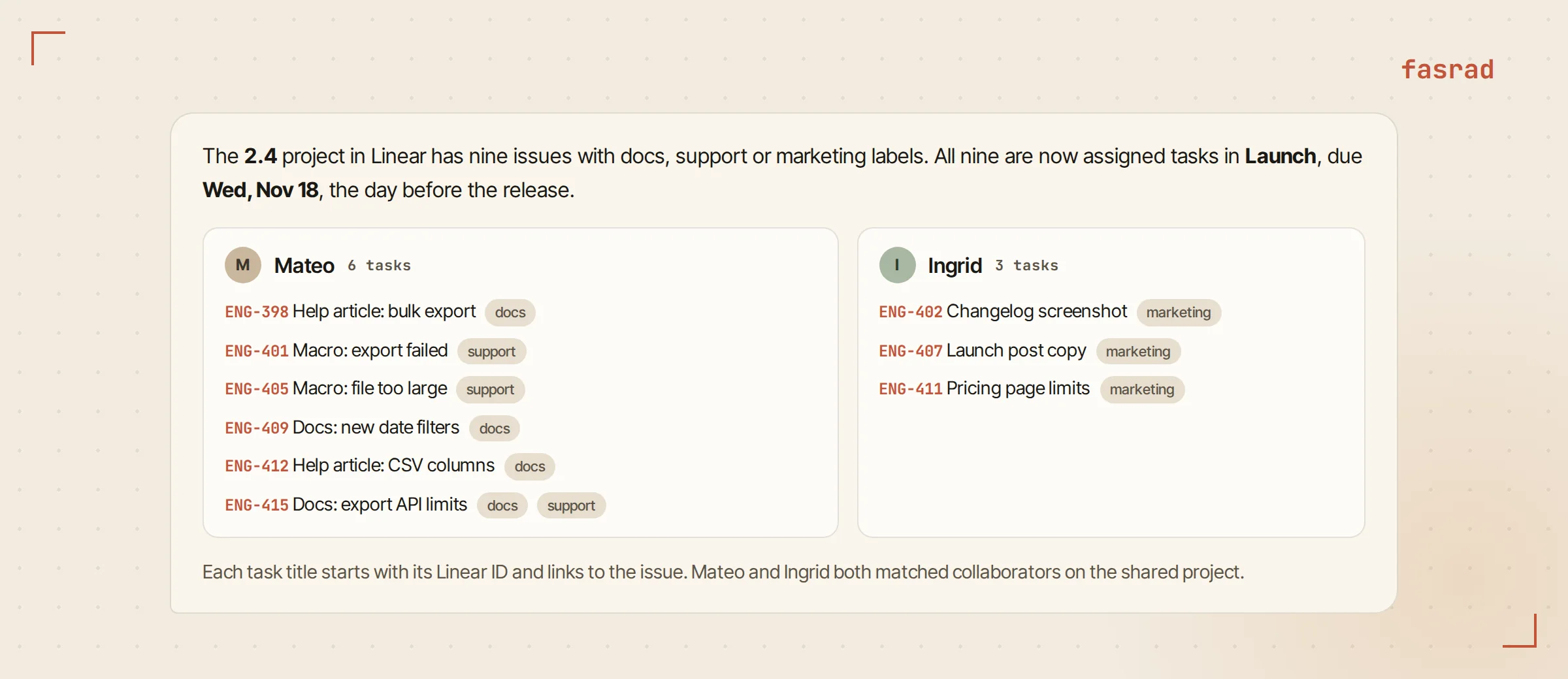
"Go through the 2.4 project in Linear. Anything labeled docs or support goes to Mateo in our shared Launch project in Todoist, anything labeled marketing goes to Ingrid. Due the day before the release."
Kit read the project's issues and labels in Linear, then matched both names against the collaborators on the Todoist project. It added nine assigned tasks: six for Mateo, three for Ingrid. Each title starts with its Linear ID, like ENG-412, and each one is due Wednesday, November 18, the day before the release. Mateo and Ingrid got them in their own Todoist that afternoon.
Assignment is where the agent earns its keep. A sync tool can copy issues, but it can't read "anything labeled marketing goes to Ingrid" and apply it to nine issues with four different label combinations. That kind of routing is most of what an AI assistant for founders does all week.
A bug jotted in Todoist becomes a Linear issue
Bugs get noticed on the train. Hana throws them into her Todoist inbox with a "bug" label and one thumb-typed line. On Friday she cleared the pile:
"File my Todoist tasks labeled bug as Linear issues for the Web team, then complete each task with the issue link as a comment."
There were three. Kit turned each line into an issue title a teammate could act on and kept Hana's original words in the description. Then it closed the Todoist tasks and left the Linear link on each one as a comment. Anyone who finds the old task later can follow it to the issue in one click.
Splitting a Notion spec into Linear issues
The bulk-export spec in Notion had six sections when the team signed off on it.
"Break the Bulk export spec in Notion into Linear issues in the Exports project, one per section, and put the acceptance criteria from each section in the issue."
Kit made six issues. Each one quotes its section's acceptance criteria word for word and links back to the spec page. Two sections mentioned the new job queue, and Kit pointed that out in the reply so Hana could decide which issue goes first. She added one more request for herself, "Remind me Monday in Todoist to review the six export issues before planning", and that landed as a task due Monday with the Linear project linked.
People keep their specs in Notion because writing there is pleasant. Splitting one into tickets is the dull hour after the good meeting, and here it took one request.
Every Friday at 4 PM, shipped Linear work lands in Notion
The last route runs without a prompt, because Hana set it up once:
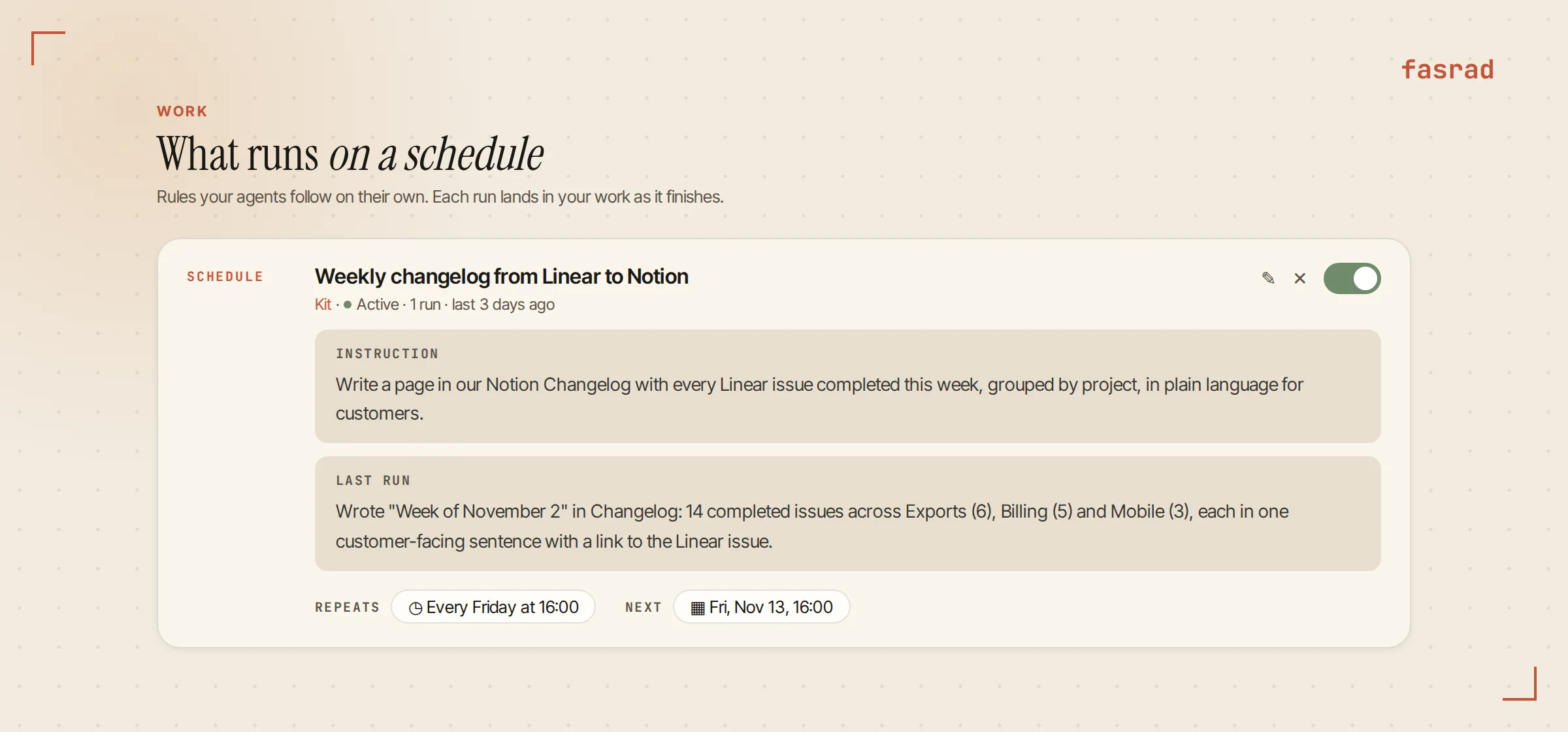
"Every Friday at 4 PM, write a page in our Notion Changelog with every Linear issue completed this week, grouped by project, in plain language for customers."
That became a schedule on the Work page, where every autonomous agent run lives, shown as Every Friday at 16:00, with the instruction underneath and a switch to pause it. On Friday, November 6, the first run wrote "Week of November 2" into the Changelog database with 14 shipped issues across three projects. The card's Last run box shows what the page said, so she can check it from the Work page between other things. Hana edits a sentence or two before the page goes into the customer email.
Frequently asked questions
Can AI connect Todoist, Linear and Notion to each other?
Yes. Connect all three to one Fasrad agent and it reads from one app and writes into another in the same request. "Make the action items from Tuesday's Notion notes Todoist tasks" or "file my Todoist bugs as Linear issues" each take one sentence.
Does the agent need my Todoist, Linear or Notion password?
No. Type "Connect Linear" in chat and you get a sign-in button. You approve access on Linear's own page, and the agent continues by itself once you're done. Disconnecting an app makes Fasrad forget its credentials.
Can it assign Todoist tasks to my teammates?
Yes, in a shared Todoist project. The agent matches the names you give it against the project's collaborators and creates each task already assigned, so a teammate who never opens Linear still gets their Linear work in Todoist.
Will it delete or overwrite anything in my apps?
It asks first before deleting or overwriting anything. Every tool that writes is marked "may change data" under Agent settings, Skills, Connected apps, and you can switch any single tool off there or by asking in chat.
Can it move work between the apps on a schedule?
Yes. Say "every Friday at 4 PM" in the request and it becomes a schedule on the Work page, for example a weekly Notion changelog page written from the Linear issues completed that week. You can pause it or change the time from the card.
Which other apps connect the same way?
Attio, Akiflow, Airtable, ClickUp, monday.com, Sentry, Stripe, Canva, Figma, Granola, Webflow, Vercel and PayPal connect by name, like Todoist, Linear and Notion. Any other service with a remote MCP server connects by its URL.