At 9:00 on the second Friday after the bid went out, the agent searched your inbox for a reply from the Hendersons. There wasn't one, so the agent said so and offered to write the nudge. Two taps later it was on its way, from your own address, before your coffee was done.
How to let AI handle your mail
Follow-ups that check the inbox before they nag, meeting requests turned into open times on your calendar, and FAQ replies drafted from your own notes. Every mail waits for your tap.
Fasrad · October 26, 2026 · 5 min read
That's the first of three mail jobs this guide sets up. Your AI checks for the replies you're waiting on and drafts the nudge when nothing came. It turns "can you come out next week?" into two open times and a calendar entry. And it answers the questions every new client asks, from notes you wrote once. Every reply leaves from your address, and only after you tap.
Friday, 9:00 AM: the follow-up check
You sent Mark and Ellen Henderson a $14,000 kitchen bid on Tuesday, October 13. Right after sending it, you typed one sentence into chat:
"If the Hendersons haven't replied to the kitchen bid by Friday the 23rd, tell me and draft a nudge."
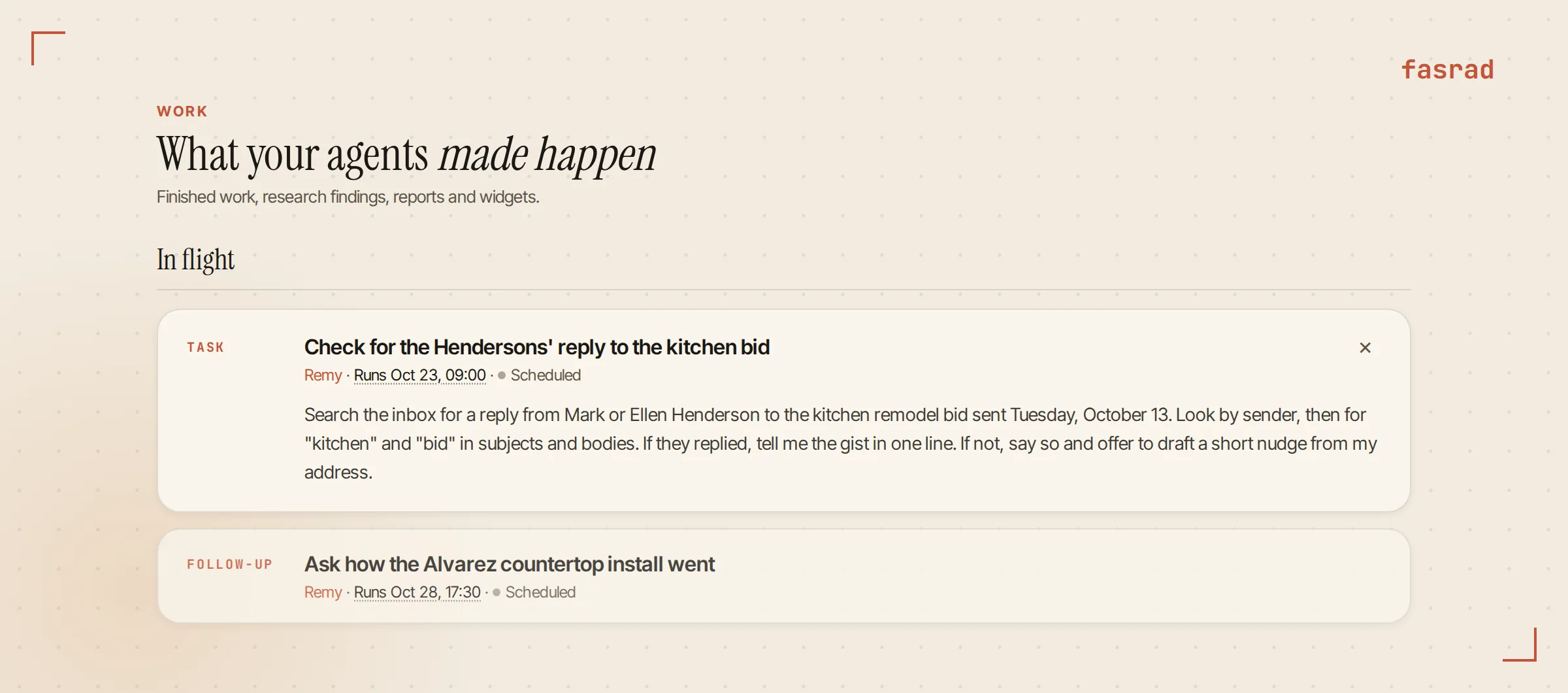
That created a one-time check for 9:00 AM on Friday, October 23. It sits on the Work page as a Task marked Scheduled, and clicking the run time lets you move it. Then nothing happens for ten days.
When the check runs, it searches your actual mailbox. It looks by sender first, then for "kitchen" and "bid" in subjects and bodies, so a reply from Ellen's work address still counts. A reply would have earned you one line with the gist. This time the inbox had nothing from either of them, so the message said so and offered two buttons: Draft the nudge and Give it a week.
A nudge from your own address
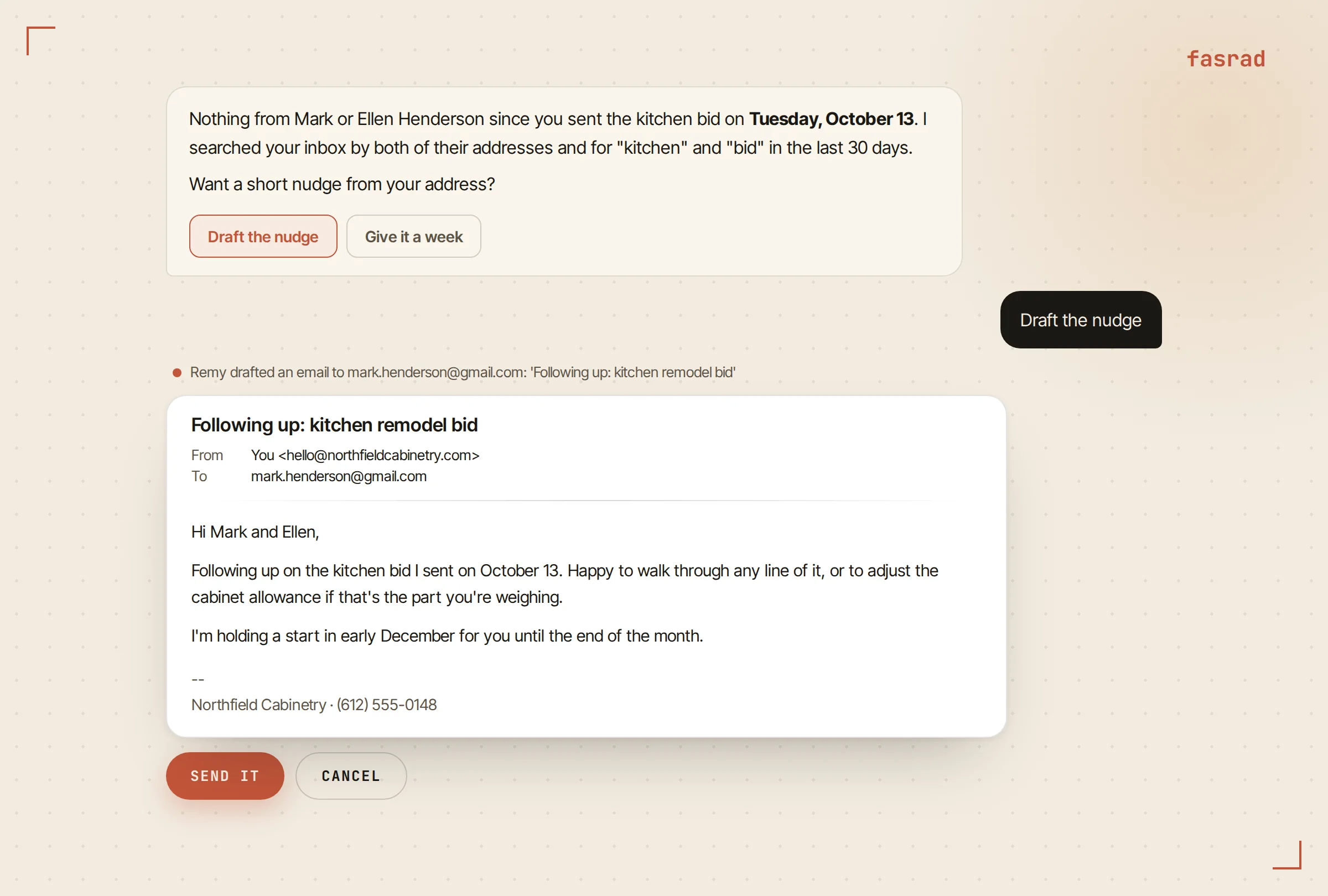
You tapped Draft the nudge. The draft showed up in chat as a mail card, From your address, To Mark, with the full body and your signature already appended. It named the bid's date and offered to walk through any line of it. Send it and Cancel sat under the card.
Tap Send it and the mail goes out through your own mail server, and a copy lands in your Sent folder like anything you wrote by hand. A draft you leave alone expires after 24 hours, so last week's nudge can't go out by accident next Tuesday. The same card and buttons show up on Telegram, which is where most of these get sent from, standing in a driveway.
Reading your mail doesn't change it.
The agent opens messages without marking them read and never moves or deletes anything, so your unread count stays exactly the way you left it.
Turning "can you come out next week?" into two open times
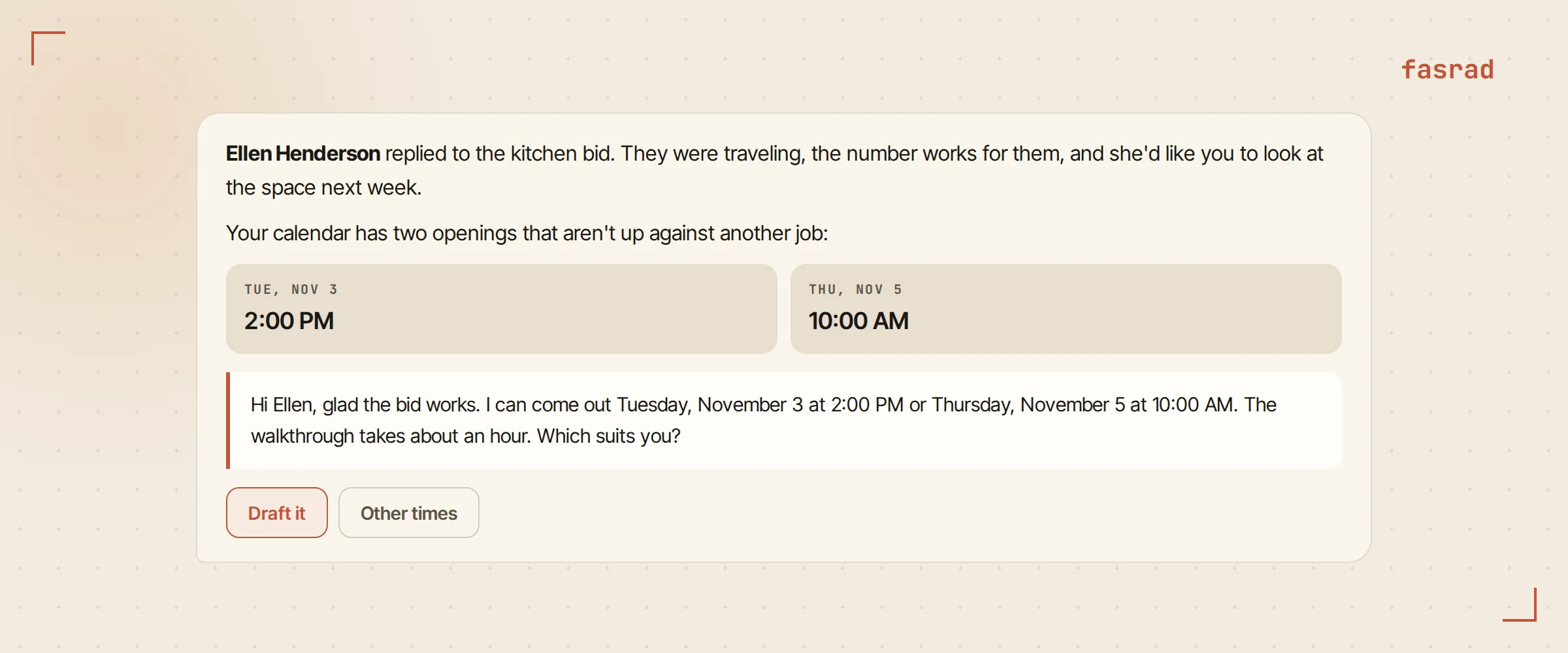
Ellen answered on Monday. They'd been traveling, the number looked fine, and could you come look at the space next week?
A rule handled that one. Rules are standing instructions on your mailbox in plain English, and the AI email assistant page lists more of the ones people run. This one went in months ago:
"When a client asks to meet, check my calendar and suggest two open times."
New mail reaches the agent the moment it lands, because it keeps an IMAP IDLE connection open to your server. Servers that don't push get checked every 15 minutes. A quick first pass reads only the sender and subject of each new mail and picks the rules that might apply. Then the agent reads the whole message and decides whether the rule really fits. A supplier newsletter with "meeting" in the subject line gets dropped right there.
Ellen's mail fit. The agent checked your calendar for the week and found two openings that weren't up against another job: Tuesday at 2:00 PM and Thursday at 10:00 AM. It wrote the reply with both times and gave it to you with a Draft it button. That tap made the mail card, and Send it put the reply into Ellen's own thread with "Re:" on her subject line.
The site visit lands on the calendar
Ellen picked Thursday. A second rule caught her answer:
"When a client confirms a time, put it on my calendar with their address."
This one runs on auto, so it doesn't ask. "Site visit: Henderson kitchen" went onto Thursday, November 5 at 10:00 AM, with the street address from Ellen's signature in the location field. When she sent a "see you Thursday" mail two days later, the rule found the visit already on the calendar and stayed quiet. You hear about a booking once. The trips guide shows the same kind of rule filing flight and hotel confirmations.
The Hendersons are contacts in your CRM, so 45 minutes before the visit you get a brief with the drive time and Ellen's last mail. How to get more than meeting notes from an AI agent shows that brief for a video call, and the AI agent for Google Calendar page covers the calendar side.
Draft answers for the questions every client asks
New clients mostly ask the same four things. Do you charge for estimates? How far out are you booking? Do you pull the permits? Can we keep our appliances?
You wrote your answers once, in a note called Client FAQ, and gave the agent one more rule:
"When a new client asks something my Client FAQ answers, draft a reply from it and show me."
On Wednesday Gwen Albers wrote in about a pantry and a cabinet wall. She asked about estimates and lead time. The rule pulled both answers from the note (free estimates within 20 miles, next open start in mid-January) and wrote them into a reply in your voice. It left the permit paragraph out because Gwen hadn't asked. Edit the note and the next draft follows it, since the rule reads the note fresh each time. For freelancers who are their own front desk, the AI virtual assistant for freelancers page runs the same pattern on discovery calls and invoices.
Ask first, or just let it run?
Every rule carries a mode. Auto rules act right away and tell you afterward in two to four sentences. Ask-first rules show you what arrived and wait for your yes. On the agent's Memories tab each rule wears a pill that says which it is, auto or asks first.
Put the calendar rule on auto first. It's the one you'd otherwise do by hand ten times a month, and a wrong event costs one click to delete. The drafting rules belong on auto from day one as well, because a reply under your name waits for Send it in either mode. Ask first earns its place on rules that change something you'd want to see beforehand, like "Ask me before adding supplier deliveries to the calendar."
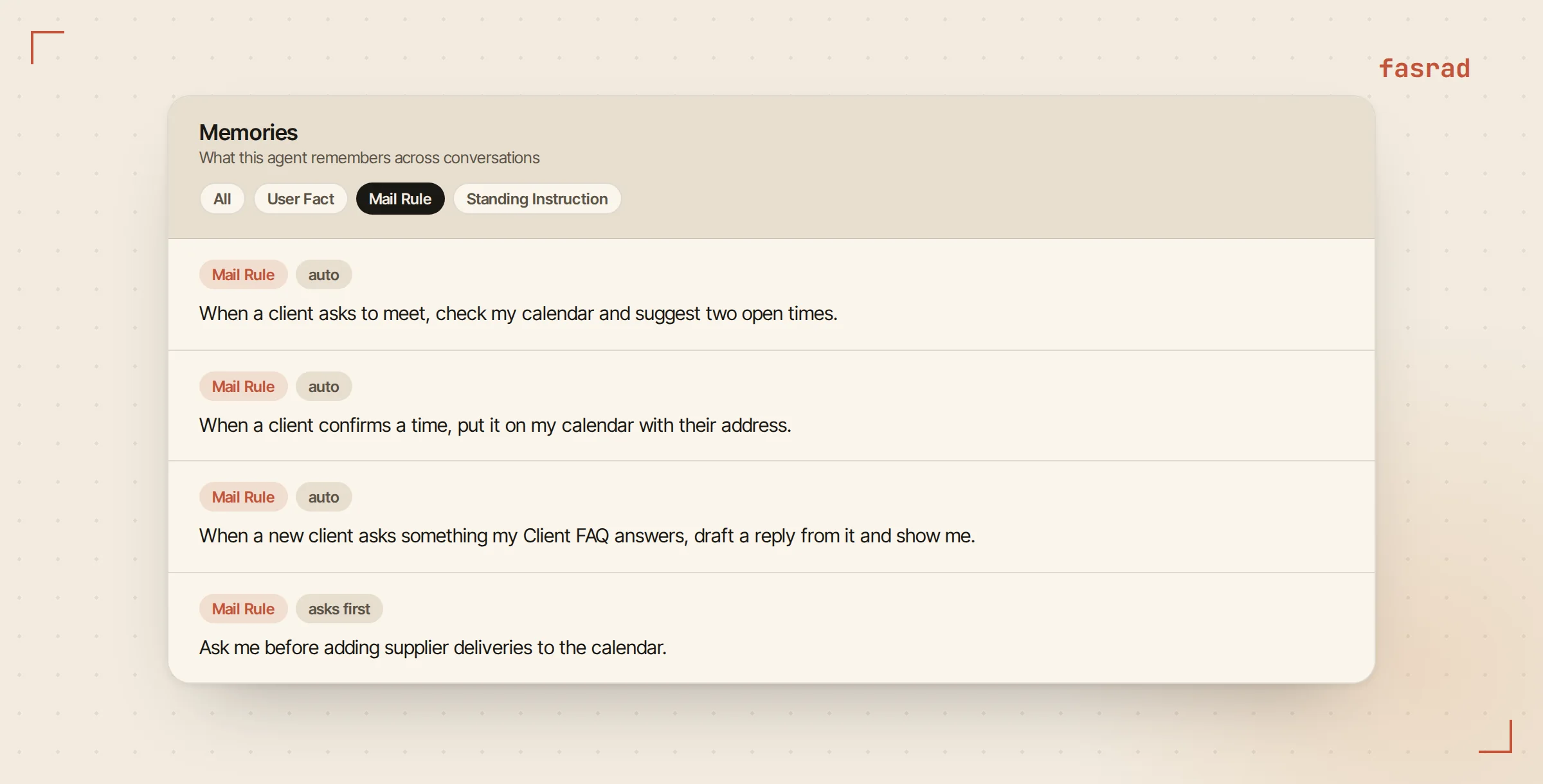
Changing a rule takes one sentence too. "Don't offer Monday mornings, that's supplier pickup" rewrites the meeting rule in place, and the next client who asks to meet gets times that skip Monday until noon.
Frequently asked questions
Can an AI follow up on an email if the client hasn't replied?
Yes. Tell it the date, for example "if they haven't replied by Friday, draft a nudge". On that date it searches your mailbox for their reply, and only if none came does it hand you a drafted follow-up with Send it and Cancel buttons.
Does the AI send email without asking me?
No. Every mail from your address is shown to you as a draft card first and goes out only when you tap Send it. A draft you don't send expires after 24 hours.
Which address do the replies come from?
Your own. The agent sends through your mailbox's mail server with your signature appended, replies stay in the original thread, and a copy lands in your Sent folder.
Will it mark my emails as read?
No. It opens messages without changing their read status and never moves or deletes anything, so your inbox looks the way you left it.
How does it schedule meetings from email?
With a mail rule such as "when a client asks to meet, check my calendar and suggest two open times". It reads the request, finds two real openings and drafts the reply. A second rule can put the confirmed time on your calendar with the address.
Can it answer common customer questions for me?
Yes. Write your answers once in a note, then set a rule that drafts replies from it. Each new question gets a draft built from your note, and editing the note changes the next draft.
Does it work from my phone?
Yes. Drafts, Send it and Cancel buttons and rule messages all arrive on Telegram as well as in the web chat.