6 boxes on the porch in one week, and nobody in the house could name what was in 3 of them. That's where Marcus started.
Keep track of your purchases with an AI assistant
Every order confirmation, from the marketplace to the pharmacy to the airline, lands as a row in one table. Ask what's arriving this week, what last month cost, and whether the coffee filters ever shipped.
Fasrad · September 17, 2026 · 5 min read
His family in Columbus shops from one shared address, and the order mail was already arriving. A Fasrad agent reads those confirmations and turns them into a table you can ask questions about. You connect the mailbox read-only, say once that every order belongs in a table, and each confirmation or shipping notice after that becomes a row or a status change.
Connect the mailbox first
Your own mailbox gets watched over IMAP. Give it the address and an app password, which works for Gmail, for Google Workspace, and for any provider with IMAP switched on.
The connection is read-only from the first second. Nothing gets marked as read, nothing moves, nothing is deleted, and your mail client behaves exactly as it did before. Watching is forward-only too, so mail that arrived before you connected is never touched. The table starts with the next confirmation rather than with a backlog of old receipts.
An AI agent with its own email inbox can hold a separate account instead, but for purchases the mailbox the stores already write to is the one worth watching. Gmail users get the same setup through an AI agent for Gmail.
The rule you write once
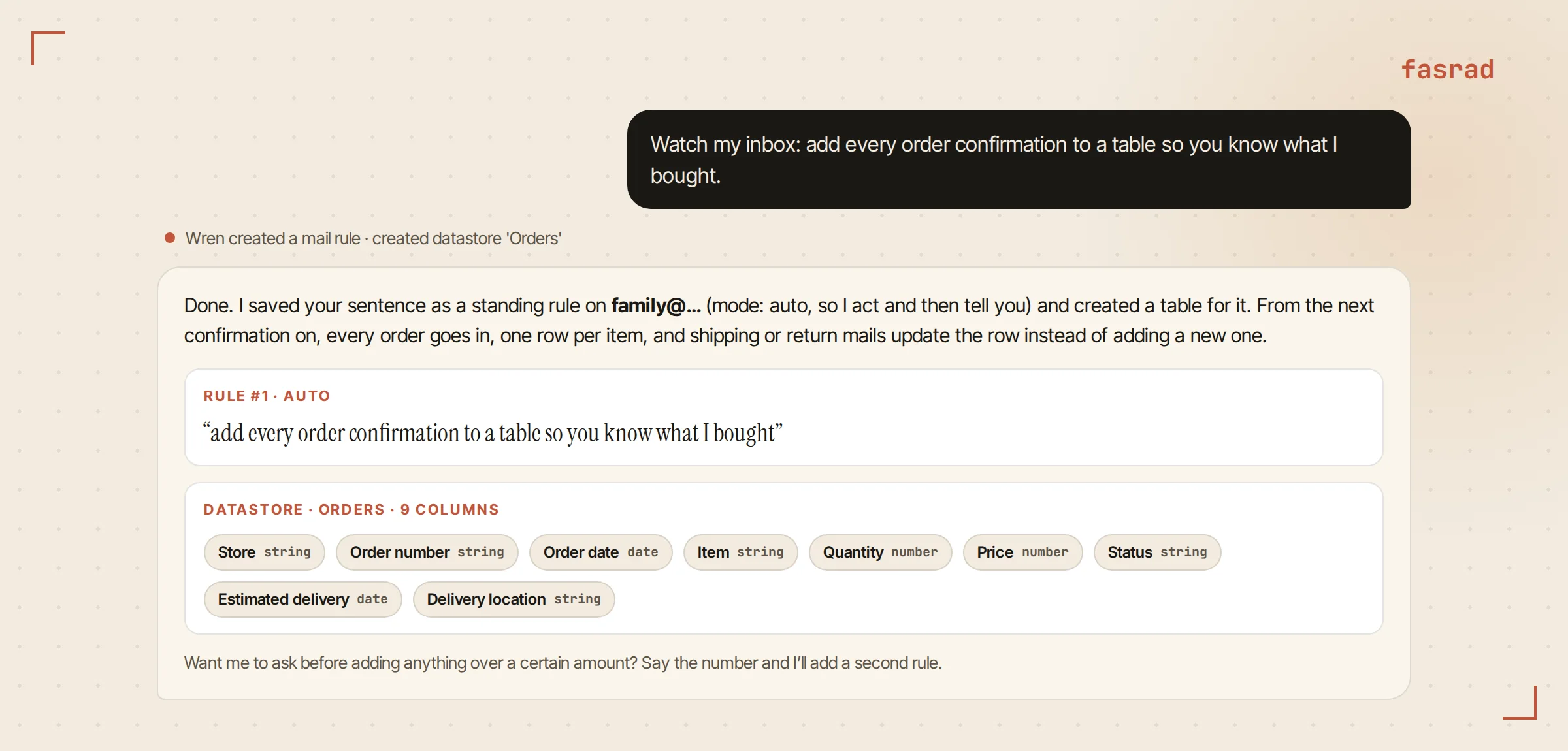
Marcus typed "Watch my inbox: add every order confirmation to a table so you know what I bought."
That sentence was stored word for word as a standing mailbox rule. A datastore called Orders appeared with the columns it needed, and one reply confirmed both. Standing rules sit beside the agent's other memories and never get paraphrased, so the rule firing next month is the one he actually wrote.
Every rule has a mode. Auto acts and then tells you what it did, while ask-first describes what arrived and waits for a yes.
Marcus left orders on auto. He added a second rule telling the agent to check with him first on anything over $300. Changing a rule takes one sentence in the chat, and "what rules do you have?" lists them back.
What ends up in the table
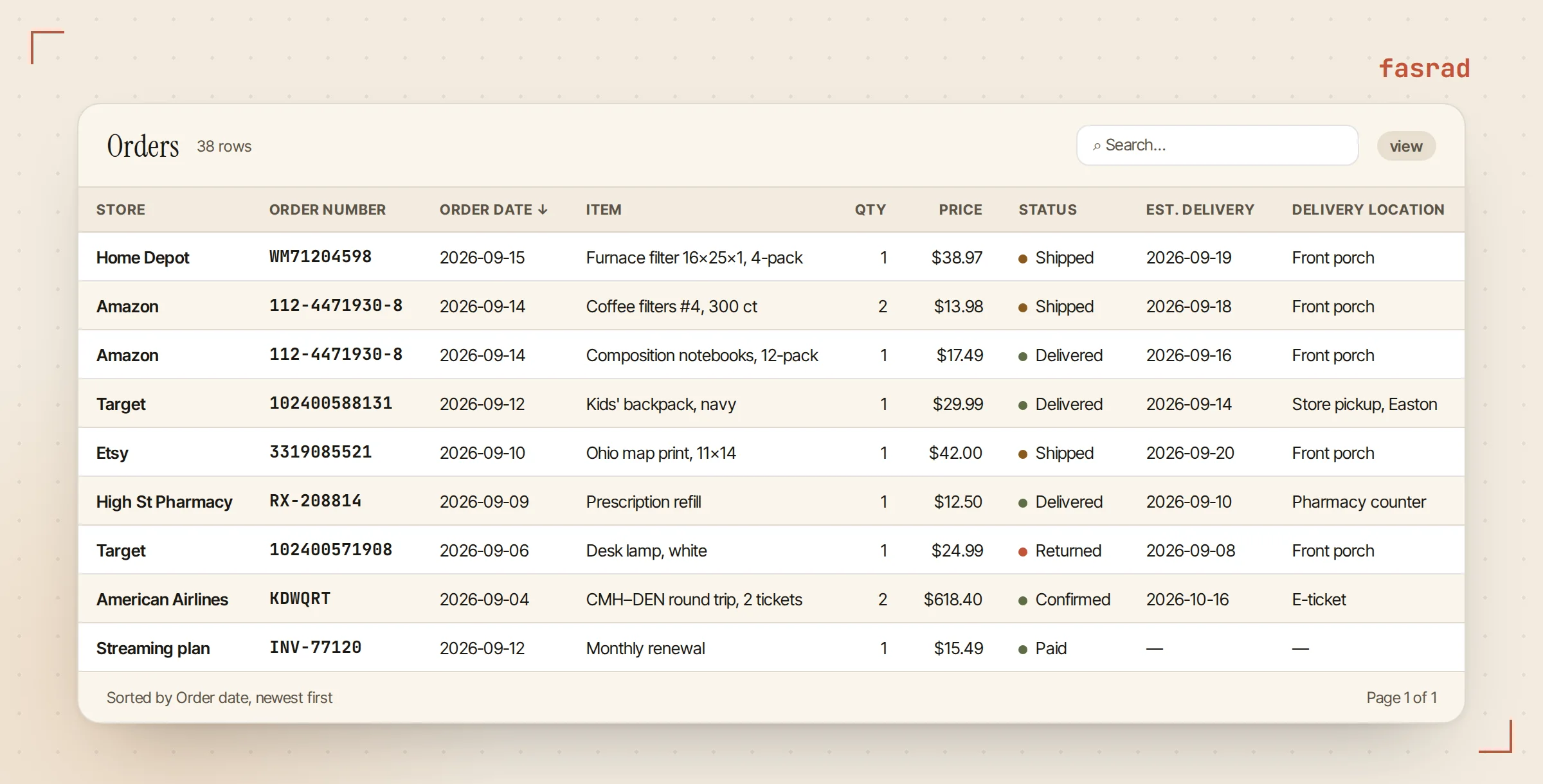
The Orders datastore has nine typed columns: the store and the order number, the date it was placed, the item and how many of it, the price, the current status, the estimated delivery and the address it's going to. Dates are stored as dates and prices as numbers. That's the part that makes sums and date ranges work later on.
Every store writes into the same table. A pickup order, a hardware delivery, a print from a marketplace seller, a refill from the pharmacy on High Street, two airline tickets and the streaming subscription that renews on the 12th all land as rows with the same nine columns, and the store column tells them apart.
One order becomes one row per item. Three things in a single box are three rows sharing an order number, so a question about the coffee filters gets an answer about the coffee filters. The order number and the item together identify a row, so a second mail about the same order updates what's there instead of adding a copy.
Ask to see the table and it appears in the chat as a live widget, sortable by any column, with a search box. Edit mode lets him fix a price or delete a row by hand. Adding a row by hand takes 2 taps, so an occasional cash purchase goes in the same table. Ask for a CSV, an Excel file or a Google Sheet and the whole thing exports.
The questions worth asking
A table only earns its keep if the answers come back in plain English.
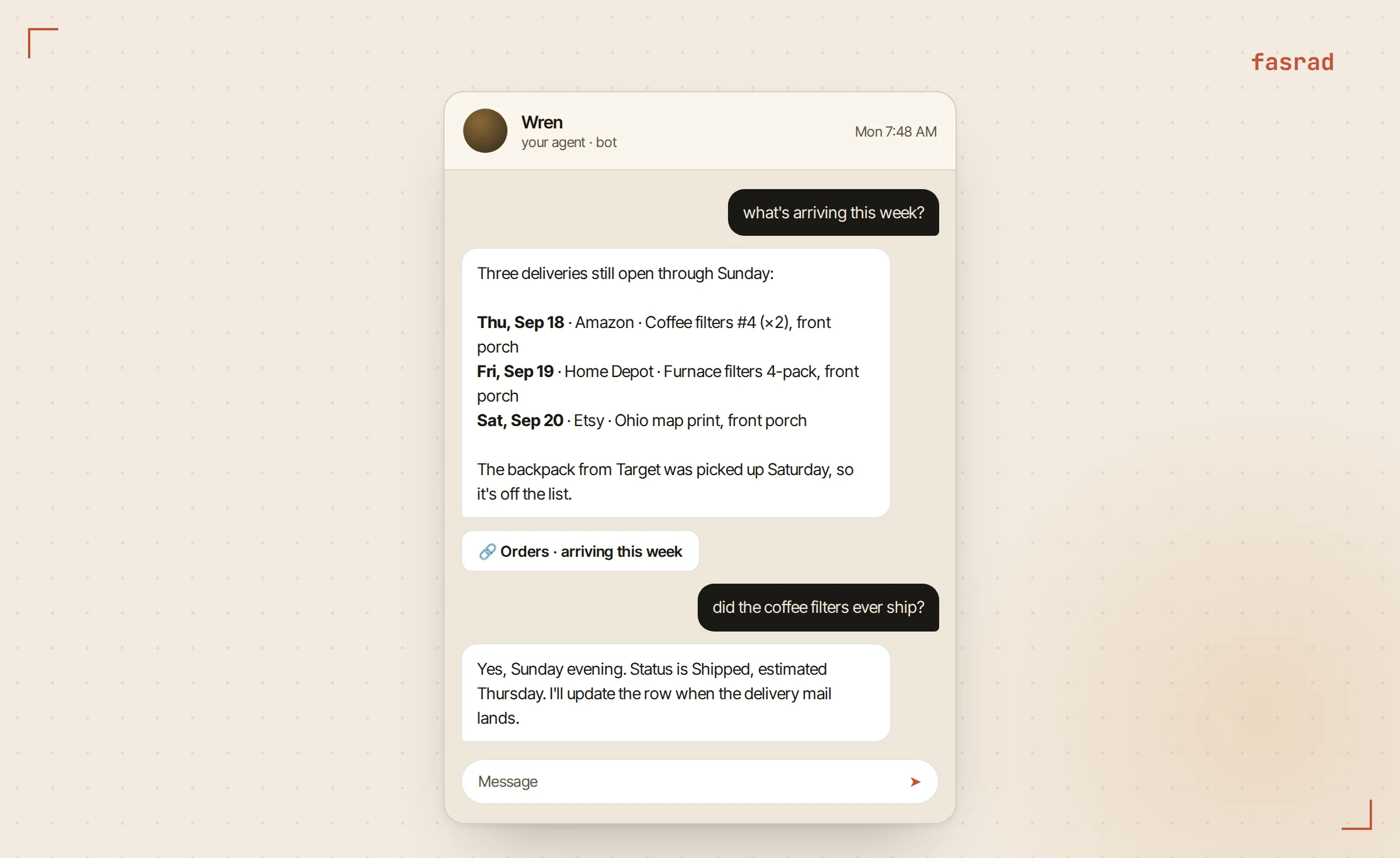
"What's arriving this week?" filters the estimated delivery column and returns the open rows for the next seven days. "How much did we spend on the kids' school stuff last month?" searches the items and sums the price column for August. The agent shows the rows it added up, so the total can be checked. "Did the coffee filters ever ship?" finds one item and answers with its status and the date it last moved.
Slower questions work off the same table. "Which store did we order from most this year?" groups the rows. "Show me everything still marked Shipped that was due before today" finds the packages worth chasing.
This is the purchase half of an AI expense tracker, and a budget agent on the same data compares the monthly total against a limit you set.
The same answers on your phone
Marcus asks most of these from the couch. The agent on Telegram is the same agent reading the same table, so "what's arriving this week?" comes back there as three short lines. When the answer wants to be a table or a chart, Telegram gets a button that opens it. A Telegram AI assistant is this setup with the phone as the main screen.
Returns, refunds and the delayed box
Stores send several mails per order. First the confirmation, then the shipping notice. Sometimes a delay. Sometimes a return label followed by a refund. Each one passes the same rule. Each one gets read in full, matched to its row by order number and item, and the status moves to Shipped, Delivered, Returned or Refunded, with the delivery date updated when the carrier moves it.
Not every change deserves a message. An update that only touches a detail already on the row gets written silently. It speaks up for the things you'd want to hear about: a delivery pushed into next week, a cancellation, a refund that came back smaller than the price paid. A rule set to ask-first turns those into a question with buttons rather than a completed action. Overnight mail waits until morning unless it's urgent.
Monthly spend as a chart
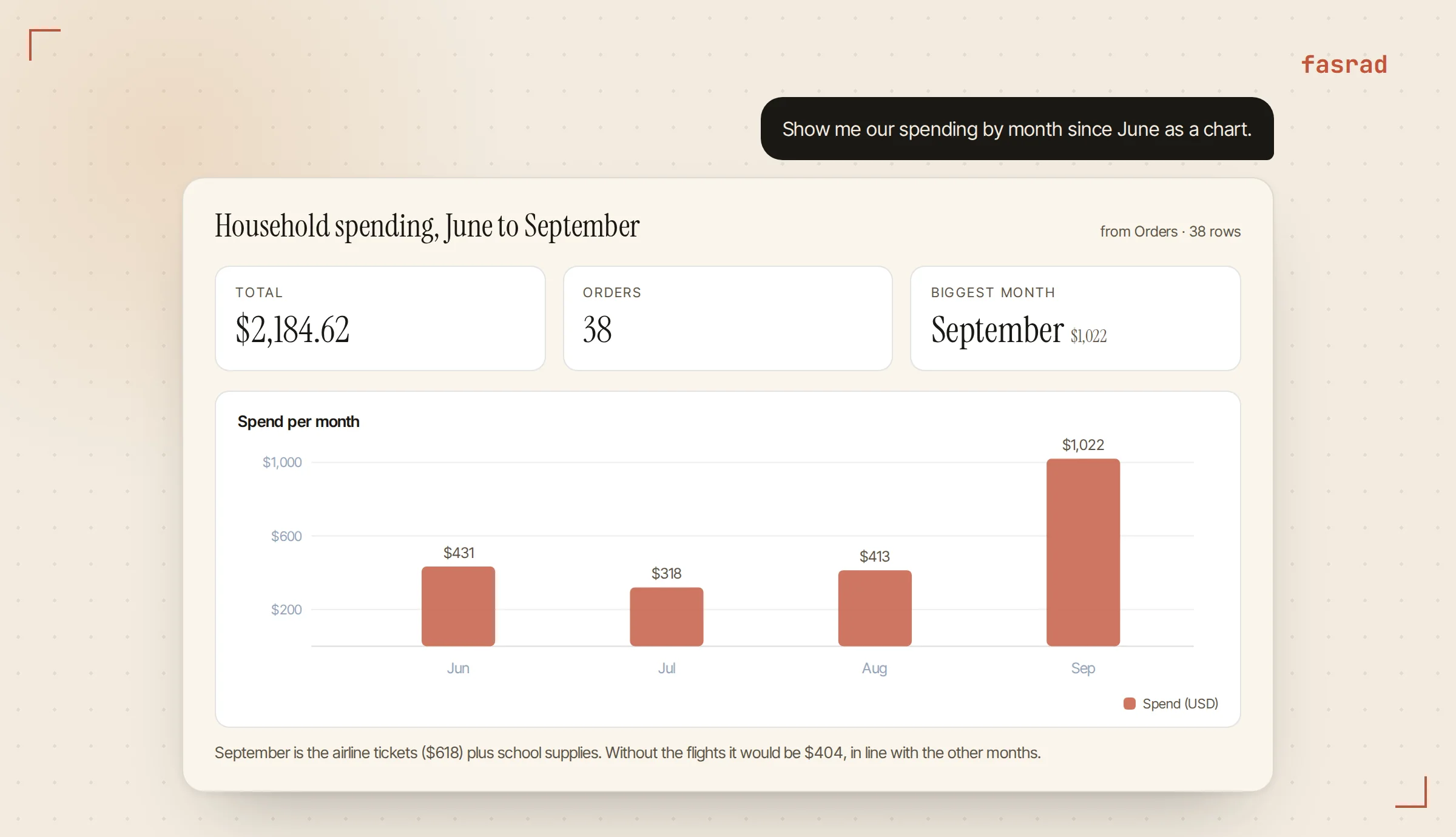
For the wider view Marcus asks "Show me our spending by month since June as a chart." Summed per month, the price column becomes a report with a metric row and a bar chart, published as a card in the chat. On Telegram the same request returns a button that opens the report.
The chart is drawn from the table at that moment, so asking again next month gives a fresh one.
An AI personal assistant already reading the mailbox for bookings and appointments does all of this with the same rule mechanism. One sentence per kind of mail.
Frequently asked questions
Which mailboxes can the agent watch?
Any mailbox with IMAP access, including Gmail and Google Workspace with an app password, Outlook and other providers with IMAP, and mailboxes from your own domain. The connection is read-only: the agent never marks mail as read, moves it, or deletes it.
Does it only work for Amazon orders?
No. The rule matches every order confirmation regardless of sender, so Target, Home Depot, Etsy, a pharmacy, an airline, and a subscription renewal all land in the same table with the same columns. Amazon is one store among many.
What about orders from before I connected the mailbox?
Watching is forward-only, so old mail is never processed on its own. If you want history, ask the agent to search the mailbox for past confirmations and add them; it searches your mail live and inserts the rows it finds, skipping any order number already in the table.
Will a shipping notice create a second row?
No. The order number and the item identify a row, so a shipping notice, delay, or return for the same order updates the existing row's status and dates instead of adding a copy.
Can I fix a row by hand?
Yes. Ask for the table in edit mode and change any cell, add a row for a cash purchase, or delete one. You can also just tell the agent what to change and it updates the row for you.
Can I get the table out of Fasrad?
Yes. Ask for a CSV, an Excel file, a PDF, or a Google Sheet and the agent exports the whole table, or the filtered part of it you asked for.
Is the content of my mail safe with the agent?
The agent treats mail as untrusted input: it extracts facts like order numbers and prices and never follows instructions found inside a message. Mail that looks like a manipulation attempt is held and reported to you instead of being processed.