One ask on Thursday, four picks that match what you actually like, and the ticket page read before you click. The venues you turn down stay turned down.
Fasrad · September 21, 2026 · 4 min read
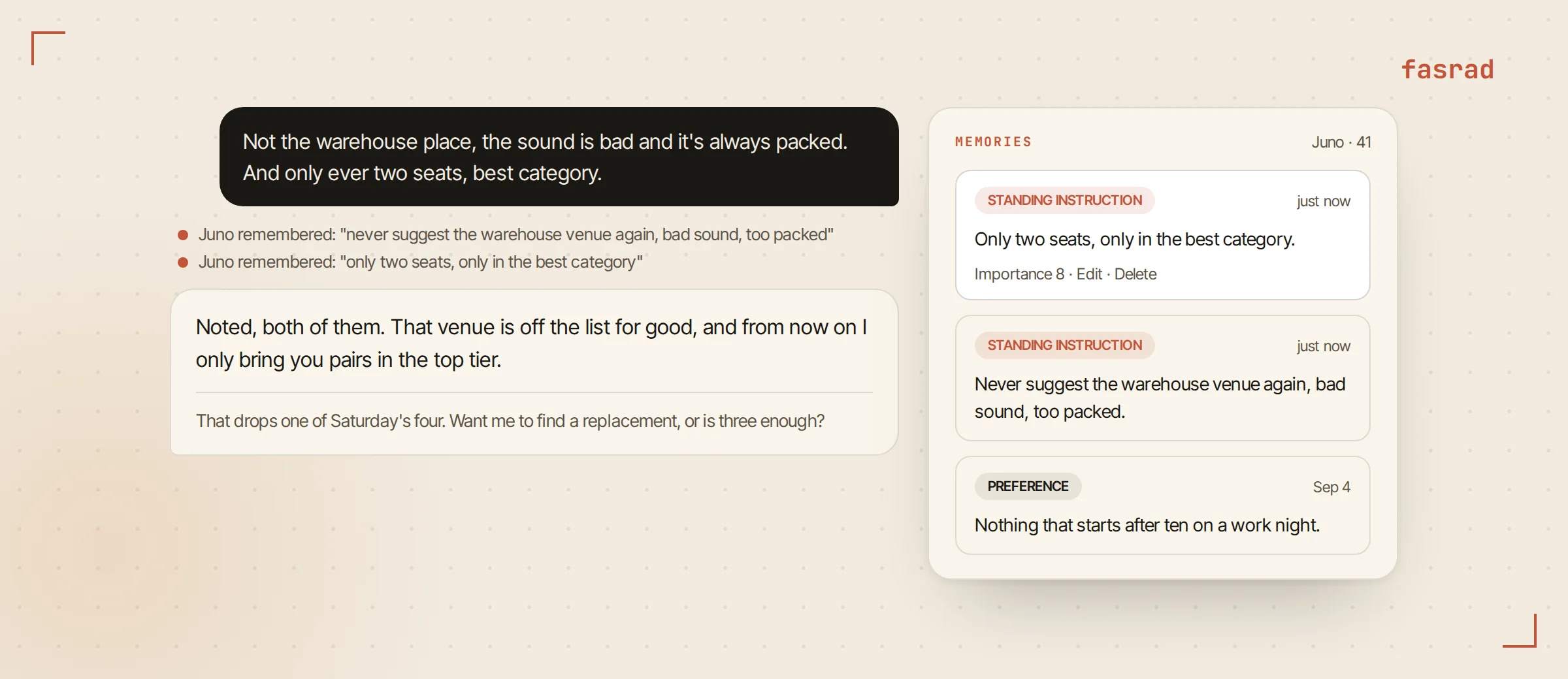
"Not the warehouse place, the sound is bad and it's always packed."
That's a whole rejection, and it's the most useful thing Priya types all week. The venue stops appearing. A Fasrad agent searches the web for what's on near her and reads the event mail already sitting in her inbox. It opens the ticket pages to see what's still for sale. And it keeps every reason she has ever given for saying no.
She lives in Philadelphia. Thursday night used to mean 11 open tabs: venue calendars, a ticket site, 3 newsletters she never reads, and a group chat where nobody commits to anything. Now she asks once and picks from four.
What one ask gets you
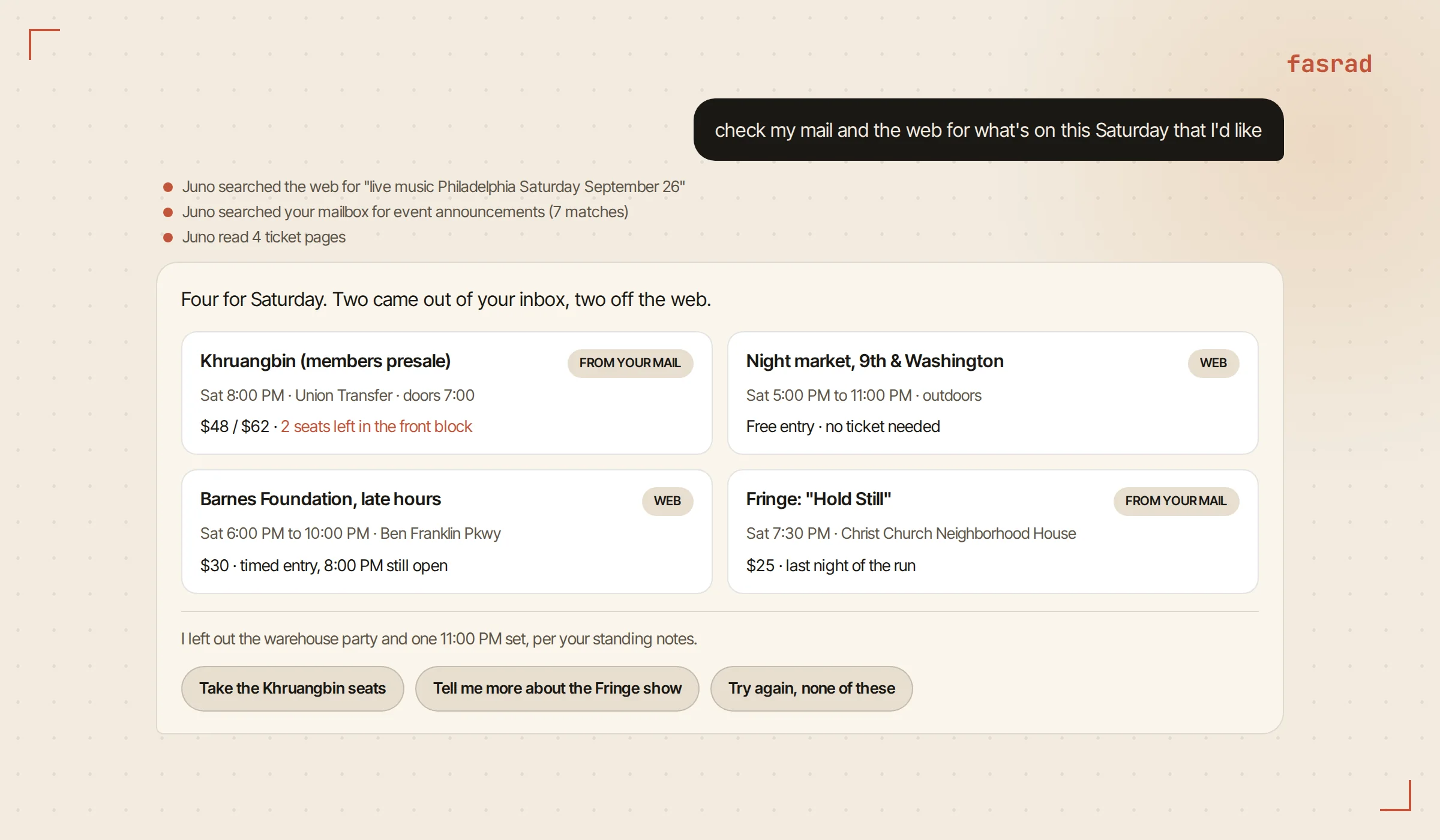
She types "check my mail and the web for what's on this Saturday that I'd like". The agent searches for what's happening in the city that weekend, opens the pages worth opening, and searches her mailbox for event mail she's already been sent.
Those two sources answer different questions. Search finds what exists. Her inbox finds what was aimed at her, such as the members presale from the venue near Fishtown, or the lineup mail from a festival she bought into last summer.
Mailbox access is read-only, so nothing gets marked read or moved, and she keeps using her mail app exactly as before.
One ask on Thursday. Four picks, each with the night, the venue, the price and a link.
Four picks come back. Each one carries the night and the venue, with the door price and a link. She reads all 4 in under a minute on a phone. Buttons sit under the message so a reply costs one tap. A personal assistant agent runs this the same way it runs a dentist appointment.
Near you is worked out rather than asked. The agent builds a picture of where she is from the city on her account, what the calendar says about the weekend, and a recent position if she's shared one. Travelling changes the answer on its own. The same sentence typed from a hotel in Chicago returns Chicago listings.
Turning down the ones that miss
The rejection at the top of this article did two things. It dropped the pick from that round, and it went into the agent's memory as a standing instruction.
The same applies to the shape of an evening out rather than one venue. "Only two seats, and only in the best category" is a rule about how she buys. "Nothing that starts after ten on a work night" is another. Both stick.
A rejection becomes a standing instruction, readable and editable in the Memories panel.
Standing instructions sit with the agent's other memories, where each one can be read, reworded or deleted. They come back into the conversation whenever the topic is weekend plans, so the picks arrive already filtered rather than filtered after the fact. Three sharp rejections beat a long setup form.
Nothing here is a category or a checkbox. The instruction keeps the wording she used, and that's why an awkward preference survives intact. No standing room. A seat on the aisle. Nothing in that one neighborhood after dark. Preferences can also contradict each other over time, and the newer one wins.
Checking what is actually for sale
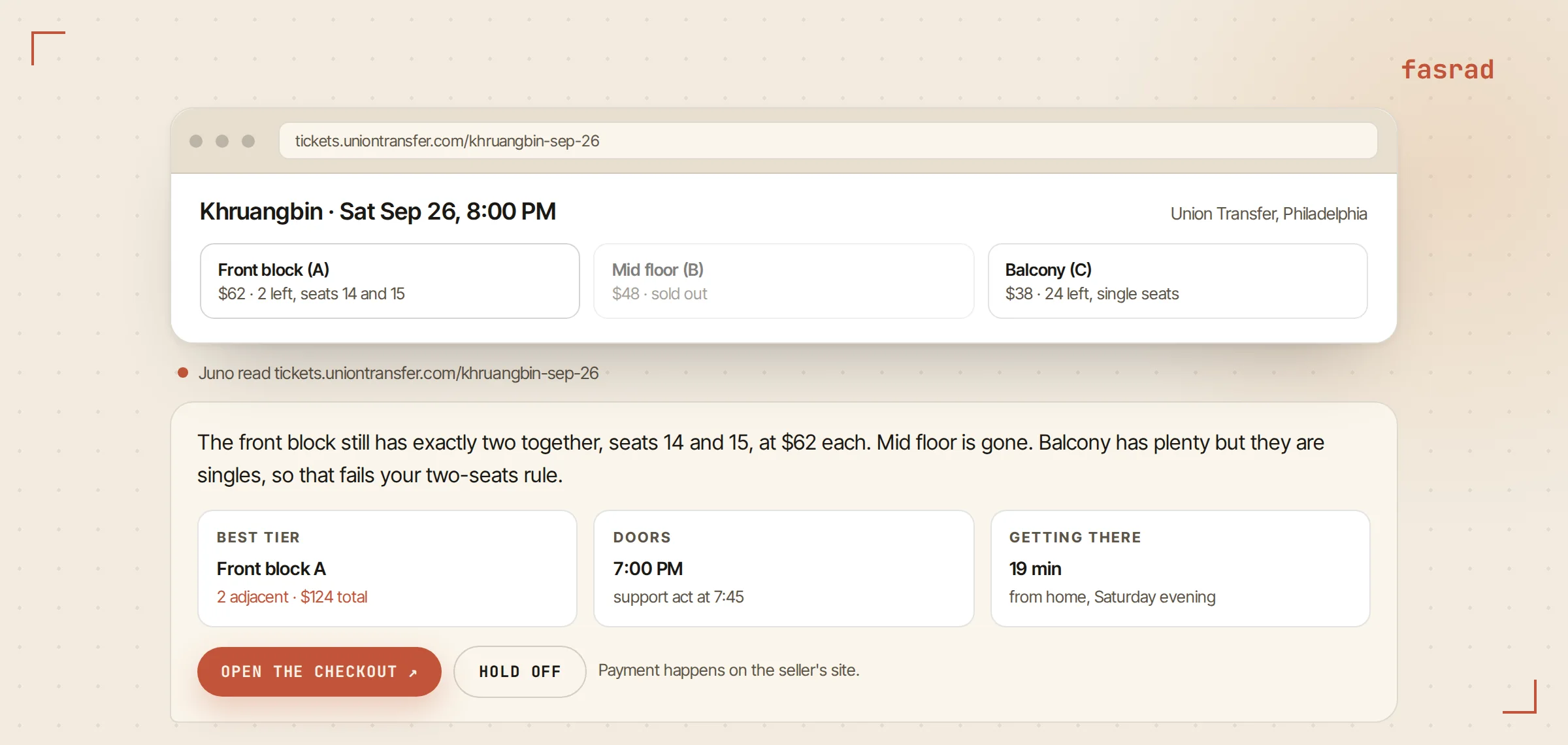
A listing saying tickets available is a long way from 2 seats together in the front block at $68. So the agent opens the ticket page and reads it.
It reports by category: what's left in each tier, at what price, and whether 2 adjacent seats exist at all. For general admission it says so plainly. When the good tier is gone and only the back rows are left, the pick never reaches her, because her standing instruction already ruled it out.
The ticket page read through by tier: what is left, at what price, and whether two seats sit together.
Reading a live page is the same capability a competitive intelligence agent points at a rival's pricing. On an event page it's the difference between a plan and a Saturday at home.
From a pick to a calendar entry
She taps "take this one". The agent sends the ticket link as a button that opens the seller's page. Card details and checkout belong on the seller's site and never in the chat, so she pays there. Two minutes later the confirmation mail lands.
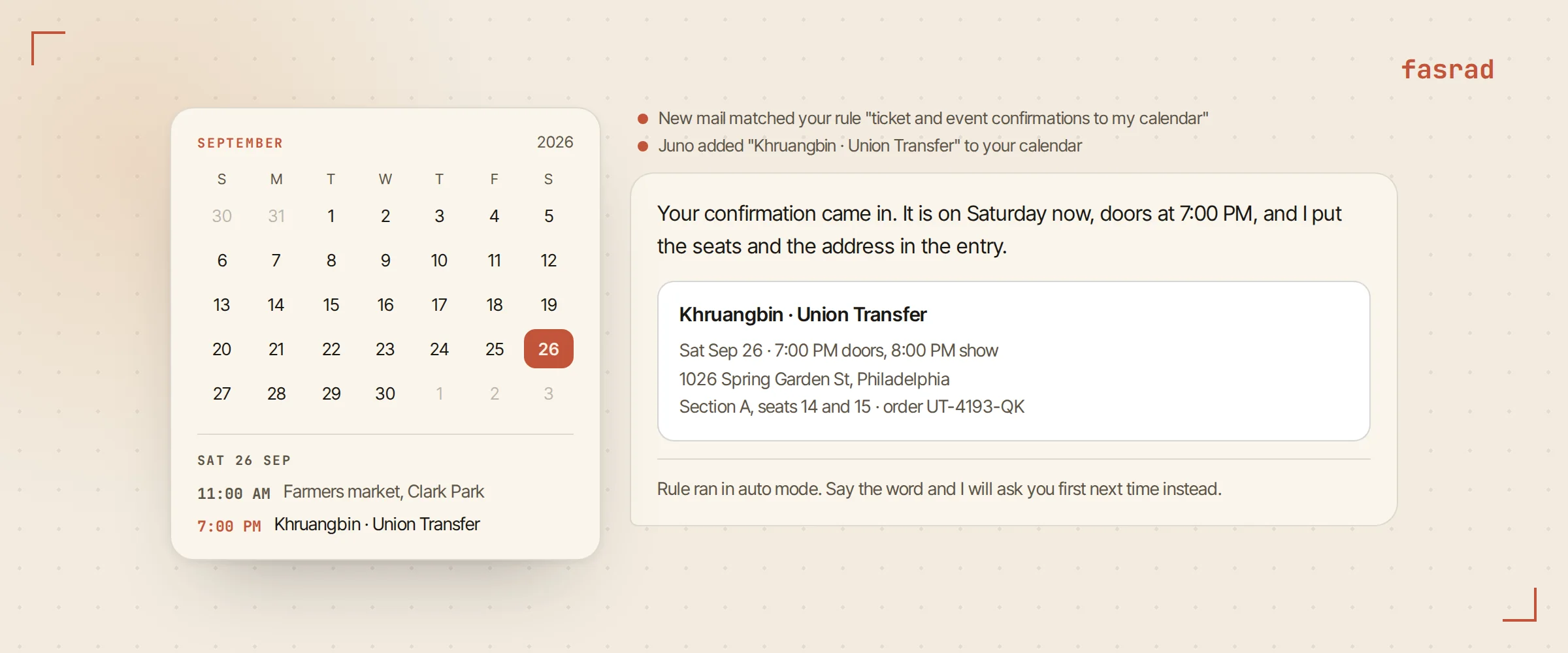
That's where one standing mail rule earns its keep. She wrote it once: "when a ticket or event confirmation arrives, put it in my calendar". Matching mail wakes the agent with the full message, it pulls out the date and the doors time, along with the venue address and the seat numbers. The calendar entry appears with a one-line note saying where it came from.
The confirmation mail becomes a calendar entry with doors time, address and seats.
Mail rules have two modes. Auto acts and then reports back. Ask-first describes what arrived and waits for a yes. That's the mode worth choosing for anything landing on a calendar she shares with somebody else. Rules get listed, reworded and removed by chat, and "stop putting those in my calendar" ends one.
Making it a standing Thursday
The last step is to stop asking. "Every Thursday at six, check what's on this weekend and send me the shortlist" creates a recurring run at 6 PM doing the same search, the same inbox pass and the same availability check, then messages her wherever she's reachable.
Every recurring run shows up on the Work page with its repeat rule and its next run, so the Thursday shortlist can be paused for a month of travel and switched back on after. An event planner agent runs other people's evenings off the same three parts.
Frequently asked questions
Does the agent buy the tickets for me?
No. It finds the event, checks what is left by category, and hands you the seller's link as a button. Payment happens on the seller's site with your own card. Once the confirmation mail arrives, the agent takes it from there and creates the calendar entry.
How does it know what I like?
From what you turn down. Tell it a venue is too loud or that you only want two seats in the top tier and it saves that as a standing instruction. Those instructions come back whenever the topic is weekend plans, so later shortlists arrive pre-filtered.
Can it read my personal inbox?
Yes, read-only, once you connect the mailbox you want watched. It searches your mail for presales, lineup announcements and confirmations, and it never marks a message read, moves it or deletes it.
What happens to a suggestion that is sold out?
It does not reach you. The agent opens the ticket page before suggesting anything and reports availability tier by tier, including whether two adjacent seats exist. A pick that fails your standing rule about seats is dropped silently.
Will the confirmed event land on my calendar automatically?
With a mail rule, yes. Say what you want watched in your own words and new confirmation mail wakes the agent, which reads out the date, doors time, address and seat numbers and creates the event. Choose the ask-first mode if you would rather approve each one.
Can I get the shortlist without asking every week?
Schedule it. A line like every Thursday at six sets up a recurring run that searches, checks your inbox and messages you the shortlist. It appears on the Work page, where it can be paused or ended.
Does this work on Telegram?
Yes. The same agent reaches you there, and the picks arrive as tappable buttons instead of a numbered list, so replying is one tap while you are out.