Fourteen subscriptions. She could name nine.
Cut your subscription bill with AI: receipts, renewals, price alerts
Twelve months of receipts become one table. Annual renewals land on your calendar three days ahead, a mail rule reports each price change the day it arrives, and the plans you've stopped using get cancelled from your own browser.
Fasrad · November 16, 2026 · 5 min read
Carmen found the other five on a Sunday evening, in a table her agent had built from her own inbox. You'll end up with the same table. Every annual charge gets a calendar entry three days ahead, a price change reaches you the day the notice lands, and the plans you've stopped using get cancelled from your own browser. Each step starts as a sentence typed to a Fasrad agent.
Find every subscription in twelve months of receipts
Carmen's first request was "Search my mailbox for every subscription receipt from the last 12 months and put them in a Subscriptions table."
Her mailbox was already connected over IMAP, read-only, the way the purchase tracking guide sets it up. Her agent, Moss, searched the live mailbox with a window of 365 days. Matches come back 20 to a page, and Moss paged through until the list ended. It opened each receipt without marking it read, so her unread count didn't move.
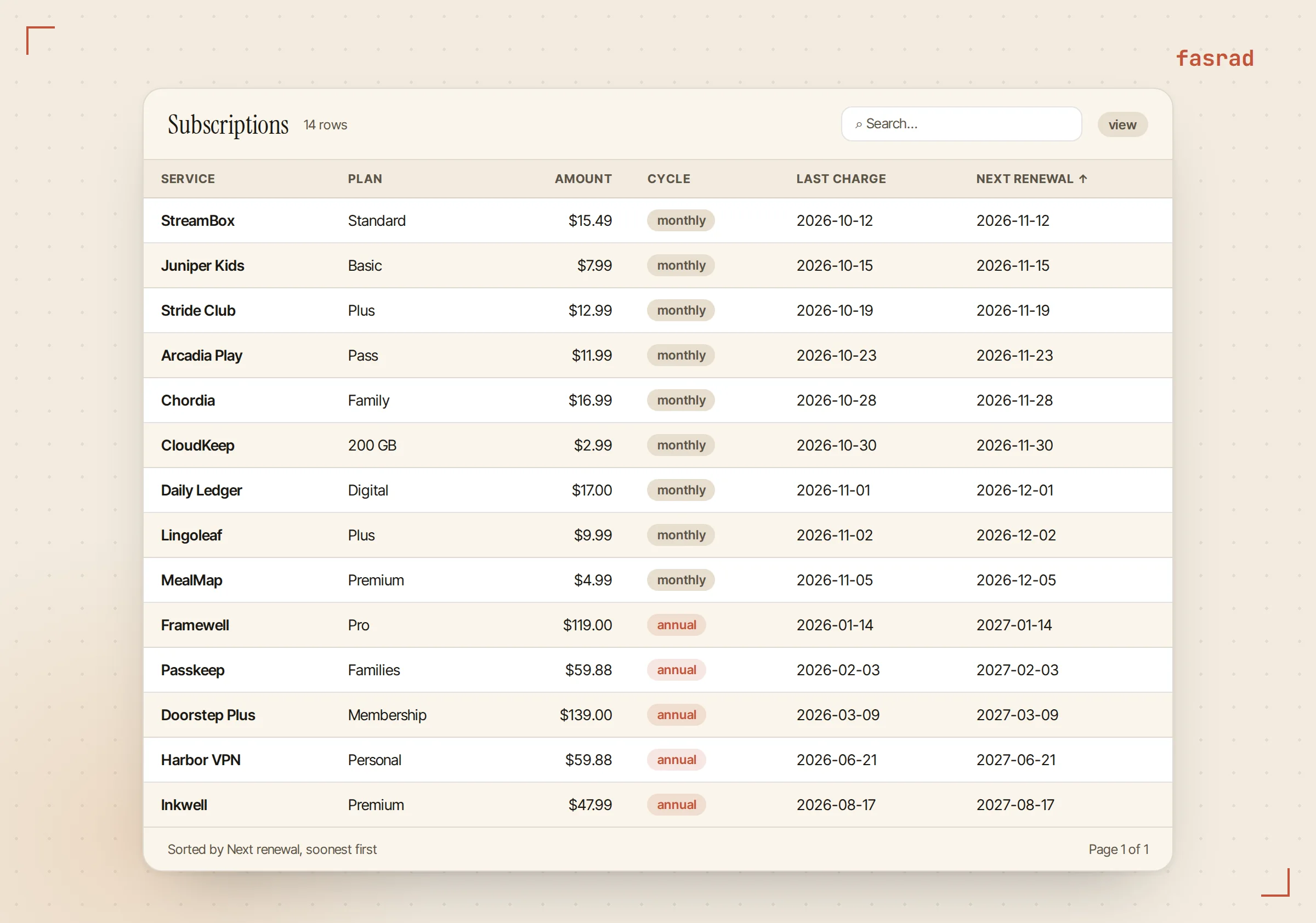
Then it wrote the table. Each service got one row with six columns, from Service and Plan through to Next renewal. Moss set up the Amount column as a number and both date columns as dates, so the table can be summed and sorted by renewal. A plan that had billed twelve times still got one row, carrying its latest charge. Fourteen rows came back, and Carmen couldn't place five of them. Two were annual, a VPN and a notes app. The others billed monthly, among them a language app from a trip two summers ago and a games pass that began as her son's free trial.
What does it all cost in a year?
"What does all of this cost me per year?" came next. Summed by cycle, the Amount column came to $100.42 a month across the nine monthly plans, plus $425.75 for the five annual ones. That's $1,630.79 a year.
She had guessed about $900.
The table shows up in chat as a live widget, sortable by any column. "Show me the annual ones, biggest first" redraws it with five rows and Doorstep Plus on top at $139. A gym that bills on paper goes in by hand in edit mode. An AI expense tracker keeps one-off purchases in a table of the same kind.
What renews this month?
In March Doorstep Plus had renewed at $139, up from $119, and Carmen found out from her card statement. This time she typed "Put each annual renewal on my calendar three days ahead."
Five all-day events went onto her Google Calendar, each one three days before its charge. The Framewell entry reads "Framewell Pro renews Jan 14, $119" and sits on January 11. That leaves three days to downgrade or cancel before the card is charged.
The nine monthly plans stayed off the calendar. For those she asks "What renews in the next 30 days?" and gets the rows whose Next renewal falls inside that window, with the total due.
Put the annual plans on the calendar first. They're the charges with eleven quiet months in front of them.
A mail rule that reports only price changes
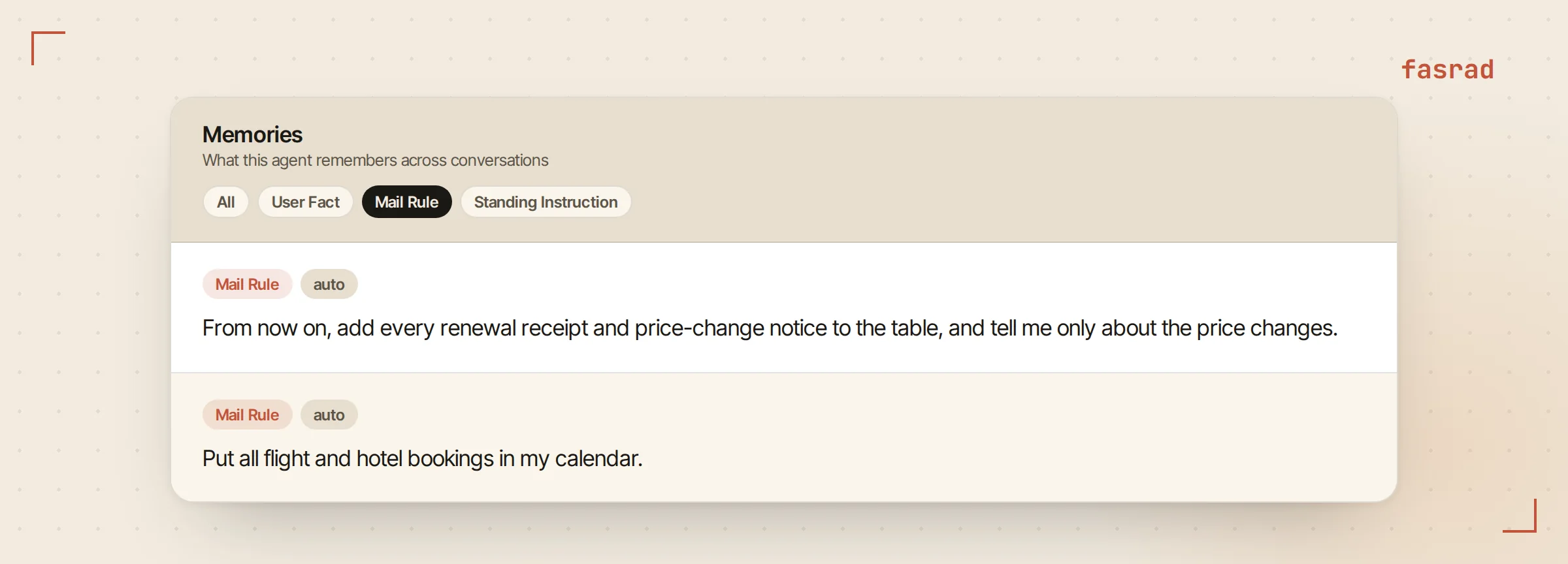
To keep the table current, Carmen typed "From now on, add every renewal receipt and price-change notice to the table, and tell me only about the price changes."
Moss saved that sentence word for word as a mail rule set to auto. New mail now gets a first pass on sender and subject alone, and anything that could be a receipt is read in full against the rule's wording. On November 12 StreamBox charged $15.49. Moss moved that row's Last charge to November 12 and its Next renewal to December 12. Carmen heard nothing about it.
The rule sits on the agent's Memories tab in her wording, with an "auto" pill beside it.
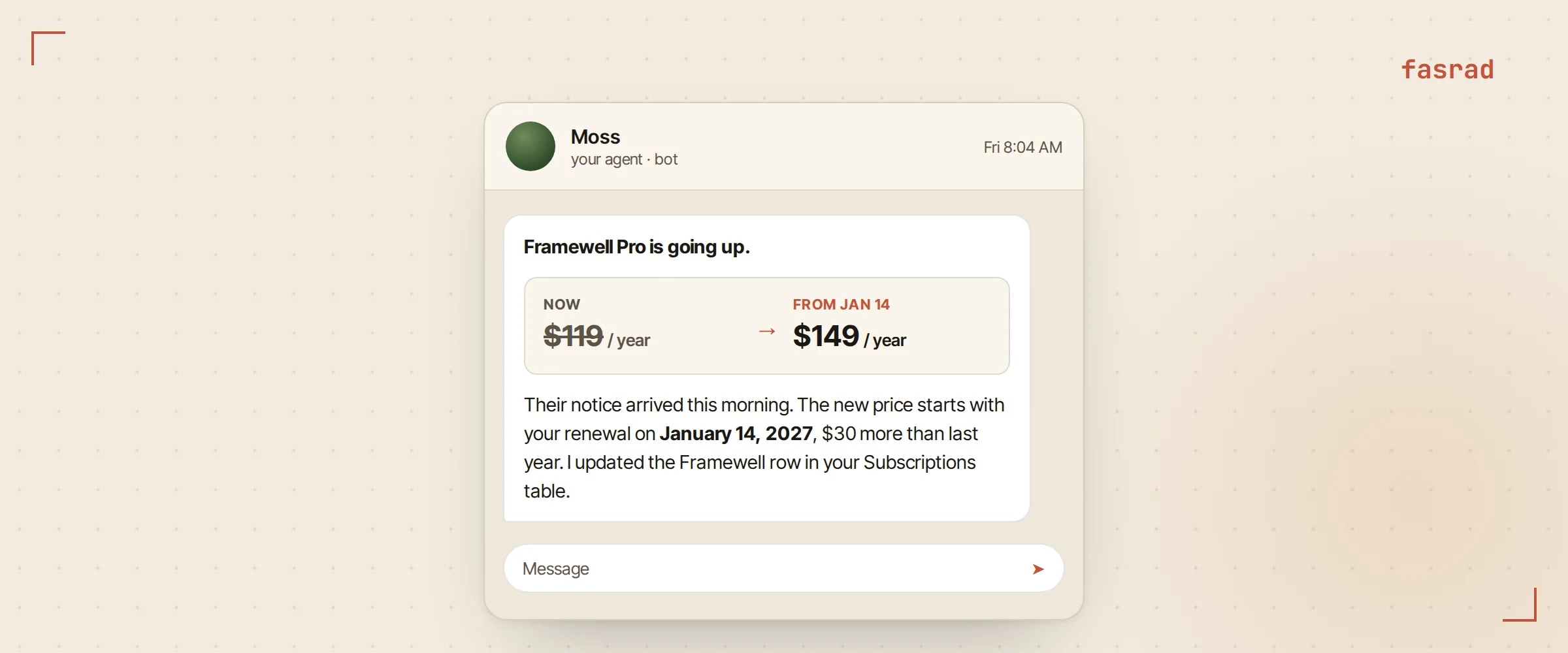
A day later Framewell wrote that Pro would go from $119 to $149 a year at the January renewal. Moss changed the Amount on that row, and this time her phone buzzed with both prices and the date. Notices that land overnight are held until morning. How to let AI handle your mail has more rules of this kind, including ones that ask before they act.
Watching the pricing page before the email arrives
Doorstep Plus hadn't emailed about that March increase, so a mail rule would've had nothing to read. Its pricing page is public. Carmen pasted the link and typed "Watch this page every day and tell me when the price changes."
Moss loaded the page once as a signed-out visitor and kept that copy as the baseline. Every day since, a check has fetched the page again and compared the text. When only a banner or a menu has moved, the check ends without a message, and when a price has changed, Carmen gets one with the old figure beside the new one. An account holds up to 50 of these monitors. How to monitor a web page with an AI agent goes through the checks step by step.
Cancelling in your own browser, with a Yes and a No
Three rows had to go. Lingoleaf, MealMap and Arcadia Play cost $26.97 a month between them, or $323.64 a year.
Carmen had the Scanner extension in her browser, so Moss could work in her browser, where she was already signed in to all three. She typed "Open the Lingoleaf cancel page in my browser and get it ready. Show me before you confirm anything."
Moss opened a tab, clicked through the account pages to the last step and stopped there. Its question reached her on Telegram with a screenshot of the page, showing Lingoleaf Plus at $9.99 a month with access until December 2 and a button labeled Cancel subscription. Under the message sat a Yes button and a No button.
She tapped Yes.
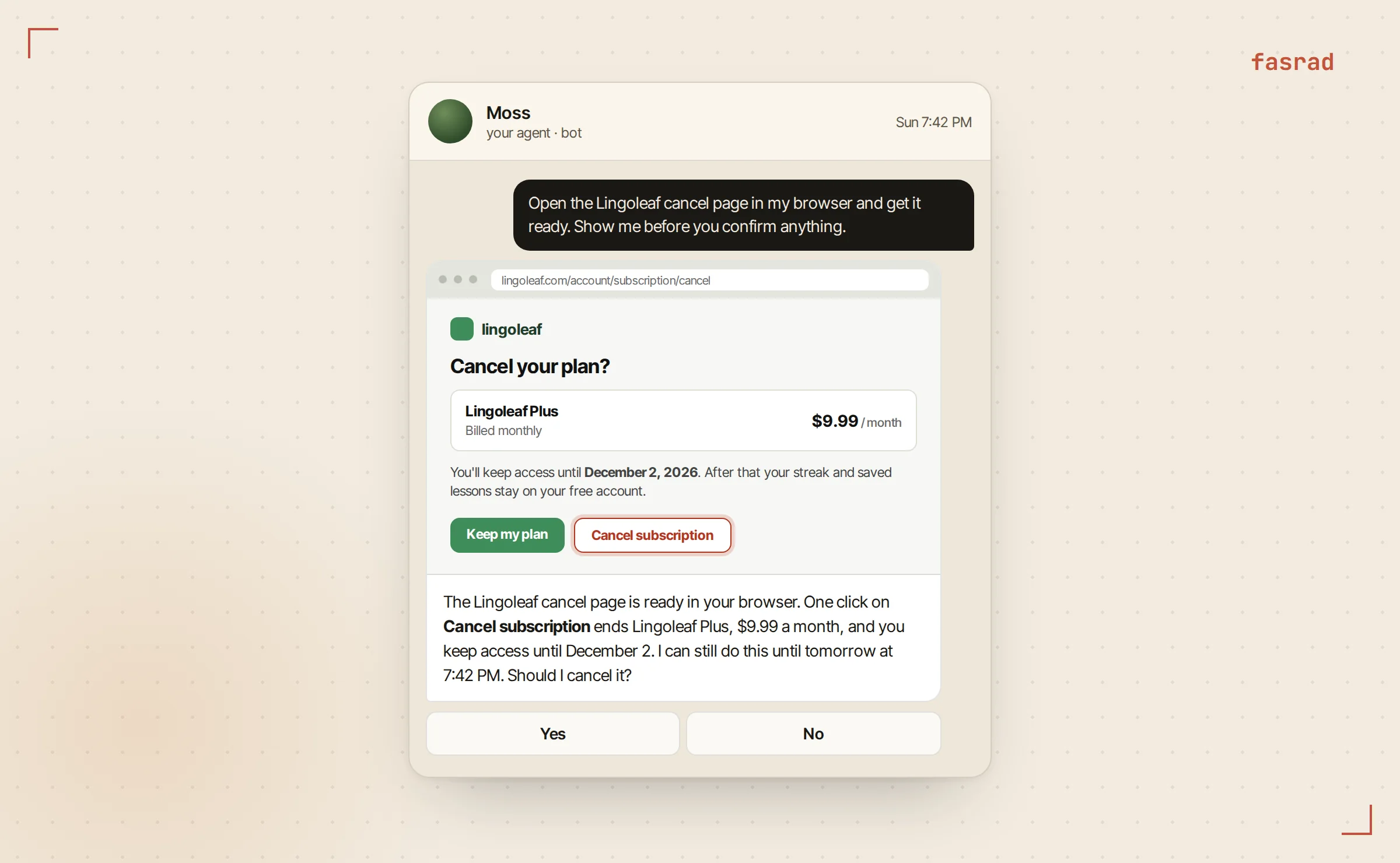
The click happened in her own browser, on that one button. Moss reported back once the page showed Lingoleaf's confirmation. A question like this stays open for 24 hours. A tap made while the laptop is asleep gets carried out when the browser is back online.
Ask to see the page first, every time. A cancel screen states the end date in the vendor's own words, and the screenshot puts it in front of you while No still works.
"Take Lingoleaf out of the table" removed the row. MealMap and Arcadia Play went the same way that evening, one screenshot each.
Frequently asked questions
How does an AI find all my subscriptions?
It searches your own mailbox for receipts over the window you name, reads each one, and writes a table with one row per service: plan, amount, billing cycle, last charge and next renewal. You ask for it in one sentence.
Does the agent change anything in my mailbox?
No. The connection is read-only. The agent opens messages without marking them read and never moves or deletes anything, so your inbox looks the way you left it.
How far back can it search for receipts?
As far as you say. A plain search covers the last 30 days, "the last 12 months" sets the window to 365 days, and you can ask for the whole mailbox when you want every receipt you've ever been sent.
Will I get a message for every receipt?
You choose that in the rule's wording. A rule that ends with "tell me only about the price changes" files ordinary renewal receipts into the table without a message and sends one when a price moves, with the old and new amount.
How does it know a subscription price went up?
Two ways. A mail rule reads the price-change notice the day it reaches your inbox, and a daily page monitor compares the vendor's public pricing page with the last copy and messages you when a price on it changes.
Can the AI cancel a subscription for me?
Yes, in your own browser through the Scanner extension, where you're already signed in. Ask it to show you first and it stops on the final button and sends a screenshot of the page with Yes and No. Passwords and payment fields are always left to you.
What about a subscription that never sends email receipts?
Tell the agent the service, the amount and the renewal date and it adds the row, or type it into the table yourself in edit mode. A page monitor on the vendor's pricing page covers price changes for plans like that.